> ## Documentation Index
> Fetch the complete documentation index at: https://docs.cdp.coinbase.com/llms.txt
> Use this file to discover all available pages before exploring further.
# Quickstart
Get Agentic Wallet MCP running in 5 minutes.
## Prerequisites
* Node.js and npm installed
* An MCP client (Claude Desktop, Claude Code, Codex CLI, Gemini CLI, etc.)
## Installation
### 1. Run the installer
```bash theme={null}
npx @coinbase/payments-mcp
```
### 2. Select your client
Choose your MCP client from the prompts:
* Claude Desktop
* Claude Code
* Codex CLI
* Gemini CLI
* Other
The installer will automatically configure your client. If auto-config doesn't work, you'll get manual instructions.
### 3. Restart your client
Close and reopen your MCP client to load Agentic Wallet MCP.
## First-time setup
### 1. Sign into your wallet
Open your MCP client and ask:
```
Show me my wallet
```
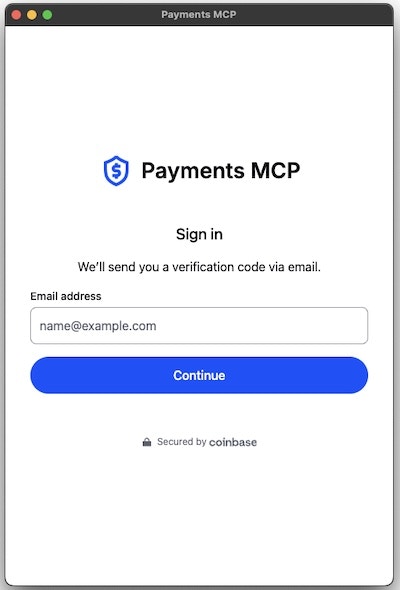
This opens a browser window for authentication.
 ### 2. Authenticate
* **New users:** Enter your email → verify your email → wallet created
* **Returning users:** Enter your email → verify your email → you're in
### 3. Add funds
There are 2 ways to add funds in the Wallet UI:
1. Click **Fund**
2. Follow Coinbase Onramp flow to add USDC
3. Return to your agent
or
1. Click **Receive**
2. Scan your QR code or copy your wallet address
3. Send USDC to your wallet
4. Return to your agent
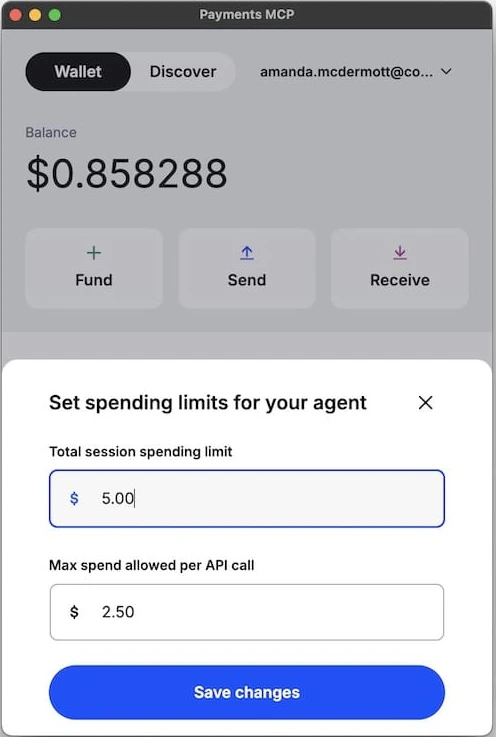
### 4. Set spending limits (recommended)
Control what your agent can spend:
1. In the wallet UI, click the spending limit tracker
2. Set two limits:
* **Max per call:** e.g., \$0.05
* **Max per session:** e.g., \$5.00
3. Save
Your agent can't change these—only you can.
### 2. Authenticate
* **New users:** Enter your email → verify your email → wallet created
* **Returning users:** Enter your email → verify your email → you're in
### 3. Add funds
There are 2 ways to add funds in the Wallet UI:
1. Click **Fund**
2. Follow Coinbase Onramp flow to add USDC
3. Return to your agent
or
1. Click **Receive**
2. Scan your QR code or copy your wallet address
3. Send USDC to your wallet
4. Return to your agent
### 4. Set spending limits (recommended)
Control what your agent can spend:
1. In the wallet UI, click the spending limit tracker
2. Set two limits:
* **Max per call:** e.g., \$0.05
* **Max per session:** e.g., \$5.00
3. Save
Your agent can't change these—only you can.
 ## Try it out
### Check your balance
```
What's my wallet balance?
```
### Discover services
**Option 1: Ask your agent directly**
```
What x402 services are available for crypto data?
```
**Option 2: Search via CLI**
Use `npx awal x402 bazaar search` with semantic queries and optional filters:
```bash theme={null}
# Semantic search
npx awal x402 bazaar search "crypto news"
# Filter by network
npx awal x402 bazaar list --network solana
# More results
npx awal x402 bazaar search "sentiment analysis" -k 10
```
**Option 3: Browse the Bazaar in the wallet app**
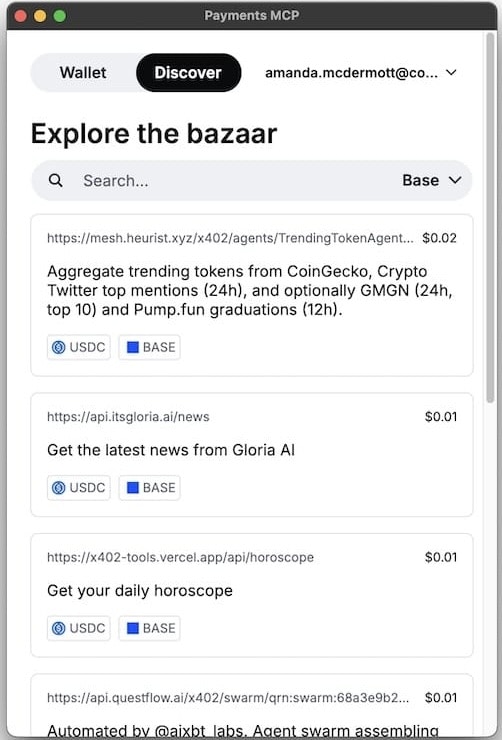
In the wallet, click the **Discover** tab to:
* Browse all available x402 services
* Filter by category, price, or quality
* Click any service to copy a ready-to-use prompt for your agent
## Try it out
### Check your balance
```
What's my wallet balance?
```
### Discover services
**Option 1: Ask your agent directly**
```
What x402 services are available for crypto data?
```
**Option 2: Search via CLI**
Use `npx awal x402 bazaar search` with semantic queries and optional filters:
```bash theme={null}
# Semantic search
npx awal x402 bazaar search "crypto news"
# Filter by network
npx awal x402 bazaar list --network solana
# More results
npx awal x402 bazaar search "sentiment analysis" -k 10
```
**Option 3: Browse the Bazaar in the wallet app**
In the wallet, click the **Discover** tab to:
* Browse all available x402 services
* Filter by category, price, or quality
* Click any service to copy a ready-to-use prompt for your agent
 ### Example: Multi-step autonomous workflow
```
What are the trending crypto tokens and what's the latest news about them?
```
**Example outcome:**
1. Agent discovers TrendingTokenAgent and Gloria News services
2. Gets trending tokens from Twitter
3. Fetches news about top tokens
4. Analyzes and recommends
*Note: The actual tools and resources discovered will differ based on your prompt and model.*
***
## Commands
```bash theme={null}
# Force reinstall
npx @coinbase/payments-mcp install --force
# Check status
npx @coinbase/payments-mcp status
# Verbose logging
npx @coinbase/payments-mcp install --verbose
# Uninstall
npx @coinbase/payments-mcp uninstall
```
## Troubleshooting
See the [FAQ](/agentic-wallet/mcp/faq) for common issues and solutions.
## Next steps
* [MCP Tools](/agentic-wallet/mcp/mcp-tools/overview): What your agent can do
* [Examples](/agentic-wallet/mcp/examples): More use cases
* [x402 Protocol](/x402/welcome): How payments work
* [Discord](https://discord.gg/invite/cdp): Get help
### Example: Multi-step autonomous workflow
```
What are the trending crypto tokens and what's the latest news about them?
```
**Example outcome:**
1. Agent discovers TrendingTokenAgent and Gloria News services
2. Gets trending tokens from Twitter
3. Fetches news about top tokens
4. Analyzes and recommends
*Note: The actual tools and resources discovered will differ based on your prompt and model.*
***
## Commands
```bash theme={null}
# Force reinstall
npx @coinbase/payments-mcp install --force
# Check status
npx @coinbase/payments-mcp status
# Verbose logging
npx @coinbase/payments-mcp install --verbose
# Uninstall
npx @coinbase/payments-mcp uninstall
```
## Troubleshooting
See the [FAQ](/agentic-wallet/mcp/faq) for common issues and solutions.
## Next steps
* [MCP Tools](/agentic-wallet/mcp/mcp-tools/overview): What your agent can do
* [Examples](/agentic-wallet/mcp/examples): More use cases
* [x402 Protocol](/x402/welcome): How payments work
* [Discord](https://discord.gg/invite/cdp): Get help