> ## Documentation Index
> Fetch the complete documentation index at: https://docs.cdp.coinbase.com/llms.txt
> Use this file to discover all available pages before exploring further.
# Coinbase App API Key Authentication
**API Key authentication should only be used to access your own account.** To securely access the accounts of other Coinbase users, use [Coinbase App (OAuth2)](/coinbase-app/introduction/welcome)
API keys for Coinbase App are created through the CDP portal but have specific requirements outlined below.
**Looking for Coinbase Developer Platform (CDP) authentication?**
This page covers authentication for Coinbase App APIs (consumer account access). If you're building Web3 applications, managing programmatic wallets, or using CDP's APIs, see the [CDP API Authentication documentation](/api-reference/v2/authentication).
## CDP API keys
Keys created on the Coinbase Development Platform (CDP) may not yet be supported by all third-party applications.
**Important key type requirement**
When using Coinbase App SDKs, Ed25519 (EdDSA) keys are **NOT** supported. You must use ES256 key format.
When creating your API key to use with Coinbase App in step 6 below, you should select **ECDSA** as the signature algorithm. If you select Ed25519, your authentication attempts may fail.
### Creating API Keys
**Optional API Key File Download**
For enhanced security, API key files are no longer automatically downloaded. If you need to reference your API key via file path in your code, click the **Download API key** button in the modal to save the key file. Otherwise, you can copy the key details directly from the modal and use them as environment variables (recommended for better security).
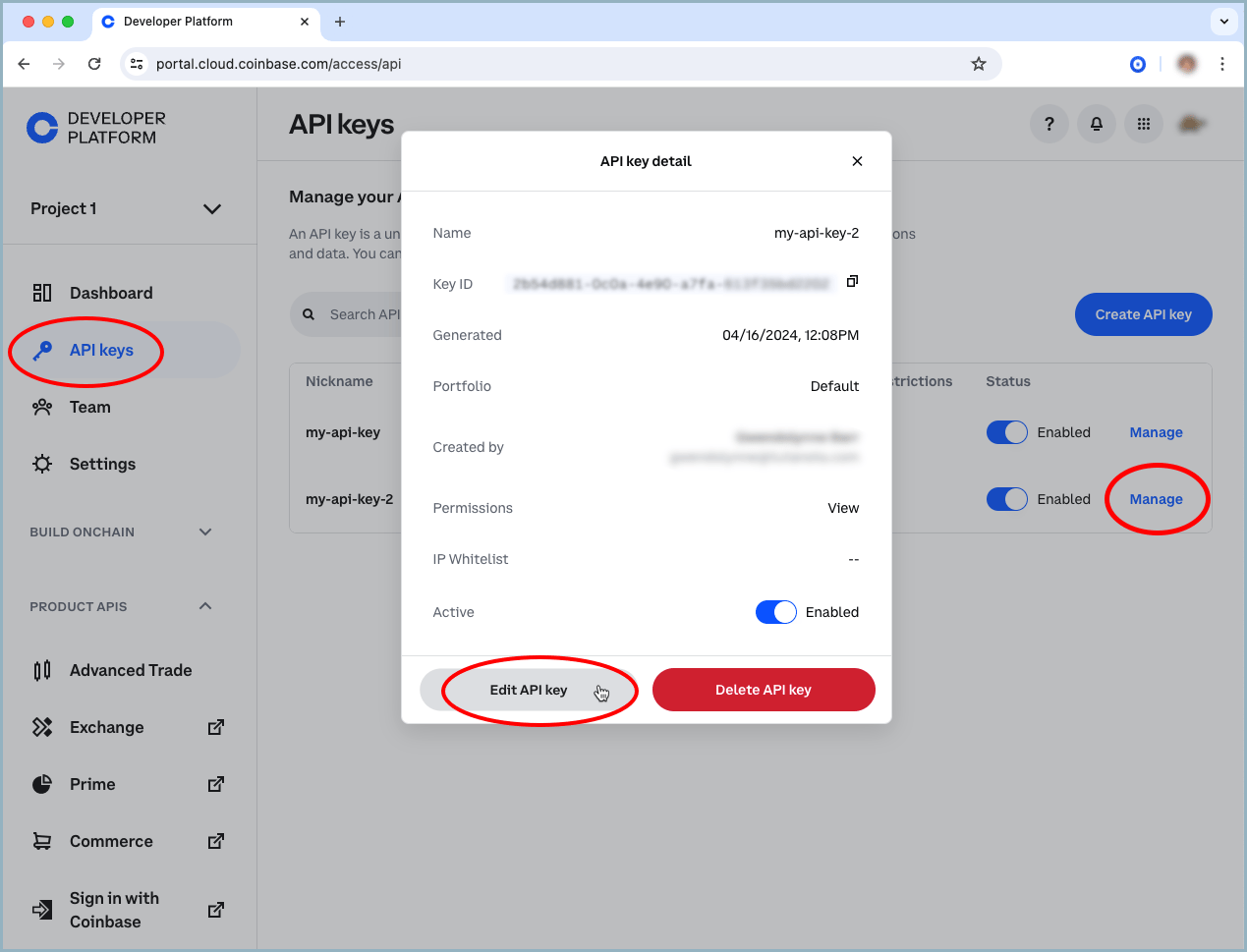
1. Navigate to the Coinbase Developer Platform and select [**Secret API Keys**](https://portal.cdp.coinbase.com/projects/api-keys) under the **API Keys** tab.
2. Click the **Create API key** button.
3. Enter an API key nickname and then expand **API restrictions** and **Advanced Settings**.
4. Enter your IPs in the IP allowlist section *(recommended but not required)*.
5. Set portfolio and permission restrictions.
6. **Required**: Change signature algorithm to **ECDSA**. Do NOT select Ed25519 as it is not supported by Coinbase App APIs.
7. Click **Create API key**.
8. Secure your private/public key pair in a safe location.
### Making Requests
CDP API keys are used to generate a JSON Web Token (JWT) for an API. Once you've generated a JWT, set it as a Authorization Bearer header to make an authenticated request.
```shell lines wrap theme={null}
# Example request to get account
curl -H "Authorization: Bearer $JWT" 'https://api.coinbase.com/v2/accounts/f603f97c-37d7-4e58-b264-c27e9e393dd9/addresses'
```
#### Generating a JWT
Regardless of which [code snippet](#code-samples) you use, follow these steps:
1. Replace `key name` and `key secret` with your key name and private key. `key secret` is a multi-line key and newlines must be preserved to properly parse the key. Do this on one line with `\n` escaped newlines, or with a multi-line string.
2. Replace the request method and the path you want to test. If the URI has a UUID in the path you should include that UUID here, e.g., `/v2/accounts/f603f97c-37d7-4e58-b264-c27e9e393dd9/addresses`.
3. Run the generation script that prints the command `export JWT=...`.
4. Run the generated command to save your JWT.
Your JWT expires after 2 minutes, after which all requests are unauthenticated.
You must generate a different JWT for each unique API request.
#### Code Samples
The easiest way to generate a JWT is to use the built-in functions in our [Python SDK](/coinbase-app/advanced-trade-apis/sdk) as described below.
Otherwise, use the code samples below to generate/export a JWT and make an authenticated request.
All code examples below use the **ES256** algorithm (ECDSA with P-256 curve), which is the only supported signature algorithm supported for Coinbase App SDKs.
1. Install the SDK.
```
pip3 install coinbase-advanced-py
```
2. In the console, run: `python main.py` (or whatever your file name is).
3. Set the JWT to that output, or export the JWT to the environment with `export JWT=$(python main.py)`.
4. Make your request, example `curl -H "Authorization: Bearer $JWT" 'https://api.coinbase.com/api/v3/brokerage/accounts'`
```python lines wrap theme={null}
from coinbase import jwt_generator
api_key = "organizations/{org_id}/apiKeys/{key_id}"
api_secret = "-----BEGIN EC PRIVATE KEY-----\nYOUR PRIVATE KEY\n-----END EC PRIVATE KEY-----\n"
request_method = "GET"
request_path = "/api/v3/brokerage/accounts"
def main():
jwt_uri = jwt_generator.format_jwt_uri(request_method, request_path)
jwt_token = jwt_generator.build_rest_jwt(jwt_uri, api_key, api_secret)
print(jwt_token)
if __name__ == "__main__":
main()
```
1. Install dependencies `PyJWT` and `cryptography`.
```
pip install PyJWT==2.8.0
pip install cryptography==42.0.5
```
2. In the console, run: `python main.py` (or whatever your file name is).
3. Set the JWT to that output, or export the JWT to the environment with `export JWT=$(python main.py)`.
4. Make your request, example `curl -H "Authorization: Bearer $JWT" 'https://api.coinbase.com/api/v3/brokerage/accounts'`
```python lines wrap theme={null}
import jwt
from cryptography.hazmat.primitives import serialization
import time
import secrets
key_name = "organizations/{org_id}/apiKeys/{key_id}"
key_secret = "-----BEGIN EC PRIVATE KEY-----\nYOUR PRIVATE KEY\n-----END EC PRIVATE KEY-----\n"
request_method = "GET"
request_host = "api.coinbase.com"
request_path = "/api/v3/brokerage/accounts"
def build_jwt(uri):
private_key_bytes = key_secret.encode('utf-8')
private_key = serialization.load_pem_private_key(private_key_bytes, password=None)
jwt_payload = {
'sub': key_name,
'iss': "cdp",
'nbf': int(time.time()),
'exp': int(time.time()) + 120,
'uri': uri,
}
jwt_token = jwt.encode(
jwt_payload,
private_key,
algorithm='ES256',
headers={'kid': key_name, 'nonce': secrets.token_hex()},
)
return jwt_token
def main():
uri = f"{request_method} {request_host}{request_path}"
jwt_token = build_jwt(uri)
print(jwt_token)
if __name__ == "__main__":
main()
```
1. Create a new directory and generate a Go file called `main.go`.
2. Paste the Go snippet below into `main.go`.
3. Run `go mod init jwt-generator` and `go mod tidy` to generate `go.mod` and `go.sum` to manage your dependencies.
4. In the console, run `go run main.go`. This outputs the command, `export JWT=`.
5. Set your JWT with the generated output, or export the JWT to the environment with `export JWT=$(go run main.go)`.
6. Make your request, for example `curl -H "Authorization: Bearer $JWT" 'https://api.coinbase.com/api/v3/brokerage/accounts'`
```go lines wrap theme={null}
package main
import (
"crypto/rand"
"crypto/x509"
"encoding/pem"
"fmt"
"math"
"math/big"
"time"
log "github.com/sirupsen/logrus"
"gopkg.in/go-jose/go-jose.v2"
"gopkg.in/go-jose/go-jose.v2/jwt"
)
const (
keyName = "organizations/{org_id}/apiKeys/{key_id}"
keySecret = "-----BEGIN EC PRIVATE KEY-----\nYOUR PRIVATE KEY\n-----END EC PRIVATE KEY-----\n"
requestMethod = "GET"
requestHost = "api.coinbase.com"
requestPath = "/api/v3/brokerage/accounts"
)
type APIKeyClaims struct {
*jwt.Claims
URI string `json:"uri"`
}
func buildJWT(uri string) (string, error) {
block, _ := pem.Decode([]byte(keySecret))
if block == nil {
return "", fmt.Errorf("jwt: Could not decode private key")
}
key, err := x509.ParseECPrivateKey(block.Bytes)
if err != nil {
return "", fmt.Errorf("jwt: %w", err)
}
sig, err := jose.NewSigner(
jose.SigningKey{Algorithm: jose.ES256, Key: key},
(&jose.SignerOptions{NonceSource: nonceSource{}}).WithType("JWT").WithHeader("kid", keyName),
)
if err != nil {
return "", fmt.Errorf("jwt: %w", err)
}
cl := &APIKeyClaims{
Claims: &jwt.Claims{
Subject: keyName,
Issuer: "cdp",
NotBefore: jwt.NewNumericDate(time.Now()),
Expiry: jwt.NewNumericDate(time.Now().Add(2 * time.Minute)),
},
URI: uri,
}
jwtString, err := jwt.Signed(sig).Claims(cl).CompactSerialize()
if err != nil {
return "", fmt.Errorf("jwt: %w", err)
}
return jwtString, nil
}
var max = big.NewInt(math.MaxInt64)
type nonceSource struct{}
func (n nonceSource) Nonce() (string, error) {
r, err := rand.Int(rand.Reader, max)
if err != nil {
return "", err
}
return r.String(), nil
}
func main() {
uri := fmt.Sprintf("%s %s%s", requestMethod, requestHost, requestPath)
jwt, err := buildJWT(uri)
if err != nil {
log.Errorf("error building jwt: %v", err)
}
fmt.Println(jwt)
}
```
1. Install JSON Web Token:
```
npm install jsonwebtoken
```
2. In the console, run: `node main.js` (or whatever your file name is).
3. Set the JWT to that output, or export the JWT to the environment with `export JWT=$(node main.js)`.
4. Make your request, example `curl -H "Authorization: Bearer $JWT" 'https://api.coinbase.com/api/v3/brokerage/accounts'`
```javascript lines wrap theme={null}
const { sign } = require('jsonwebtoken');
const crypto = require('crypto');
const key_name = 'organizations/{org_id}/apiKeys/{key_id}';
const key_secret = '-----BEGIN EC PRIVATE KEY-----\nYOUR PRIVATE KEY\n-----END EC PRIVATE KEY-----\n';
const request_method = 'GET';
const url = 'api.coinbase.com';
const request_path = '/api/v3/brokerage/accounts';
const algorithm = 'ES256';
const uri = request_method + ' ' + url + request_path;
const token = sign(
{
iss: 'cdp',
nbf: Math.floor(Date.now() / 1000),
exp: Math.floor(Date.now() / 1000) + 120,
sub: key_name,
uri,
},
key_secret,
{
algorithm,
header: {
kid: key_name,
nonce: crypto.randomBytes(16).toString('hex'),
},
}
);
return token
```
1. Add PHP dependencies with Composer (for JWT and environment variable management):
```
composer require firebase/php-jwt
composer require vlucas/phpdotenv
```
2. Run `generate_jwt.php` (or a filename of your choice).
3. Output the JWT to the command line and use a shell script to export it:
```
#!/bin/bash
export JWT=$(php generate_jwt.php)
```
4. Make your request, for example:
```
curl -H "Authorization: Bearer $JWT" 'https://api.coinbase.com/api/v3/brokerage/accounts'
```
> Code Snippet
```php lines wrap theme={null}
load();
function buildJwt() {
$keyName = $_ENV['NAME'];
$keySecret = str_replace('\\n', "\n", $_ENV['PRIVATE_KEY']);
$request_method = 'GET';
$url = 'api.coinbase.com';
$request_path = '/api/v3/brokerage/accounts';
$uri = $request_method . ' ' . $url . $request_path;
$privateKeyResource = openssl_pkey_get_private($keySecret);
if (!$privateKeyResource) {
throw new Exception('Private key is not valid');
}
$time = time();
$nonce = bin2hex(random_bytes(16)); // Generate a 32-character hexadecimal nonce
$jwtPayload = [
'sub' => $keyName,
'iss' => 'cdp',
'nbf' => $time,
'exp' => $time + 120, // Token valid for 120 seconds from now
'uri' => $uri,
];
$headers = [
'typ' => 'JWT',
'alg' => 'ES256',
'kid' => $keyName, // Key ID header for JWT
'nonce' => $nonce // Nonce included in headers for added security
];
$jwtToken = JWT::encode($jwtPayload, $privateKeyResource, 'ES256', $keyName, $headers);
return $jwtToken;
}
```
1. Add Java dependencies to your project's Maven or Gradle configuration:
```
nimbus-jose-jwt (version 9.39), bcpkix-jdk18on (version 1.78), and java-dotenv (version 5.2.2)
```
2. Compile your Java application to generates a JWT, for example:
```
mvn compile
```
3. Capture and export the JWT output from your Java application to an environment variable:
```
export JWT=$(mvn exec:java -Dexec.mainClass=Main)
```
4. Make an API Request, for example:
```
curl -H "Authorization: Bearer $JWT" 'https://api.coinbase.com/api/v3/brokerage/accounts'
```
> Code Snippet
```java lines wrap theme={null}
import com.nimbusds.jose.*;
import com.nimbusds.jose.crypto.*;
import com.nimbusds.jwt.*;
import java.security.interfaces.ECPrivateKey;
import java.util.Map;
import java.util.HashMap;
import java.time.Instant;
import java.util.Base64;
import org.bouncycastle.jce.provider.BouncyCastleProvider;
import org.bouncycastle.openssl.PEMParser;
import org.bouncycastle.openssl.jcajce.JcaPEMKeyConverter;
import java.security.spec.PKCS8EncodedKeySpec;
import java.security.KeyFactory;
import java.io.StringReader;
import java.security.PrivateKey;
import java.security.Security;
import io.github.cdimascio.dotenv.Dotenv;
public class Main {
public static void main(String[] args) throws Exception {
// Register BouncyCastle as a security providerx
Security.addProvider(new BouncyCastleProvider());
// Load environment variables
Dotenv dotenv = Dotenv.load();
String privateKeyPEM = dotenv.get("PRIVATE_KEY").replace("\\n", "\n");
String name = dotenv.get("NAME");
// create header object
Map header = new HashMap<>();
header.put("alg", "ES256");
header.put("typ", "JWT");
header.put("kid", name);
header.put("nonce", String.valueOf(Instant.now().getEpochSecond()));
// create uri string for current request
String requestMethod = "GET";
String url = "api.coinbase.com/api/v3/brokerage/accounts";
String uri = requestMethod + " " + url;
// create data object
Map data = new HashMap<>();
data.put("iss", "cdp");
data.put("nbf", Instant.now().getEpochSecond());
data.put("exp", Instant.now().getEpochSecond() + 120);
data.put("sub", name);
data.put("uri", uri);
// Load private key
PEMParser pemParser = new PEMParser(new StringReader(privateKeyPEM));
JcaPEMKeyConverter converter = new JcaPEMKeyConverter().setProvider("BC");
Object object = pemParser.readObject();
PrivateKey privateKey;
if (object instanceof PrivateKey) {
privateKey = (PrivateKey) object;
} else if (object instanceof org.bouncycastle.openssl.PEMKeyPair) {
privateKey = converter.getPrivateKey(((org.bouncycastle.openssl.PEMKeyPair) object).getPrivateKeyInfo());
} else {
throw new Exception("Unexpected private key format");
}
pemParser.close();
// Convert to ECPrivateKey
KeyFactory keyFactory = KeyFactory.getInstance("EC");
PKCS8EncodedKeySpec keySpec = new PKCS8EncodedKeySpec(privateKey.getEncoded());
ECPrivateKey ecPrivateKey = (ECPrivateKey) keyFactory.generatePrivate(keySpec);
// create JWT
JWTClaimsSet.Builder claimsSetBuilder = new JWTClaimsSet.Builder();
for (Map.Entry entry : data.entrySet()) {
claimsSetBuilder.claim(entry.getKey(), entry.getValue());
}
JWTClaimsSet claimsSet = claimsSetBuilder.build();
JWSHeader jwsHeader = new JWSHeader.Builder(JWSAlgorithm.ES256).customParams(header).build();
SignedJWT signedJWT = new SignedJWT(jwsHeader, claimsSet);
JWSSigner signer = new ECDSASigner(ecPrivateKey);
signedJWT.sign(signer);
String sJWT = signedJWT.serialize();
System.out.println(sJWT);
}
}
```
1. Install C++ project dependencies like so:
```
apt-get update
apt-get install libcurlpp-dev libssl-dev
git clone https://github.com/Thalhammer/jwt-cpp
cd jwt-cpp
mkdir build && cd build
cmake ..
make
make install
```
2. After you've saved your code to a file name, for example main.cpp, compile the program:
```
g++ main.cpp -o myapp -lcurlpp -lcurl -lssl -lcrypto -I/usr/local/include -L/usr/local/lib -ljwt -std=c++17
```
3. Capture and export the JWT output from your C++ application to an environment variable:
```
export JWT=$(./myapp)
```
4. Make an API Request, for example:
```
curl -H "Authorization: Bearer $JWT" 'https://api.coinbase.com/api/v3/brokerage/accounts'
```
> Code Snippet
```cpp lines wrap theme={null}
#include
#include
#include
#include
#include
#include
#include
#include
#include
#include
#include
std::string create_jwt() {
// Set request parameters
std::string key_name = "organizations/{org_id}/apiKeys/{key_id}";
std::string key_secret = "-----BEGIN EC PRIVATE KEY-----\nYOUR PRIVATE KEY\n-----END EC PRIVATE KEY-----\n";
std::string request_method = "GET";
std::string url = "api.coinbase.com";
std::string request_path = "/api/v3/brokerage/accounts";
std::string uri = request_method + " " + url + request_path;
// Generate a random nonce
unsigned char nonce_raw[16];
RAND_bytes(nonce_raw, sizeof(nonce_raw));
std::string nonce(reinterpret_cast(nonce_raw), sizeof(nonce_raw));
// Create JWT token
auto token = jwt::create()
.set_subject(key_name)
.set_issuer("cdp")
.set_not_before(std::chrono::system_clock::now())
.set_expires_at(std::chrono::system_clock::now() + std::chrono::seconds{120})
.set_payload_claim("uri", jwt::claim(uri))
.set_header_claim("kid", jwt::claim(key_name))
.set_header_claim("nonce", jwt::claim(nonce))
.sign(jwt::algorithm::es256(key_name, key_secret));
return token;
};
int main() {
try {
std::string token = create_jwt();
std::cout << "Generated JWT Token: " << token << std::endl;
} catch (const std::exception& e) {
std::cerr << "Error: " << e.what() << std::endl;
return 1;
}
return 0;
};
```
1. Create a new console project by running the following command:
```
dotnet new console
```
2. Open the Program.cs file in a text editor or IDE (e.g., Visual Studio Code, Visual Studio, or any text editor). Replace the contents of Program.cs with the provided bellow in the Code Snippet.
3. Install C# project dependencies like so:
```
dotnet add package Microsoft.IdentityModel.Tokens
dotnet add package System.IdentityModel.Tokens.Jwt
dotnet add package Jose-JWT
```
4. Build the project by running the following command:
```
dotnet build
```
5. Run the project by running the following command:
```
dotnet run
```
> Code Snippet
```dotnet lines wrap theme={null}
// Environment is .NET 6.0 C#
using Microsoft.IdentityModel.Tokens;
using System.IdentityModel.Tokens.Jwt;
using System.Security.Claims;
using System.Security.Cryptography;
using Jose;
namespace JwtTest {
internal class Program {
static Random random = new Random();
static void Main(string[] args) {
string name = "organizations/{org_id}/apiKeys/{key_id}";
string cbPrivateKey = "-----BEGIN EC PRIVATE KEY-----\nYOUR PRIVATE KEY\n-----END EC PRIVATE KEY-----\n";
string key = parseKey(cbPrivateKey);
string endpoint = "api.coinbase.com/api/v3/brokerage/accounts";
string token = generateToken(name, key, $"GET {endpoint}");
Console.WriteLine($"Token is valid? {isTokenValid(token, name, key)}");
Console.WriteLine("Call API...");
Console.WriteLine(CallApiGET($"https://{endpoint}", token));
}
static string generateToken(string name, string secret, string uri) {
var privateKeyBytes = Convert.FromBase64String(secret); // Assuming PEM is base64 encoded
using var key = ECDsa.Create();
key.ImportECPrivateKey(privateKeyBytes, out _);
var payload = new Dictionary
{
{ "sub", name },
{ "iss", "coinbase-cloud" },
{ "nbf", Convert.ToInt64((DateTime.UtcNow - new DateTime(1970, 1, 1, 0, 0, 0, DateTimeKind.Utc)).TotalSeconds) },
{ "exp", Convert.ToInt64((DateTime.UtcNow.AddMinutes(1) - new DateTime(1970, 1, 1, 0, 0, 0, DateTimeKind.Utc)).TotalSeconds) },
{ "uri", uri }
};
var extraHeaders = new Dictionary
{
{ "kid", name },
// add nonce to prevent replay attacks with a random 10 digit number
{ "nonce", randomHex(10) },
{ "typ", "JWT"}
};
var encodedToken = JWT.Encode(payload, key, JwsAlgorithm.ES256, extraHeaders);
// print token
Console.WriteLine(encodedToken);
return encodedToken;
}
static bool isTokenValid(string token, string tokenId, string secret) {
if (token == null)
return false;
var key = ECDsa.Create();
key?.ImportECPrivateKey(Convert.FromBase64String(secret), out _);
var securityKey = new ECDsaSecurityKey(key) { KeyId = tokenId };
try {
var tokenHandler = new JwtSecurityTokenHandler();
tokenHandler.ValidateToken(token, new TokenValidationParameters {
ValidateIssuerSigningKey = true,
IssuerSigningKey = securityKey,
ValidateIssuer = false,
ValidateAudience = false,
ClockSkew = TimeSpan.Zero
}, out var validatedToken);
return true;
} catch {
return false;
}
}
static string parseKey(string key) {
List keyLines = new List();
keyLines.AddRange(key.Split('\n', StringSplitOptions.RemoveEmptyEntries));
keyLines.RemoveAt(0);
keyLines.RemoveAt(keyLines.Count - 1);
return String.Join("", keyLines);
}
static string randomHex(int digits) {
byte[] buffer = new byte[digits / 2];
random.NextBytes(buffer);
string result = String.Concat(buffer.Select(x => x.ToString("X2")).ToArray());
if (digits % 2 == 0)
return result;
return result + random.Next(16).ToString("X");
}
static string CallApiGET(string url, string bearerToken = "") {
using (var client = new HttpClient()) {
using (var request = new HttpRequestMessage(HttpMethod.Get, url)) {
if (bearerToken != "")
request.Headers.Authorization = new System.Net.Http.Headers.AuthenticationHeaderValue("Bearer", bearerToken);
var response = client.Send(request);
if (response != null)
return response.Content.ReadAsStringAsync().Result;
else
return "";
}
}
}
}
}
```
1. Install `ts-node` and TypeScript:
```bash theme={null}
npm install -g ts-node typescript
npm install jsonwebtoken
npm install @types/jsonwebtoken
```
2. Add the code to a TypeScript file named `main.ts`.
3. Run the TypeScript file directly using `ts-node`:
```bash theme={null}
ts-node main.ts
```
4. Capture and export the JWT output from your TypeScript application to an environment variable:
```bash theme={null}
export JWT=$(ts-node main.ts)
```
5. Make an API request, for example:
```bash theme={null}
curl -H "Authorization: Bearer $JWT" 'https://api.coinbase.com/api/v3/brokerage/accounts'
```
> Code Snippet
```typescript lines wrap theme={null}
import * as jwt from 'jsonwebtoken';
import * as crypto from 'crypto';
const keyName = 'organizations/{org_id}/apiKeys/{key_id}';
const keySecret = `-----BEGIN EC PRIVATE KEY-----
YOUR PRIVATE KEY
-----END EC PRIVATE KEY-----`;
const requestMethod = 'GET';
const requestHost = 'api.coinbase.com';
const requestPath = '/api/v3/brokerage/accounts';
const algorithm = 'ES256';
const uri = `${requestMethod} ${requestHost}${requestPath}`;
const generateJWT = (): string => {
const payload = {
iss: 'cdp',
nbf: Math.floor(Date.now() / 1000),
exp: Math.floor(Date.now() / 1000) + 120,
sub: keyName,
uri,
};
const header = {
alg: algorithm,
kid: keyName,
nonce: crypto.randomBytes(16).toString('hex'),
};
return jwt.sign(payload, keySecret, { algorithm, header });
};
const main = () => {
const token = generateJWT();
console.log(token);
};
main();
```
## Security Best Practices
### Storing Credentials Securely
Store your credentials securely. If someone obtains your `api_secret` with the `transfer` permission, they will be able to send all the digital currency out of your account.
Avoid storing API keys in your code base (which gets added to version control). The recommended best practice is to store them in environment variables. Learn more about environment variables [here](https://12factor.net/config). Separating credentials from your code base and database is always good practice.
API Key access is turned off by default on all accounts. To implement an API Key integration, you therefore must first enable it,and then take necessary precautions to store the API Key securely. You can always regenerate your API Key (or disable it) if you feel it has been compromised.
### Validating SSL Certificates
It is also very important that your application validates our SSL certificate when it connects over `https`. This helps prevent a [man in the middle attack](http://en.wikipedia.org/wiki/Man-in-the-middle_attack). If you are using a client library, this may be turned on by default, but you should confirm this. Whenever you see 'verify SSL' you should always ensure it is set to true.
### Additional Security for API Keys
For enhanced API Key security, we recommend that you **allowlist IP addresses** that are permitted to make requests with a particular API Key.
You can specify IP addresses to allowlist when [creating a new API Key or editing an existing one](https://portal.cdp.coinbase.com).