

Get started
Paste this prompt into your agent:Portfolio isolation: Before you connect, create a separate portfolio for your agent, fund it with only what you’re willing to risk, and scope your agent’s access to that portfolio. This limits the blast radius if the agent makes an unexpected trade.To create a portfolio, go to Portfolio > Spot on Coinbase Advanced, open the All portfolios dropdown above your balance, and select New portfolio. Creating portfolios is only available on the Coinbase website, not in the mobile app.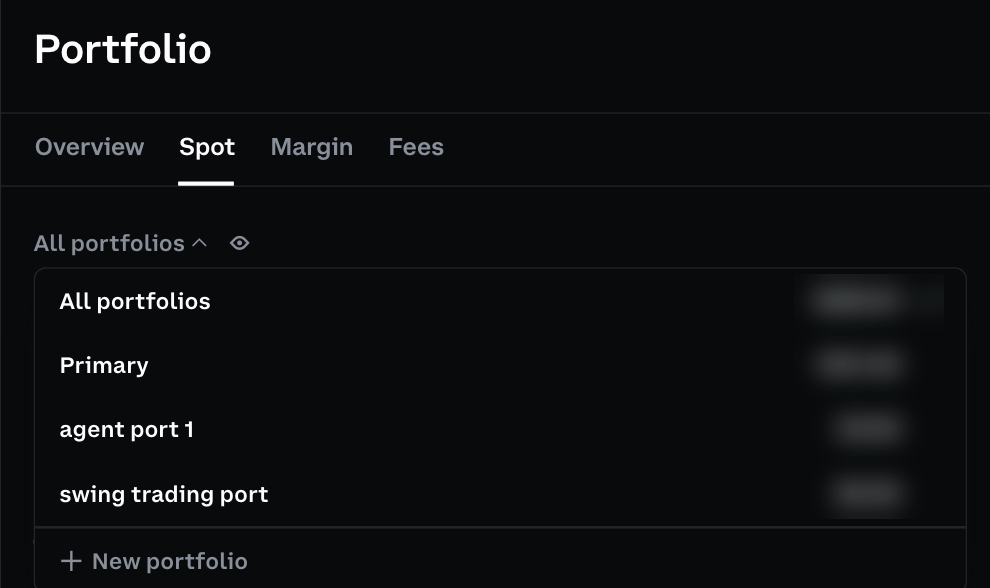
- MCP (Recommended)
- CLI
The remote MCP connects directly to
https://agents.coinbase.com/mcp via OAuth. It includes x402 payments for premium data services.Supported harnesses
Remote MCP supports Dynamic Client Registration (DCR) and Client ID Metadata Documents (CIMD). Coinbase still approves clients through allowlisting, including DCR clients; DCR is not unrestricted self-service access. Successful registration does not grant every account, scope, or tool permission.- Supported: ChatGPT, Grok, Grok Bot, Muse, Perplexity Computer, Claude, Claude Code, and Codex CLI
- Additional harnesses: Support is expanding as clients are approved. DCR support alone does not mean a client is available yet.
- Other or custom harnesses: Use the CLI. To request support for a harness, reach out to us on Discord.
- ChatGPT
- Grok
- Grok Bot
- Muse
- Perplexity Computer
- Claude
- Claude Code
- Codex CLI
- Open Plugins in the side navigation
- Click Add (top right) > Add Custom MCP Server
- Name it (e.g., “Coinbase”) and enter
https://agents.coinbase.com/mcpas the Server URL - Leave Authentication set to OAuth, check I understand and want to continue, then click Create as a plugin
- Sign in with your Coinbase account when prompted
- On the approval screen, select which portfolios to give the agent access to
If Add Custom MCP Server isn’t available, turn on developer mode in ChatGPT Settings. Availability depends on your plan and workspace policy; see OpenAI’s developer mode requirements.
Desktop & mobile: Set up the connection on ChatGPT web first. Once connected, the app will automatically be available in ChatGPT desktop and mobile.
What’s supported today
Coinbase for Agents currently supports:- Spot crypto trading: buy and sell 900+ trading pairs on Coinbase
- US Derivatives (Futures): trade CFM dated futures contracts on Coinbase
- Equities: trade eligible US stocks on Coinbase
- Isolated agent portfolios: spot crypto only, scoped to a specific portfolio selected when logging in or creating an API key. US Derivatives (Futures) are available only in your default portfolio.
- Portfolio management: Check balances and positions across your account
- x402 payments (remote MCP and local CLI): pay for premium data services per-request from your USDC balance
- Agent feedback: agents can send the Coinbase team short notes about the integration
Coming soon: prediction markets and additional asset classes.
x402 payments
Your agent can pay per request for trading data and research, including onchain analytics, market intelligence, and stock data, directly from your retail Coinbase USDC balance. You don’t need a separate wallet, provider API key, or data subscription for these resources. The remote MCP uses Coinbase OAuth; the local CLI uses your configured CDP API key. Payments use USDC on Base through the x402 protocol.Discover, pay, and use the data
- Discover: Call
coinbase_x402_resourcesor runcoinbase x402 resources q==<keyword>. Discovery is free and returns resource URLs, input schemas, and advisory pricing. - Set a budget: Tell your agent how much it may spend on research. Research authorization does not authorize a trade.
- Fetch: Call
coinbase_x402_fetchor runcoinbase x402 fetchwith a catalog resource URL and the required inputs. The tool handles the payment challenge and returns the resource response. - Review: Ask the agent to cite the data, report what it spent, and propose a trade only if that is part of your instructions.
Tool availability depends on your account and client. The dedicated ChatGPT trading integration does not expose x402 tools. These instructions use the core remote MCP or the local CLI.
Limits and payment safety
- Payments are capped at 5 USDC per payment. Additional account and spending controls may apply.
max_amountis an optional per-request ceiling for fetch, in atomic USDC units:1000000is 1 USDC. It can lower, not raise, the catalog payment ceiling. It does not set a session or daily budget.- Fetch accepts curated catalog resources and x402 v2 challenges. It is not an unrestricted web-fetch or Bazaar-discovery tool.
- Generate an
idempotency_keyUUID before a payment and retain it. If a request times out or the payment outcome is unknown, reuse that key for the same logical payment; a new key can create another hold. Follow terminal-error instructions rather than retrying blindly. - A successful payment authorization does not guarantee that the provider returned usable data. Report payment and data-delivery outcomes separately.
Data providers
The curated catalog includes Arkham, Dripstack (listed as Drip), Exa, Glassnode, Massive, Nansen, and You.com. Runcoinbase x402 resources or call coinbase_x402_resources for current resources, schemas, and advisory prices. The provider’s payment challenge determines the exact price, subject to your request ceiling and server limits. Catalog inclusion does not guarantee provider availability.
Guiding agents to place orders
Based on order-creation testing across Claude and ChatGPT clients and models connected to the Coinbase for Agents remote MCP server:- Web clients for Claude and ChatGPT reliably create orders from clear, well-specified instructions, across models. The exception is GPT-5.5 Pro, which doesn’t appear to automatically discover the connected MCP.
- Claude previews and requests confirmation in the chat to create the order, whereas ChatGPT creates the order in one turn.
- Claude Desktop refuses most orders that the web client creates; Sonnet 4.6 is the exception, creating orders when the request includes an explicit authorization (e.g.
I authorize you to buy…). - Lower-tier models may create orders with the wrong product, for example,
ETH-USDinstead ofETH-USDC. Prompt for approval to confirm before creating the order.
Buy 1 USDC of ETH in my agent portfolio. Vague or partial requests require the model to infer and resolve additional details.
Best practices
- Scope the agent’s access to the portfolio(s) you want it to use. A focused set gives the agent a clear, unambiguous target.
- Higher-reasoning models translate more complex intent and recover from underspecified orders; use one for multi-step or vague requests, e.g.
check my balance, then put 5% of my USDC into BTC.
Send feedback
You or your agent can send feedback about the Coinbase MCP directly through thecoinbase_feedback_submit tool. Submit a prompt in this form: Tell Coinbase that [your feedback]. The team reads submitted feedback every day.
- Feedback is limited to 2,000 characters or less.
- Each user can send up to 6 submissions per day.
Tools
The tables use short MCP tool names. The core server prefixes these withcoinbase_ (for example, coinbase_portfolios_list); use the exact names returned by your connection’s tools/list.
Market data
Equities: Use
products_get or products_list for a reference price, not a guaranteed executable quote. Do not assume equity ticker, order-book, bid/ask, candle, or preview support from a successful product lookup. See the agent guide’s product-type limitations before building an equity workflow.
Orders
Market order: executes immediately at the best available price.
Market buys use
quote_size (the amount to spend in USD). Market sells use base_size (the amount of the asset to sell). When switching between buy and sell, explicitly clear the other field (e.g., add quote_size= to clear a stale value).Futures: CFM dated futures market orders require
base_size (number of contracts)—quote_size is rejected. Contract codes roll on a schedule (e.g. BIT-28AUG26-CDE); discover the live one with coinbase products list product_type=FUTURE. Preview the order first to check predicted_liquidation_price.Equities: use
TICKER-QUOTE as the product ID (e.g. AAPL-USD or AAPL-USDC). Discover eligible tickers with the product tools. Orders trade regular market hours by default; check the current tool schema for supported sessions, order types, and sizing restrictions.