> ## Documentation Index
> Fetch the complete documentation index at: https://docs.cdp.coinbase.com/llms.txt
> Use this file to discover all available pages before exploring further.
# JWT Authentication
A JSON Web Token (JWT) is a secure method of authenticating API calls used by Coinbase Developer Platform.
They combine encryption and access management in a single token, offering a robust security layer compared to traditional API keys.
## Generating a JWT
Regardless of which [code snippet](#code-samples) you use, follow these steps:
1. Replace `key name` and `key secret` with your key name and private key. `key secret` is a multi-line key and newlines must be preserved to properly parse the key. Do this on one line with `\n` escaped newlines, or with a multi-line string.
2. Update the `request_path` and `request_host or url` variables as needed depending on which endpoint is being targeted.
3. Run the generation script that prints the command `export JWT=...`.
4. Run the generated command to save your JWT.
Your JWT expires after 2 minutes, after which all requests are unauthenticated.
### Code samples for Ed25519 Keys
These code samples are for Ed25519 Signature algorithm keys.
First, install the CDP SDK:
```bash lines wrap theme={null}
npm install @coinbase/cdp-sdk
```
Create a new file for JWT generation code:
```javascript main.js lines wrap [expandable] theme={null}
const { generateJwt } = require("@coinbase/cdp-sdk/auth");
const main = async () => {
// Generate the JWT using the CDP SDK
const token = await generateJwt({
apiKeyId: process.env.KEY_NAME,
apiKeySecret: process.env.KEY_SECRET,
requestMethod: process.env.REQUEST_METHOD,
requestHost: process.env.REQUEST_HOST,
requestPath: process.env.REQUEST_PATH,
expiresIn: 120 // optional (defaults to 120 seconds)
});
console.log(token);
};
main();
```
Finally, run the script to generate the JWT output and export it as an environment variable:
```bash lines wrap theme={null}
export JWT=$(node main.js)
echo $JWT
```
First, install the CDP SDK:
```bash lines wrap theme={null}
npm install @coinbase/cdp-sdk
```
Create a new file for JWT generation code:
```typescript main.ts lines wrap [expandable] theme={null}
import { generateJwt } from "@coinbase/cdp-sdk/auth";
const main = async () => {
// Generate the JWT using the CDP SDK
const token = await generateJwt({
apiKeyId: process.env.KEY_NAME!,
apiKeySecret: process.env.KEY_SECRET!,
requestMethod: process.env.REQUEST_METHOD!,
requestHost: process.env.REQUEST_HOST!,
requestPath: process.env.REQUEST_PATH!,
expiresIn: 120 // optional (defaults to 120 seconds)
});
console.log(token);
};
main();
```
Finally, run the script to generate the JWT output and export it as an environment variable:
```bash lines wrap theme={null}
export JWT=$(npx tsx main.ts)
echo $JWT
```
First, install the CDP SDK:
```bash lines wrap theme={null}
pip install cdp-sdk
```
Create a new file for JWT generation code:
```python main.py lines wrap [expandable] theme={null}
import os
from cdp.auth.utils.jwt import generate_jwt, JwtOptions
# Generate the JWT using the CDP SDK
jwt_token = generate_jwt(JwtOptions(
api_key_id=os.getenv('KEY_NAME'),
api_key_secret=os.getenv('KEY_SECRET'),
request_method=os.getenv('REQUEST_METHOD'),
request_host=os.getenv('REQUEST_HOST'),
request_path=os.getenv('REQUEST_PATH'),
expires_in=120 # optional (defaults to 120 seconds)
))
print(jwt_token)
```
Finally, run the script to generate the JWT output and export it as an environment variable:
```bash lines wrap theme={null}
export JWT=$(python main.py)
echo $JWT
```
First, install the CDP SDK:
```bash lines wrap theme={null}
go mod init jwt-example
go get github.com/coinbase/cdp-sdk/go
```
Create a new file for JWT generation code:
```go main.go lines wrap [expandable] theme={null}
package main
import (
"fmt"
"log"
"os"
"github.com/coinbase/cdp-sdk/go/auth"
)
func main() {
// Generate the JWT using the CDP SDK
jwt, err := auth.GenerateJWT(auth.JwtOptions{
KeyID: os.Getenv("KEY_NAME"),
KeySecret: os.Getenv("KEY_SECRET"),
RequestMethod: os.Getenv("REQUEST_METHOD"),
RequestHost: os.Getenv("REQUEST_HOST"),
RequestPath: os.Getenv("REQUEST_PATH"),
ExpiresIn: 120, // optional (defaults to 120 seconds)
})
if err != nil {
log.Fatalf("error building jwt: %v", err)
}
fmt.Println(jwt)
}
```
Finally, run the script to generate the JWT output and export it as an environment variable:
```bash lines wrap theme={null}
export JWT=$(go run main.go)
echo $JWT
```
First, install required dependencies:
```bash lines wrap theme={null}
gem install jwt
gem install ed25519
```
Create a new file for JWT generation code:
```ruby main.rb lines wrap [expandable] theme={null}
require 'jwt'
require 'ed25519'
require 'base64'
require 'time'
require 'securerandom'
# Fetching environment variables
key_name = ENV['KEY_NAME']
key_secret = ENV['KEY_SECRET']
request_method = ENV['REQUEST_METHOD']
request_host = ENV['REQUEST_HOST']
request_path = ENV['REQUEST_PATH']
def build_jwt(key_name, key_secret, uri)
# Decode the Ed25519 private key from base64
decoded = Base64.decode64(key_secret)
# Ed25519 keys are 64 bytes (32 bytes seed + 32 bytes public key)
if decoded.length != 64
raise "Invalid Ed25519 key length"
end
# Extract the seed (first 32 bytes)
seed = decoded[0, 32]
signing_key = Ed25519::SigningKey.new(seed)
# Header for the JWT
header = {
alg: 'EdDSA',
typ: 'JWT',
kid: key_name,
nonce: SecureRandom.hex(16)
}
# Claims for the JWT
claims = {
sub: key_name,
iss: 'cdp',
aud: ['cdp_service'],
nbf: Time.now.to_i,
exp: Time.now.to_i + 120, # Expiration time: 2 minute from now.
uri: uri
}
# Encode the JWT with EdDSA algorithm
JWT.encode(claims, signing_key, 'EdDSA', header)
end
# Build the JWT with the URI
token = build_jwt(key_name, key_secret, "#{request_method.upcase} #{request_host}#{request_path}")
# Print the JWT token
puts token
```
Finally, run the script to generate the JWT output and export it as an environment variable:
```bash lines wrap theme={null}
export JWT=$(ruby main.rb)
echo $JWT
```
First, ensure the Sodium extension is enabled (included by default in PHP 7.2+):
```bash lines wrap theme={null}
# Ensure the sodium extension is enabled
php -m | grep sodium
```
Create a new file for JWT generation code:
```php main.php lines wrap [expandable] theme={null}
'EdDSA',
'typ' => 'JWT',
'kid' => $keyName,
'nonce' => $nonce
];
// JWT Payload
$payload = [
'sub' => $keyName,
'iss' => 'cdp',
'aud' => ['cdp_service'],
'nbf' => $time,
'exp' => $time + 120, // Token valid for 120 seconds from now
'uri' => $uri
];
// Encode header and payload
$encodedHeader = rtrim(strtr(base64_encode(json_encode($header)), '+/', '-_'), '=');
$encodedPayload = rtrim(strtr(base64_encode(json_encode($payload)), '+/', '-_'), '=');
// Create the message to sign
$message = $encodedHeader . '.' . $encodedPayload;
// Sign with Ed25519 using sodium
$signature = sodium_crypto_sign_detached($message, $privateKey);
// Encode signature
$encodedSignature = rtrim(strtr(base64_encode($signature), '+/', '-_'), '=');
// Create the JWT
return $message . '.' . $encodedSignature;
}
// Example of calling the function to generate the JWT
try {
$jwt = buildJwt();
echo $jwt . "\n";
} catch (Exception $e) {
echo "Error generating JWT: " . $e->getMessage() . "\n";
}
```
Finally, run the script to generate the JWT output and export it as an environment variable:
```bash lines wrap theme={null}
export JWT=$(php main.php)
echo $JWT
```
First, install required dependencies:
```xml lines wrap theme={null}
com.nimbusds
nimbus-jose-jwt
9.31
```
Create a new file for JWT generation code:
```java main.java lines wrap [expandable] theme={null}
import com.nimbusds.jose.*;
import com.nimbusds.jose.crypto.*;
import com.nimbusds.jwt.*;
import java.util.Date;
import java.util.UUID;
import java.util.Base64;
public class Main {
public static void main(String[] args) throws Exception {
// Load environment variables
String keySecret = System.getenv("KEY_SECRET");
String keyName = System.getenv("KEY_NAME");
String requestMethod = System.getenv("REQUEST_METHOD");
String requestHost = System.getenv("REQUEST_HOST");
String requestPath = System.getenv("REQUEST_PATH");
// Ensure all environment variables are provided
if (keySecret == null || keyName == null || requestMethod == null || requestHost == null || requestPath == null) {
throw new IllegalArgumentException("Required environment variables are missing");
}
// Decode the Ed25519 private key from base64
byte[] decoded = Base64.getDecoder().decode(keySecret);
// Ed25519 keys are 64 bytes (32 bytes seed + 32 bytes public key)
if (decoded.length != 64) {
throw new Exception("Invalid Ed25519 key length");
}
// Extract the seed (first 32 bytes) and public key (last 32 bytes)
byte[] seed = new byte[32];
byte[] publicKey = new byte[32];
System.arraycopy(decoded, 0, seed, 0, 32);
System.arraycopy(decoded, 32, publicKey, 0, 32);
// Create OctetKeyPair for Ed25519
OctetKeyPair okp = new OctetKeyPair.Builder(Curve.Ed25519, Base64.getUrlEncoder().withoutPadding().encodeToString(publicKey))
.d(Base64.getUrlEncoder().withoutPadding().encodeToString(seed))
.keyUse(KeyUse.SIGNATURE)
.build();
// Create URI string for current request
String uri = requestMethod + " " + requestHost + requestPath;
// Create JWT claims
JWTClaimsSet claims = new JWTClaimsSet.Builder()
.issuer("cdp")
.subject(keyName)
.notBeforeTime(new Date())
.expirationTime(new Date(System.currentTimeMillis() + 120000)) // 120 seconds
.claim("uri", uri)
.build();
// Create JWT header with nonce
JWSHeader header = new JWSHeader.Builder(JWSAlgorithm.EdDSA)
.keyID(keyName)
.customParam("nonce", UUID.randomUUID().toString().replace("-", ""))
.build();
// Sign the JWT
SignedJWT signedJWT = new SignedJWT(header, claims);
JWSSigner signer = new Ed25519Signer(okp);
signedJWT.sign(signer);
String jwt = signedJWT.serialize();
System.out.println(jwt);
}
}
```
Finally, compile the script and export the JWT output as an environment variable:
```bash lines wrap theme={null}
javac -cp "nimbus-jose-jwt-9.31.jar:." Main.java
export JWT=$(java -cp "nimbus-jose-jwt-9.31.jar:." Main)
echo $JWT
```
First, install required dependencies:
```bash lines wrap theme={null}
# For Ubuntu/Debian
sudo apt-get install libsodium-dev nlohmann-json3-dev
# For MacOS
brew install libsodium nlohmann-json
```
Create a new file for JWT generation code:
```cpp main.cpp lines wrap [expandable] theme={null}
#include
#include
#include
#include
#include
#include
#include
#include
#include
// Base64 URL encoding helper
std::string base64url_encode(const unsigned char* data, size_t len) {
static const char* base64_chars =
"ABCDEFGHIJKLMNOPQRSTUVWXYZabcdefghijklmnopqrstuvwxyz0123456789-_";
std::string encoded;
encoded.reserve(((len + 2) / 3) * 4);
for (size_t i = 0; i < len; i += 3) {
unsigned int octet1 = data[i];
unsigned int octet2 = (i + 1 < len) ? data[i + 1] : 0;
unsigned int octet3 = (i + 2 < len) ? data[i + 2] : 0;
unsigned int combined = (octet1 << 16) | (octet2 << 8) | octet3;
encoded += base64_chars[(combined >> 18) & 0x3F];
encoded += base64_chars[(combined >> 12) & 0x3F];
if (i + 1 < len) encoded += base64_chars[(combined >> 6) & 0x3F];
if (i + 2 < len) encoded += base64_chars[combined & 0x3F];
}
return encoded;
}
// Base64 decode helper
std::vector base64_decode(const std::string& encoded) {
static const unsigned char base64_table[256] = {
64, 64, 64, 64, 64, 64, 64, 64, 64, 64, 64, 64, 64, 64, 64, 64,
64, 64, 64, 64, 64, 64, 64, 64, 64, 64, 64, 64, 64, 64, 64, 64,
64, 64, 64, 64, 64, 64, 64, 64, 64, 64, 64, 62, 64, 64, 64, 63,
52, 53, 54, 55, 56, 57, 58, 59, 60, 61, 64, 64, 64, 64, 64, 64,
64, 0, 1, 2, 3, 4, 5, 6, 7, 8, 9, 10, 11, 12, 13, 14,
15, 16, 17, 18, 19, 20, 21, 22, 23, 24, 25, 64, 64, 64, 64, 64,
64, 26, 27, 28, 29, 30, 31, 32, 33, 34, 35, 36, 37, 38, 39, 40,
41, 42, 43, 44, 45, 46, 47, 48, 49, 50, 51, 64, 64, 64, 64, 64,
64, 64, 64, 64, 64, 64, 64, 64, 64, 64, 64, 64, 64, 64, 64, 64,
64, 64, 64, 64, 64, 64, 64, 64, 64, 64, 64, 64, 64, 64, 64, 64,
64, 64, 64, 64, 64, 64, 64, 64, 64, 64, 64, 64, 64, 64, 64, 64,
64, 64, 64, 64, 64, 64, 64, 64, 64, 64, 64, 64, 64, 64, 64, 64,
64, 64, 64, 64, 64, 64, 64, 64, 64, 64, 64, 64, 64, 64, 64, 64,
64, 64, 64, 64, 64, 64, 64, 64, 64, 64, 64, 64, 64, 64, 64, 64
};
std::vector decoded;
decoded.reserve((encoded.length() * 3) / 4);
for (size_t i = 0; i < encoded.length(); ) {
unsigned char c1 = base64_table[static_cast(encoded[i++])];
unsigned char c2 = base64_table[static_cast(encoded[i++])];
unsigned char c3 = (i < encoded.length()) ? base64_table[static_cast(encoded[i++])] : 64;
unsigned char c4 = (i < encoded.length()) ? base64_table[static_cast(encoded[i++])] : 64;
if (c1 == 64 || c2 == 64) break;
decoded.push_back((c1 << 2) | (c2 >> 4));
if (c3 != 64) decoded.push_back((c2 << 4) | (c3 >> 2));
if (c4 != 64) decoded.push_back((c3 << 6) | c4);
}
return decoded;
}
std::string create_jwt() {
// Initialize libsodium
if (sodium_init() < 0) {
throw std::runtime_error("Failed to initialize libsodium");
}
// Fetching environment variables
const char* key_name_env = std::getenv("KEY_NAME");
const char* key_secret_env = std::getenv("KEY_SECRET");
const char* request_method_env = std::getenv("REQUEST_METHOD");
const char* request_host_env = std::getenv("REQUEST_HOST");
const char* request_path_env = std::getenv("REQUEST_PATH");
// Ensure all environment variables are present
if (!key_name_env || !key_secret_env || !request_method_env || !request_host_env || !request_path_env) {
throw std::runtime_error("Missing required environment variables");
}
std::string key_name = key_name_env;
std::string key_secret = key_secret_env;
std::string request_method = request_method_env;
std::string request_host = request_host_env;
std::string request_path = request_path_env;
// Decode the Ed25519 private key from base64
std::vector decoded = base64_decode(key_secret);
// Ed25519 keys are 64 bytes (32 bytes seed + 32 bytes public key)
if (decoded.size() != 64) {
throw std::runtime_error("Invalid Ed25519 key length");
}
// Extract the seed (first 32 bytes)
unsigned char private_key[32];
std::memcpy(private_key, decoded.data(), 32);
std::string uri = request_method + " " + request_host + request_path;
// Generate a random nonce (16 digits)
std::random_device rd;
std::mt19937 gen(rd());
std::uniform_int_distribution<> dis(0, 9);
std::string nonce;
for (int i = 0; i < 16; ++i) {
nonce += std::to_string(dis(gen));
}
// Get current timestamp
auto now = std::chrono::system_clock::now();
auto now_seconds = std::chrono::duration_cast(now.time_since_epoch()).count();
// Create JWT header
nlohmann::json header = {
{"alg", "EdDSA"},
{"typ", "JWT"},
{"kid", key_name},
{"nonce", nonce}
};
// Create JWT payload
nlohmann::json payload = {
{"sub", key_name},
{"iss", "cdp"},
{"aud", nlohmann::json::array({"cdp_service"})},
{"nbf", now_seconds},
{"exp", now_seconds + 120},
{"uri", uri}
};
// Encode header and payload
std::string header_json = header.dump();
std::string payload_json = payload.dump();
std::string encoded_header = base64url_encode(
reinterpret_cast(header_json.c_str()),
header_json.length()
);
std::string encoded_payload = base64url_encode(
reinterpret_cast(payload_json.c_str()),
payload_json.length()
);
// Create message to sign
std::string message = encoded_header + "." + encoded_payload;
// Sign with Ed25519
unsigned char signature[crypto_sign_BYTES];
crypto_sign_detached(signature, nullptr,
reinterpret_cast(message.c_str()), message.length(),
private_key);
// Encode signature
std::string encoded_signature = base64url_encode(signature, crypto_sign_BYTES);
// Return complete JWT
return message + "." + encoded_signature;
}
int main() {
try {
std::string token = create_jwt();
std::cout << token << std::endl;
} catch (const std::exception& e) {
std::cerr << "Error: " << e.what() << std::endl;
return 1;
}
return 0;
}
```
Finally, compile the script and export the JWT output as an environment variable:
```bash lines wrap theme={null}
g++ main.cpp -o myapp -lsodium -std=c++17
export JWT=$(./myapp)
echo $JWT
```
First, install required dependencies:
```bash lines wrap theme={null}
dotnet add package System.IdentityModel.Tokens.Jwt
dotnet add package BouncyCastle.NetCore
dotnet add package Microsoft.IdentityModel.Tokens
dotnet add package Newtonsoft.Json
```
Create a new file for JWT generation code:
```csharp GenerateBearerJWT.cs lines wrap [expandable] theme={null}
using System;
using System.Collections.Generic;
using System.Security.Cryptography;
using System.Text;
using Org.BouncyCastle.Crypto.Parameters;
using Org.BouncyCastle.Crypto.Signers;
using Newtonsoft.Json;
namespace BearerJWT
{
internal class Program
{
static void Main(string[] args)
{
// Get environment variables
string keyName = Environment.GetEnvironmentVariable("KEY_NAME");
string keySecret = Environment.GetEnvironmentVariable("KEY_SECRET");
string requestMethod = Environment.GetEnvironmentVariable("REQUEST_METHOD");
string requestHost = Environment.GetEnvironmentVariable("REQUEST_HOST");
string requestPath = Environment.GetEnvironmentVariable("REQUEST_PATH");
// Validate environment variables
if (string.IsNullOrEmpty(keyName) || string.IsNullOrEmpty(keySecret) ||
string.IsNullOrEmpty(requestMethod) || string.IsNullOrEmpty(requestHost) ||
string.IsNullOrEmpty(requestPath))
{
throw new InvalidOperationException("Missing required environment variables");
}
string token = GenerateBearerJWT(keyName, keySecret, requestMethod, requestHost, requestPath);
Console.WriteLine(token);
}
static string GenerateBearerJWT(string keyName, string keySecret, string requestMethod,
string requestHost, string requestPath)
{
// Decode the Ed25519 private key from base64
byte[] decoded = Convert.FromBase64String(keySecret);
// Ed25519 keys are 64 bytes (32 bytes seed + 32 bytes public key)
if (decoded.Length != 64)
{
throw new Exception("Invalid Ed25519 key length");
}
// Extract the seed (first 32 bytes)
byte[] seed = new byte[32];
Array.Copy(decoded, 0, seed, 0, 32);
// Create Ed25519 private key parameters
var privateKey = new Ed25519PrivateKeyParameters(seed, 0);
// Create the URI
string uri = $"{requestMethod} {requestHost}{requestPath}";
// Create header
var header = new Dictionary
{
{ "alg", "EdDSA" },
{ "typ", "JWT" },
{ "kid", keyName },
{ "nonce", GenerateNonce() }
};
// Create payload with timing
var now = DateTimeOffset.UtcNow.ToUnixTimeSeconds();
var payload = new Dictionary
{
{ "sub", keyName },
{ "iss", "cdp" },
{ "aud", new[] { "cdp_service" } },
{ "nbf", now },
{ "exp", now + 120 }, // 2 minutes expiration
{ "uri", uri }
};
// Encode header and payload
string headerJson = JsonConvert.SerializeObject(header);
string payloadJson = JsonConvert.SerializeObject(payload);
string encodedHeader = Base64UrlEncode(Encoding.UTF8.GetBytes(headerJson));
string encodedPayload = Base64UrlEncode(Encoding.UTF8.GetBytes(payloadJson));
string message = $"{encodedHeader}.{encodedPayload}";
// Sign with Ed25519
var signer = new Ed25519Signer();
signer.Init(true, privateKey);
byte[] messageBytes = Encoding.UTF8.GetBytes(message);
signer.BlockUpdate(messageBytes, 0, messageBytes.Length);
byte[] signature = signer.GenerateSignature();
string encodedSignature = Base64UrlEncode(signature);
return $"{message}.{encodedSignature}";
}
// Method to generate a dynamic nonce
static string GenerateNonce()
{
var random = new Random();
var nonce = new char[16];
for (int i = 0; i < 16; i++)
{
nonce[i] = (char)('0' + random.Next(10));
}
return new string(nonce);
}
// Base64 URL encoding without padding
static string Base64UrlEncode(byte[] input)
{
return Convert.ToBase64String(input)
.Replace("+", "-")
.Replace("/", "_")
.Replace("=", "");
}
}
}
```
Finally, build and run the project to generate the JWT output and export it as an environment variable:
```bash lines wrap theme={null}
dotnet build
export JWT=$(dotnet run)
echo $JWT
```
### Code samples for ECDSA Keys
ECDSA is a legacy key algorithm. You should use **Ed25519** instead. Choose **ECDSA** only when required by the Coinbase App SDK or Advanced Trade SDK.
See [product compatibility](/get-started/authentication/overview#product-compatibility) for details.
The easiest way to generate a JWT is to use the built-in functions in our SDKs. See the relevant product docs like
[Advanced Trade SDK](/coinbase-app/authentication-authorization/api-key-authentication), or [CDP SDK](https://coinbase.github.io/coinbase-sdk-nodejs/index.html#md:initialization),
for examples.
These code samples are for ECDSA Signature algorithm keys. [Ed25519 code samples](#code-samples-for-ed25519-keys) above.
First, install the CDP SDK:
```bash lines wrap theme={null}
pip install cdp-sdk
```
Create a new file for JWT generation code:
```python main.py lines wrap [expandable] theme={null}
import os
from cdp.auth.utils.jwt import generate_jwt, JwtOptions
# Generate the JWT using the CDP SDK
jwt_token = generate_jwt(JwtOptions(
api_key_id=os.getenv('KEY_NAME'),
api_key_secret=os.getenv('KEY_SECRET'),
request_method=os.getenv('REQUEST_METHOD'),
request_host=os.getenv('REQUEST_HOST'),
request_path=os.getenv('REQUEST_PATH'),
expires_in=120 # optional (defaults to 120 seconds)
))
print(jwt_token)
```
Finally, run the script to generate the JWT output and export it as an environment variable:
```bash lines wrap theme={null}
export JWT=$(python main.py)
echo $JWT
```
First, install the CDP SDK:
```bash lines wrap theme={null}
npm install @coinbase/cdp-sdk
```
Create a new file for JWT generation code:
```javascript main.js lines wrap [expandable] theme={null}
const { generateJwt } = require("@coinbase/cdp-sdk/auth");
const main = async () => {
// Generate the JWT using the CDP SDK
const token = await generateJwt({
apiKeyId: process.env.KEY_NAME,
apiKeySecret: process.env.KEY_SECRET,
requestMethod: process.env.REQUEST_METHOD,
requestHost: process.env.REQUEST_HOST,
requestPath: process.env.REQUEST_PATH,
expiresIn: 120 // optional (defaults to 120 seconds)
});
console.log(token);
};
main();
```
Finally, run the script to generate the JWT output and export it as an environment variable:
```bash lines wrap theme={null}
export JWT=$(node main.js)
echo $JWT
```
First, install the CDP SDK:
```bash lines wrap theme={null}
npm install @coinbase/cdp-sdk
```
Create a new file for JWT generation code:
```typescript main.ts lines wrap [expandable] theme={null}
import { generateJwt } from "@coinbase/cdp-sdk/auth";
const main = async () => {
// Generate the JWT using the CDP SDK
const token = await generateJwt({
apiKeyId: process.env.KEY_NAME!,
apiKeySecret: process.env.KEY_SECRET!,
requestMethod: process.env.REQUEST_METHOD!,
requestHost: process.env.REQUEST_HOST!,
requestPath: process.env.REQUEST_PATH!,
expiresIn: 120 // optional (defaults to 120 seconds)
});
console.log(token);
};
main();
```
Finally, run the script to generate the JWT output and export it as an environment variable:
```bash lines wrap theme={null}
export JWT=$(npx tsx main.ts)
echo $JWT
```
First, install the CDP SDK:
```bash lines wrap theme={null}
go mod init jwt-example
go get github.com/coinbase/cdp-sdk/go
```
Create a new file for JWT generation code:
```go main.go lines wrap [expandable] theme={null}
package main
import (
"fmt"
"log"
"os"
"github.com/coinbase/cdp-sdk/go/auth"
)
func main() {
// Generate the JWT using the CDP SDK
jwt, err := auth.GenerateJWT(auth.JwtOptions{
KeyID: os.Getenv("KEY_NAME"),
KeySecret: os.Getenv("KEY_SECRET"),
RequestMethod: os.Getenv("REQUEST_METHOD"),
RequestHost: os.Getenv("REQUEST_HOST"),
RequestPath: os.Getenv("REQUEST_PATH"),
ExpiresIn: 120, // optional (defaults to 120 seconds)
})
if err != nil {
log.Fatalf("error building jwt: %v", err)
}
fmt.Println(jwt)
}
```
Finally, run the script to generate the JWT output and export it as an environment variable:
```bash lines wrap theme={null}
export JWT=$(go run main.go)
echo $JWT
```
1. Install dependencies `JWT` and `OpenSSL`.
```bash lines wrap theme={null}
gem install JWT
gem install OpenSSL
```
2. Copy this code into `main.rb`:
```ruby theme={null}
require 'jwt'
require 'openssl'
require 'time'
require 'securerandom'
Key_name = "organizations/{org_id}/apiKeys/{key_id}"
Key_secret = "-----BEGIN EC PRIVATE KEY-----\nYOUR PRIVATE KEY\n-----END EC PRIVATE KEY-----\n"
request_method = "GET"
request_host = "api.coinbase.com"
request_path = "/api/v3/brokerage/accounts"
def build_jwt(uri)
header = {
typ: 'JWT',
kid: Key_name,
nonce: SecureRandom.hex(16)
}
claims = {
sub: Key_name,
iss: 'cdp',
aud: ['cdp_service'],
nbf: Time.now.to_i,
exp: Time.now.to_i + 120, # Expiration time: 2 minute from now.
uri: uri
}
private_key = OpenSSL::PKey::read(Key_secret)
JWT.encode(claims, private_key, 'ES256', header)
end
token = build_jwt("#{request_method.upcase} #{request_host}#{request_path}")
puts token
```
3. Export the JWT:
```bash lines wrap theme={null}
export JWT=$(ruby main.rb)
echo $JWT
```
1. Add PHP dependencies with Composer (for JWT and environment variable management):
```
composer require firebase/php-jwt
composer require vlucas/phpdotenv
```
2. Copy this code into `generate_jwt.php`:
```php theme={null}
load();
function buildJwt() {
$keyName = $_ENV['NAME'];
$keySecret = str_replace('\\n', "\n", $_ENV['PRIVATE_KEY']);
$request_method = 'GET';
$url = 'api.coinbase.com';
$request_path = '/api/v3/brokerage/accounts';
$uri = $request_method . ' ' . $url . $request_path;
$privateKeyResource = openssl_pkey_get_private($keySecret);
if (!$privateKeyResource) {
throw new Exception('Private key is not valid');
}
$time = time();
$nonce = bin2hex(random_bytes(16)); // Generate a 32-character hexadecimal nonce
$jwtPayload = [
'sub' => $keyName,
'iss' => 'cdp',
'nbf' => $time,
'exp' => $time + 120, // Token valid for 120 seconds from now
'uri' => $uri,
];
$headers = [
'typ' => 'JWT',
'alg' => 'ES256',
'kid' => $keyName, // Key ID header for JWT
'nonce' => $nonce // Nonce included in headers for added security
];
$jwtToken = JWT::encode($jwtPayload, $privateKeyResource, 'ES256', $keyName, $headers);
return $jwtToken;
}
$token = buildJwt();
echo $token;
?>
```
3. Export the JWT:
```
export JWT=$(php generate_jwt.php)
echo $JWT
```
1. Add Java Dependencies to your project's Maven or Gradle configuration:
```
nimbus-jose-jwt (version 9.39), bcpkix-jdk18on (version 1.78), and java-dotenv (version 5.2.2)
```
2. Copy this into `Main.java`:
```java theme={null}
import com.nimbusds.jose.*;
import com.nimbusds.jose.crypto.*;
import com.nimbusds.jwt.*;
import java.security.interfaces.ECPrivateKey;
import java.util.Map;
import java.util.HashMap;
import java.time.Instant;
import java.util.Base64;
import org.bouncycastle.jce.provider.BouncyCastleProvider;
import org.bouncycastle.openssl.PEMParser;
import org.bouncycastle.openssl.jcajce.JcaPEMKeyConverter;
import java.security.spec.PKCS8EncodedKeySpec;
import java.security.KeyFactory;
import java.io.StringReader;
import java.security.PrivateKey;
import java.security.Security;
import io.github.cdimascio.dotenv.Dotenv;
public class Main {
public static void main(String[] args) throws Exception {
// Register BouncyCastle as a security provider
Security.addProvider(new BouncyCastleProvider());
// Load environment variables
Dotenv dotenv = Dotenv.load();
String privateKeyPEM = dotenv.get("PRIVATE_KEY").replace("\\n", "\n");
String name = dotenv.get("NAME");
// create header object
Map header = new HashMap<>();
header.put("alg", "ES256");
header.put("typ", "JWT");
header.put("kid", name);
header.put("nonce", String.valueOf(Instant.now().getEpochSecond()));
// create uri string for current request
String requestMethod = "GET";
String url = "api.coinbase.com/api/v3/brokerage/accounts";
String uri = requestMethod + " " + url;
// create data object
Map data = new HashMap<>();
data.put("iss", "cdp");
data.put("nbf", Instant.now().getEpochSecond());
data.put("exp", Instant.now().getEpochSecond() + 120);
data.put("sub", name);
data.put("uri", uri);
// Load private key
PEMParser pemParser = new PEMParser(new StringReader(privateKeyPEM));
JcaPEMKeyConverter converter = new JcaPEMKeyConverter().setProvider("BC");
Object object = pemParser.readObject();
PrivateKey privateKey;
if (object instanceof PrivateKey) {
privateKey = (PrivateKey) object;
} else if (object instanceof org.bouncycastle.openssl.PEMKeyPair) {
privateKey = converter.getPrivateKey(((org.bouncycastle.openssl.PEMKeyPair) object).getPrivateKeyInfo());
} else {
throw new Exception("Unexpected private key format");
}
pemParser.close();
// Convert to ECPrivateKey
KeyFactory keyFactory = KeyFactory.getInstance("EC");
PKCS8EncodedKeySpec keySpec = new PKCS8EncodedKeySpec(privateKey.getEncoded());
ECPrivateKey ecPrivateKey = (ECPrivateKey) keyFactory.generatePrivate(keySpec);
// create JWT
JWTClaimsSet.Builder claimsSetBuilder = new JWTClaimsSet.Builder();
for (Map.Entry entry : data.entrySet()) {
claimsSetBuilder.claim(entry.getKey(), entry.getValue());
}
JWTClaimsSet claimsSet = claimsSetBuilder.build();
JWSHeader jwsHeader = new JWSHeader.Builder(JWSAlgorithm.ES256).customParams(header).build();
SignedJWT signedJWT = new SignedJWT(jwsHeader, claimsSet);
JWSSigner signer = new ECDSASigner(ecPrivateKey);
signedJWT.sign(signer);
String sJWT = signedJWT.serialize();
System.out.println(sJWT);
}
}
```
3. Compile and export the JWT:
```bash lines wrap theme={null}
mvn compile
export JWT=$(mvn exec:java -Dexec.mainClass=Main)
echo $JWT
```
1. Install C++ project dependencies like so:
```
apt-get update
apt-get install libcurlpp-dev libssl-dev
git clone https://github.com/Thalhammer/jwt-cpp
cd jwt-cpp
mkdir build && cd build
cmake ..
make
make install
```
2. Copy this into `main.cpp`:
```cpp theme={null}
#include
#include
#include
#include
#include
#include
#include
#include
#include
#include
#include
std::string create_jwt() {
// Set request parameters
std::string key_name = "organizations/{org_id}/apiKeys/{key_id}";
std::string key_secret = "-----BEGIN EC PRIVATE KEY-----\nYOUR PRIVATE KEY\n-----END EC PRIVATE KEY-----\n";
std::string request_method = "GET";
std::string url = "api.coinbase.com";
std::string request_path = "/api/v3/brokerage/accounts";
std::string uri = request_method + " " + url + request_path;
// Generate a random nonce
unsigned char nonce_raw[16];
RAND_bytes(nonce_raw, sizeof(nonce_raw));
std::string nonce(reinterpret_cast(nonce_raw), sizeof(nonce_raw));
// Create JWT token
auto token = jwt::create()
.set_subject(key_name)
.set_issuer("cdp")
.set_not_before(std::chrono::system_clock::now())
.set_expires_at(std::chrono::system_clock::now() + std::chrono::seconds{120})
.set_payload_claim("uri", jwt::claim(uri))
.set_header_claim("kid", jwt::claim(key_name))
.set_header_claim("nonce", jwt::claim(nonce))
.sign(jwt::algorithm::es256(key_name, key_secret));
return token;
};
int main() {
try {
std::string token = create_jwt();
std::cout << "Generated JWT Token: " << token << std::endl;
} catch (const std::exception& e) {
std::cerr << "Error: " << e.what() << std::endl;
return 1;
}
return 0;
}
```
3. Export the JWT:
```
export JWT=$(./myapp)
```
1. Create a new console project by running the following command:
```
dotnet new console
```
2. Install C# project dependencies like so:
```
dotnet add package Microsoft.IdentityModel.Tokens
dotnet add package System.IdentityModel.Tokens.Jwt
dotnet add package Jose-JWT
```
3. Replace Program.cs with the following code:
```dotnet theme={null}
// Environment is .NET 4.7.2
using System;
using System.IdentityModel.Tokens.Jwt;
using System.Net.Http;
using System.Security.Cryptography;
using Microsoft.IdentityModel.Tokens;
using Org.BouncyCastle.Crypto;
using Org.BouncyCastle.Crypto.Parameters;
using Org.BouncyCastle.OpenSsl;
using Org.BouncyCastle.Security;
using System.IO;
namespace JwtTest
{
internal class Program
{
static void Main(string[] args)
{
string name = "organizations/{org_id}/apiKeys/{key_id}";
string cbPrivateKey = "-----BEGIN EC PRIVATE KEY-----\nYOUR PRIVATE KEY\n-----END EC PRIVATE KEY-----\n";
string endpoint = "api.coinbase.com/api/v3/brokerage/products";
string token = GenerateToken(name, cbPrivateKey, $"GET {endpoint}");
Console.WriteLine($"Generated Token: {token}");
Console.WriteLine("Calling API...");
Console.WriteLine(CallApiGET($"https://{endpoint}", token));
}
static string GenerateToken(string name, string privateKeyPem, string uri)
{
// Load EC private key using BouncyCastle
var ecPrivateKey = LoadEcPrivateKeyFromPem(privateKeyPem);
// Create security key from the manually created ECDsa
var ecdsa = GetECDsaFromPrivateKey(ecPrivateKey);
var securityKey = new ECDsaSecurityKey(ecdsa);
// Signing credentials
var credentials = new SigningCredentials(securityKey, SecurityAlgorithms.EcdsaSha256);
var now = DateTimeOffset.UtcNow;
// Header and payload
var header = new JwtHeader(credentials);
header["kid"] = name;
header["nonce"] = GenerateNonce(); // Generate dynamic nonce
var payload = new JwtPayload
{
{ "iss", "coinbase-cloud" },
{ "sub", name },
{ "nbf", now.ToUnixTimeSeconds() },
{ "exp", now.AddMinutes(2).ToUnixTimeSeconds() },
{ "uri", uri }
};
var token = new JwtSecurityToken(header, payload);
var tokenHandler = new JwtSecurityTokenHandler();
return tokenHandler.WriteToken(token);
}
// Method to generate a dynamic nonce
static string GenerateNonce(int length = 64)
{
byte[] nonceBytes = new byte[length / 2]; // Allocate enough space for the desired length (in hex characters)
using (var rng = RandomNumberGenerator.Create())
{
rng.GetBytes(nonceBytes);
}
return BitConverter.ToString(nonceBytes).Replace("-", "").ToLower(); // Convert byte array to hex string
}
// Method to load EC private key from PEM using BouncyCastle
static ECPrivateKeyParameters LoadEcPrivateKeyFromPem(string privateKeyPem)
{
using (var stringReader = new StringReader(privateKeyPem))
{
var pemReader = new PemReader(stringReader);
var keyPair = pemReader.ReadObject() as AsymmetricCipherKeyPair;
if (keyPair == null)
throw new InvalidOperationException("Failed to load EC private key from PEM");
return (ECPrivateKeyParameters)keyPair.Private;
}
}
// Method to convert ECPrivateKeyParameters to ECDsa
static ECDsa GetECDsaFromPrivateKey(ECPrivateKeyParameters privateKey)
{
var q = privateKey.Parameters.G.Multiply(privateKey.D).Normalize();
var qx = q.AffineXCoord.GetEncoded();
var qy = q.AffineYCoord.GetEncoded();
var ecdsaParams = new ECParameters
{
Curve = ECCurve.NamedCurves.nistP256, // Adjust if you're using a different curve
Q =
{
X = qx,
Y = qy
},
D = privateKey.D.ToByteArrayUnsigned()
};
return ECDsa.Create(ecdsaParams);
}
// Method to call the API with a GET request
static string CallApiGET(string url, string bearerToken = "")
{
using (var client = new HttpClient())
{
using (var request = new HttpRequestMessage(HttpMethod.Get, url))
{
if (!string.IsNullOrEmpty(bearerToken))
request.Headers.Authorization = new System.Net.Http.Headers.AuthenticationHeaderValue("Bearer", bearerToken);
var response = client.SendAsync(request).Result;
if (response != null)
return response.Content.ReadAsStringAsync().Result;
else
return "";
}
}
}
}
}
```
4. Build and run, exporting the JWT:
```bash lines wrap theme={null}
dotnet build
export JWT=$(dotnet run)
echo $JWT
```
## Using a JWT
Use your generated JWT by including it as a [bearer token](https://swagger.io/docs/specification/v3_0/authentication/bearer-authentication/) within your request:
Note that your JWT is only valid for a period of **2 minutes** from the time it is generated. You'll need to re-generate your JWT before it expires to ensure uninterrupted access to our APIs.
```bash Shell lines wrap theme={null}
curl -L -X "" \
-H "Authorization: Bearer $JWT" \
-H "Content-Type: application/json" \
-H "Accept: application/json"
```
***
## Learn More about JWTs
JWTs are a secure method of authenticating API calls, especially crucial for platforms handling sensitive financial information. They combine encryption and access management in a single token, offering a robust security layer compared to traditional API keys.
At Coinbase, upholding our motto "The most trusted name in Crypto" means ensuring the utmost security in every aspect of our operations. As digital threats evolve, so must our methods of safeguarding user data. This is why we employ JSON Web Tokens (JWTs) for API authentication—a format that not only verifies identity but also encrypts critical information within a secure token framework.
### What is a JSON Web Token (JWT)?
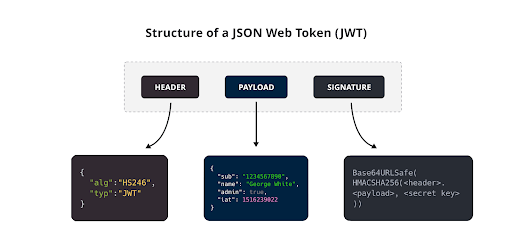
A JSON Web Token (JWT) is a compact, URL-safe means of representing claims to be transferred between two parties. At Coinbase, JWTs encapsulate the claims in a JSON object that can be digitally signed or encrypted. Each JWT consists of three parts: the Header, the Payload, and the Signature. We'll dive deeper into each of these below.
 ### The Anatomy of a JWT
Understanding the structure of a JSON Web Token (JWT) is key to leveraging its full potential for secure API interactions. A JWT consists of three distinct parts:
* **Header**: This section declares the type of the token, JWT, and the algorithm used for the signature, such as ES256 in Coinbase's case, which are critical for ensuring the security and integrity of the token.
* **Payload**: Containing claims such as the user's identity, role, and token expiration time. At Coinbase, this data is crucial for enabling not just authentication but also for ensuring that each transaction aligns with our user's privileges and security requirements.
* **Signature**: The final component is a cryptographic signature that verifies that the token comes from a trusted source and has not been altered. This ensures that the transaction is both secure and verifiable.
This structure not only ensures compliance with rigorous security standards but also supports transparent and trustworthy transactions across our platform.
### Why Use JWTs for API Authentication?
In the realm of financial transactions, where security cannot be compromised, JWTs offer a sophisticated method for authenticating API calls that goes beyond traditional approaches. At Coinbase, our commitment to being "The most trusted name in Crypto" necessitates a framework that not only enhances security but also efficiently handles the scale and complexity of modern financial systems.
JWTs excel in this environment due to several key features:
* **Improved Security Features**: JWTs provide a robust mechanism for ensuring data integrity and authenticity. By using advanced algorithms for signatures, each token is secured against tampering, crucial for protecting sensitive financial data.
* **Stateless Nature**: Unlike session-based authentication, JWTs do not require server-side storage to verify each request. This statelessness enables our systems to scale dynamically without the overhead of session management, critical in handling high volumes of transactions seamlessly.
* **Detailed Control Over User Permissions and Token Expiration**: JWTs contain detailed claims that specify user roles and access privileges, allowing for fine-grained access control. Furthermore, token expiration is explicitly managed within the JWT, ensuring that permissions are timely and securely revoked when necessary.
These features make JWTs an integral part of our security strategy, ensuring that every API interaction remains secure, scalable, and aligned with our stringent security standards.
When dealing with APIs across different environments or with multiple endpoints, it's wise to extract and verify each component of the URI:
1. **HTTP Method**: Ensure it matches the requirements (e.g., GET, POST).
2. **Host**: Check if it corresponds to the correct API server (e.g., api.coinbase.com, api.developer.coinbase.com).
3. **Endpoint Path**: Verify the path that corresponds to the specific API functionality you need (e.g., /api/v3/brokerage/accounts).
### Common Pitfalls and How to Avoid Them
* **Dynamic Parameters**: Passing the HTTP method, and the correctly formatted URL domain and URL path. This would require the variables assigned to these parameters to be dynamic in nature and to be set, at runtime to the API endpoint being queried.
* **Token Expiration**: manage the token expiration to a timeframe which makes sense for your use-case (ie. adding more time for latency if using a proxy.) For reference, our samples all set the expiration to 120 seconds, or 2 minutes.
* **Format and Import API Keys**: keep original key formatting and import both the name and private key appropriately into the JWT creation file. If running into authentication issues after following all the above steps, consider adding debugging to see what the actual private key and key name resolve to at runtime.
* **Clock Skew Issues**: JWTs depend on synchronized timestamps for `nbf` (Not Before) and `exp` (Expiration) claims. Even small discrepancies between server and client clocks can cause tokens to be rejected. Ensure systems are synchronized using a reliable time source, such as NTP.
* **Improper Header Configuration**: Ensure the JWT header includes the correct `alg` (Algorithm) and `kid` (Key ID). Misconfigurations can result in failed verifications. Follow Coinbase guidelines to set these fields accurately.
* **Payload Bloat**: Avoid adding unnecessary data to the JWT payload. Overloading the payload can increase token size, leading to performance issues and potential exposure of sensitive information. Include only essential claims needed for the specific API request.
#### Further JWT related reading:
* [Official JWT documentation](https://datatracker.ietf.org/doc/html/rfc7519)
* [JWT.io](http://JWT.io) debugging tool
### The Anatomy of a JWT
Understanding the structure of a JSON Web Token (JWT) is key to leveraging its full potential for secure API interactions. A JWT consists of three distinct parts:
* **Header**: This section declares the type of the token, JWT, and the algorithm used for the signature, such as ES256 in Coinbase's case, which are critical for ensuring the security and integrity of the token.
* **Payload**: Containing claims such as the user's identity, role, and token expiration time. At Coinbase, this data is crucial for enabling not just authentication but also for ensuring that each transaction aligns with our user's privileges and security requirements.
* **Signature**: The final component is a cryptographic signature that verifies that the token comes from a trusted source and has not been altered. This ensures that the transaction is both secure and verifiable.
This structure not only ensures compliance with rigorous security standards but also supports transparent and trustworthy transactions across our platform.
### Why Use JWTs for API Authentication?
In the realm of financial transactions, where security cannot be compromised, JWTs offer a sophisticated method for authenticating API calls that goes beyond traditional approaches. At Coinbase, our commitment to being "The most trusted name in Crypto" necessitates a framework that not only enhances security but also efficiently handles the scale and complexity of modern financial systems.
JWTs excel in this environment due to several key features:
* **Improved Security Features**: JWTs provide a robust mechanism for ensuring data integrity and authenticity. By using advanced algorithms for signatures, each token is secured against tampering, crucial for protecting sensitive financial data.
* **Stateless Nature**: Unlike session-based authentication, JWTs do not require server-side storage to verify each request. This statelessness enables our systems to scale dynamically without the overhead of session management, critical in handling high volumes of transactions seamlessly.
* **Detailed Control Over User Permissions and Token Expiration**: JWTs contain detailed claims that specify user roles and access privileges, allowing for fine-grained access control. Furthermore, token expiration is explicitly managed within the JWT, ensuring that permissions are timely and securely revoked when necessary.
These features make JWTs an integral part of our security strategy, ensuring that every API interaction remains secure, scalable, and aligned with our stringent security standards.
When dealing with APIs across different environments or with multiple endpoints, it's wise to extract and verify each component of the URI:
1. **HTTP Method**: Ensure it matches the requirements (e.g., GET, POST).
2. **Host**: Check if it corresponds to the correct API server (e.g., api.coinbase.com, api.developer.coinbase.com).
3. **Endpoint Path**: Verify the path that corresponds to the specific API functionality you need (e.g., /api/v3/brokerage/accounts).
### Common Pitfalls and How to Avoid Them
* **Dynamic Parameters**: Passing the HTTP method, and the correctly formatted URL domain and URL path. This would require the variables assigned to these parameters to be dynamic in nature and to be set, at runtime to the API endpoint being queried.
* **Token Expiration**: manage the token expiration to a timeframe which makes sense for your use-case (ie. adding more time for latency if using a proxy.) For reference, our samples all set the expiration to 120 seconds, or 2 minutes.
* **Format and Import API Keys**: keep original key formatting and import both the name and private key appropriately into the JWT creation file. If running into authentication issues after following all the above steps, consider adding debugging to see what the actual private key and key name resolve to at runtime.
* **Clock Skew Issues**: JWTs depend on synchronized timestamps for `nbf` (Not Before) and `exp` (Expiration) claims. Even small discrepancies between server and client clocks can cause tokens to be rejected. Ensure systems are synchronized using a reliable time source, such as NTP.
* **Improper Header Configuration**: Ensure the JWT header includes the correct `alg` (Algorithm) and `kid` (Key ID). Misconfigurations can result in failed verifications. Follow Coinbase guidelines to set these fields accurately.
* **Payload Bloat**: Avoid adding unnecessary data to the JWT payload. Overloading the payload can increase token size, leading to performance issues and potential exposure of sensitive information. Include only essential claims needed for the specific API request.
#### Further JWT related reading:
* [Official JWT documentation](https://datatracker.ietf.org/doc/html/rfc7519)
* [JWT.io](http://JWT.io) debugging tool