> ## Documentation Index
> Fetch the complete documentation index at: https://docs.cdp.coinbase.com/llms.txt
> Use this file to discover all available pages before exploring further.
# AI-Optimized Documentation
> Access AI-optimized content and quick integrations from the context menu on any CDP docs page.
## Overview
CDP documentation includes a contextual menu that provides quick access to AI-optimized content and direct integrations with AI tools. This feature makes it easy to get AI assistance without leaving the documentation.
## Context menu access
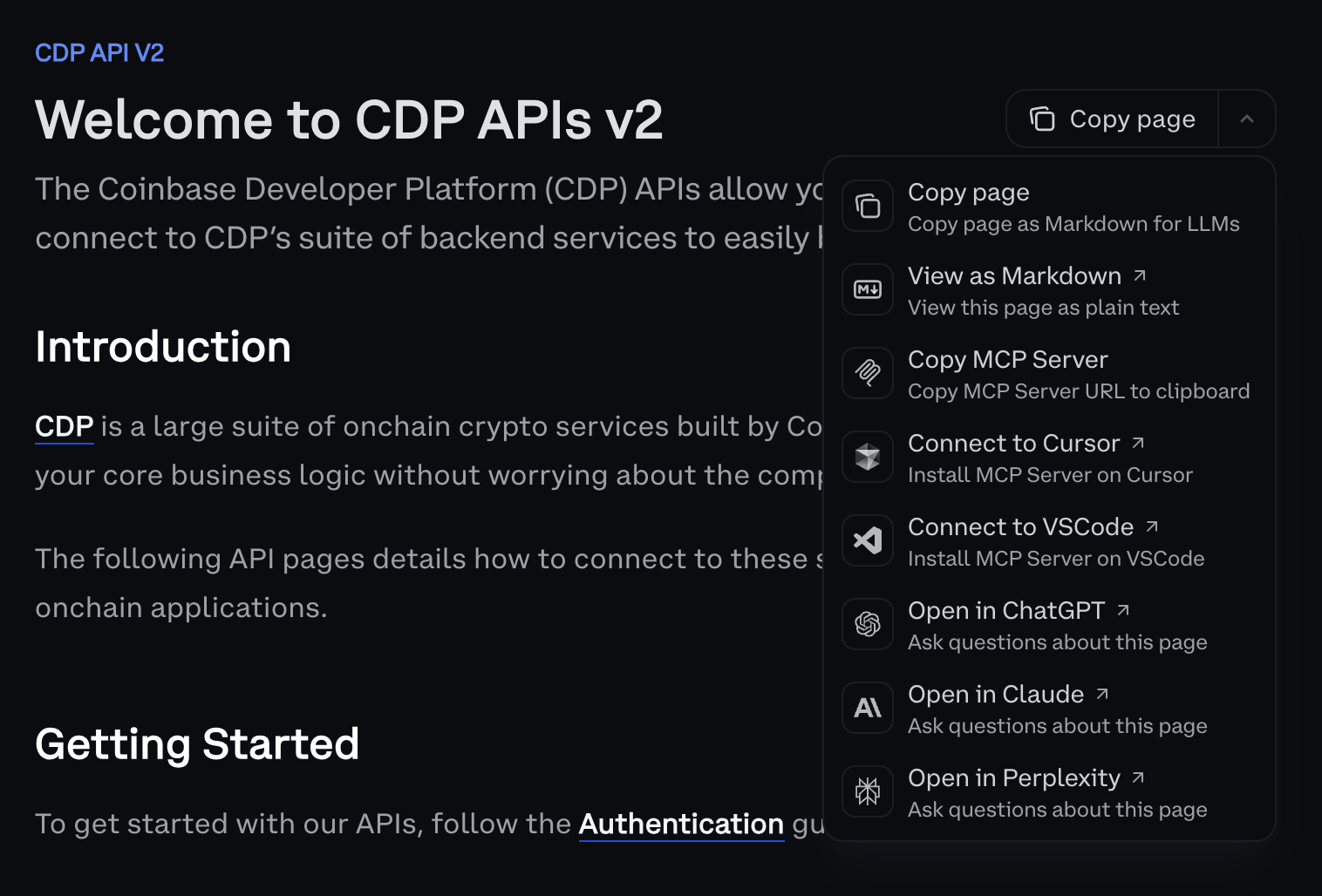
On any CDP documentation page, select the **Copy page** dropdown found next to the document header to access the AI integration options:
 ## Available options
### Page content options
**Copy page**
* Copy the current page content as standard markdown
* **When to use:** Sharing content or basic text copying
**Copy page as Markdown for LLMs**
* Copy page content optimized specifically for AI consumption
* Pre-formatted context that helps AI tools understand CDP concepts
* **When to use:** Feeding content to AI tools for analysis or questions
**View as Markdown**
* View the current page rendered as plain text markdown
* **When to use:** Previewing content in markdown format
### Direct AI tool integration
The dropdown also includes one-click options to open the current page in a supported AI assistant with pre-filled context. Use this for quick questions about the page you're reading.
### MCP server integration
**Copy MCP Server**
* Quick access to copy the MCP server URL for manual configuration
* **When to use:** Custom setups or AI tools that support MCP
The dropdown also exposes one-click connectors for MCP-compatible IDEs. For full setup details and supported clients, see [CDP Docs MCP](/get-started/build-with-ai/docs-for-ai/cdp-docs-mcp).
### Additional context
**Full Documentation Context**
* Access `llms-full.txt` - the entire CDP documentation in a single file optimized for AI tools
* URL: [`https://docs.cdp.coinbase.com/llms-full.txt`](https://docs.cdp.coinbase.com/llms-full.txt)
* **When to use:** When AI tools need comprehensive context about the entire CDP platform
**`skill.md`**
* A structured, machine-readable file that describes what AI agents can accomplish with CDP, including capabilities, required inputs, and constraints
* URL: [`https://docs.cdp.coinbase.com/skill.md`](https://docs.cdp.coinbase.com/skill.md)
* Follows the [agentskills.io specification](https://agentskills.io/specification) for compatibility with agent tooling
* **When to use:** When building AI agents that need to take actions using CDP — load this file into your agent's context so it understands CDP's capabilities
Agents can load CDP's `skill.md` automatically using the [skills CLI](https://www.npmjs.com/package/skills):
```bash theme={null}
npx skills add https://docs.cdp.coinbase.com
```
For detailed MCP server setup instructions and troubleshooting, see [CDP Docs MCP](/get-started/build-with-ai/docs-for-ai/cdp-docs-mcp).
## How to use
### For direct AI tool access
1. Navigate to any CDP documentation page
2. Click the **Copy page** dropdown
3. Select one of the **Open in...** options for your preferred AI assistant
4. The AI tool will open with the page content pre-loaded
### For manual AI tool usage
1. Navigate to any CDP documentation page
2. Click the **Copy page** dropdown
3. Select **Copy page as Markdown for LLMs**
4. Paste the content into your preferred AI tool and ask questions
### For comprehensive context
* Navigate to `https://docs.cdp.coinbase.com/llms-full.txt`
* Copy the URL or content for comprehensive CDP documentation context
* Use when questions span multiple areas of CDP documentation
### For MCP server setup
1. Navigate to any CDP documentation page
2. Click the **Copy page** dropdown
3. Select an MCP **Connect to...** option, or **Copy MCP Server URL**
4. For detailed setup instructions, see [CDP Docs MCP](/get-started/build-with-ai/docs-for-ai/cdp-docs-mcp)
## Best practices
**Provide context**
* Include relevant code snippets when asking AI questions
* Mention your specific use case (embedded wallets, DeFi, etc.)
* Reference the CDP components you're working with
* For complex questions spanning multiple topics, consider using `llms-full.txt` for comprehensive context
**Combine with the MCP server**
* Use the context menu for quick AI questions and one-off tasks
* Use [CDP Docs MCP](/get-started/build-with-ai/docs-for-ai/cdp-docs-mcp) for ongoing development with full AI tool integration
* Both approaches work together for optimal AI assistance
## Available options
### Page content options
**Copy page**
* Copy the current page content as standard markdown
* **When to use:** Sharing content or basic text copying
**Copy page as Markdown for LLMs**
* Copy page content optimized specifically for AI consumption
* Pre-formatted context that helps AI tools understand CDP concepts
* **When to use:** Feeding content to AI tools for analysis or questions
**View as Markdown**
* View the current page rendered as plain text markdown
* **When to use:** Previewing content in markdown format
### Direct AI tool integration
The dropdown also includes one-click options to open the current page in a supported AI assistant with pre-filled context. Use this for quick questions about the page you're reading.
### MCP server integration
**Copy MCP Server**
* Quick access to copy the MCP server URL for manual configuration
* **When to use:** Custom setups or AI tools that support MCP
The dropdown also exposes one-click connectors for MCP-compatible IDEs. For full setup details and supported clients, see [CDP Docs MCP](/get-started/build-with-ai/docs-for-ai/cdp-docs-mcp).
### Additional context
**Full Documentation Context**
* Access `llms-full.txt` - the entire CDP documentation in a single file optimized for AI tools
* URL: [`https://docs.cdp.coinbase.com/llms-full.txt`](https://docs.cdp.coinbase.com/llms-full.txt)
* **When to use:** When AI tools need comprehensive context about the entire CDP platform
**`skill.md`**
* A structured, machine-readable file that describes what AI agents can accomplish with CDP, including capabilities, required inputs, and constraints
* URL: [`https://docs.cdp.coinbase.com/skill.md`](https://docs.cdp.coinbase.com/skill.md)
* Follows the [agentskills.io specification](https://agentskills.io/specification) for compatibility with agent tooling
* **When to use:** When building AI agents that need to take actions using CDP — load this file into your agent's context so it understands CDP's capabilities
Agents can load CDP's `skill.md` automatically using the [skills CLI](https://www.npmjs.com/package/skills):
```bash theme={null}
npx skills add https://docs.cdp.coinbase.com
```
For detailed MCP server setup instructions and troubleshooting, see [CDP Docs MCP](/get-started/build-with-ai/docs-for-ai/cdp-docs-mcp).
## How to use
### For direct AI tool access
1. Navigate to any CDP documentation page
2. Click the **Copy page** dropdown
3. Select one of the **Open in...** options for your preferred AI assistant
4. The AI tool will open with the page content pre-loaded
### For manual AI tool usage
1. Navigate to any CDP documentation page
2. Click the **Copy page** dropdown
3. Select **Copy page as Markdown for LLMs**
4. Paste the content into your preferred AI tool and ask questions
### For comprehensive context
* Navigate to `https://docs.cdp.coinbase.com/llms-full.txt`
* Copy the URL or content for comprehensive CDP documentation context
* Use when questions span multiple areas of CDP documentation
### For MCP server setup
1. Navigate to any CDP documentation page
2. Click the **Copy page** dropdown
3. Select an MCP **Connect to...** option, or **Copy MCP Server URL**
4. For detailed setup instructions, see [CDP Docs MCP](/get-started/build-with-ai/docs-for-ai/cdp-docs-mcp)
## Best practices
**Provide context**
* Include relevant code snippets when asking AI questions
* Mention your specific use case (embedded wallets, DeFi, etc.)
* Reference the CDP components you're working with
* For complex questions spanning multiple topics, consider using `llms-full.txt` for comprehensive context
**Combine with the MCP server**
* Use the context menu for quick AI questions and one-off tasks
* Use [CDP Docs MCP](/get-started/build-with-ai/docs-for-ai/cdp-docs-mcp) for ongoing development with full AI tool integration
* Both approaches work together for optimal AI assistance