> ## Documentation Index
> Fetch the complete documentation index at: https://docs.cdp.coinbase.com/llms.txt
> Use this file to discover all available pages before exploring further.
# Quickstart
> Set up your Sandbox API keys, create a funded account, and send a test transaction
**Base API URL:** `https://sandbox.cdp.coinbase.com`
## 1. Create Sandbox API keys
Navigate to Sandbox mode in the CDP Portal
* Go to **Settings**
* Click **Create secret API Key**
* Enter an **API key nickname**
* **Download the API key JSON file** and save it securely
## 2. Install CDP CLI
[CDP CLI](/get-started/build-with-ai/cdp-for-agents) is a command-line tool that handles JWT authentication automatically — configure your API key once and it takes care of signing every request for you.
```bash theme={null}
npm install -g @coinbase/cdp-cli
cdp --version
```
Node.js 22 or later is required.
**Configure your API key:**
```bash theme={null}
cdp env sandbox --key-file ~/Downloads/cdp_api_key.json
```
Never commit API keys to version control. Store them securely in environment variables or a secrets manager. Do not use real personal data in the Sandbox environment.
## 3. Create and fund an account through the portal
In Sandbox mode, navigate to the Accounts tab
Name the account (e.g., "My Test Account")
Add balances in different assets to your account. Currently we support USD, USDC, USDT (e.g., set USD to \$1000)
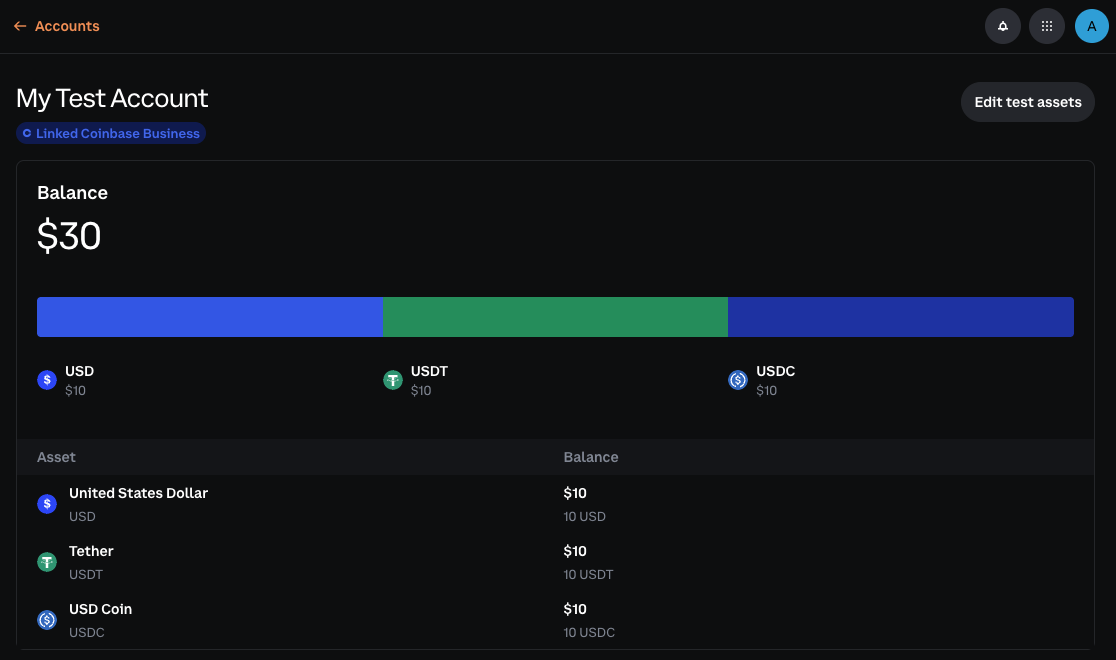 All balances are simulated within the Sandbox environment — no blockchain or testnet connectivity. You cannot fund accounts by sending real or testnet crypto.
## 4. Verify balance(s)
Run the following to verify your account balance:
```bash theme={null}
cdp accounts balance
```
List all your account IDs:
```bash theme={null}
cdp accounts list
```
## 5. Alternative: Test with Postman
Prefer a GUI? See the [Postman guide](/get-started/sandbox/postman) for setup instructions.
## 6. Test custodial API flows
Now that you're set up, use these quickstarts to test the custodial APIs end to end in Sandbox:
Create an entity-owned account, add simulated balances through the Portal, and verify balances with the CDP CLI or SDK.
Onboard a KYC'd customer, create customer-owned accounts, and test capability changes.
List mock payment methods and test successful and failed fiat withdrawal flows.
Create a placeholder deposit address, simulate an incoming deposit, and inspect webhook payloads.
Send Sandbox transfers to reserved crypto addresses, test emails, and payment methods.
Explore request and response schemas for Sandbox-compatible APIs.
## Sandbox test data and scenarios
Use the product quickstarts above for the full API walkthroughs. These Sandbox-specific fixtures are available when you test custodial API flows:
### Accounts
* Sandbox accounts are isolated from Live and do not require linking to external Coinbase accounts.
* Account funding is available through the Portal UI with simulated balances only. You cannot fund Sandbox accounts by sending real or testnet crypto.
* Supported test balances in the Portal include USD, USDC, and USDT.
### Payment methods
Sandbox automatically creates entity-level test payment methods based on your entity's region. Use active methods to test successful withdrawals and inactive methods to test error handling.
#### US entities
| Payment rail | Bank | Status | Behavior |
| ------------ | ---------------------- | ---------- | ----------------- |
| Fedwire | JPMorgan Chase Bank NA | `active` | Transfers succeed |
| Fedwire | Bank of America NA | `inactive` | Transfers fail |
| Swift | Deutsche Bank | `active` | Transfers succeed |
#### EU entities
| Payment rail | Bank | Status | Behavior |
| ------------ | --------------------------- | ---------- | ----------------- |
| SEPA | Deutsche Bank | `active` | Transfers succeed |
| SEPA | Baden-Wurttembergische Bank | `inactive` | Transfers fail |
### Deposit destinations
* In Sandbox, deposit destinations are placeholder addresses for API testing. They are not real blockchain addresses and the Sandbox does not connect to any blockchain network.
* The API uses **deposit destination** for the resource. The Portal UI uses **deposit address** for the same concept.
* Deposit simulation uses the Sandbox-only `/fake/deposit/crypto` endpoint or the Portal **Deposit** action. The `asset_symbol` and `network` must match the destination configuration.
* Simulated deposits fire transfer webhooks, create transfer records visible through the Transfers API, and credit the account balance immediately.
Do not send real funds to Sandbox deposit addresses. They do not exist on any blockchain and your funds will be lost.
### Transfers
Sandbox transfers are simulated. Webhooks fire and transfer statuses change, but no real crypto transaction or fiat rail movement occurs.
#### Reserved crypto addresses
| Reserved address | Simulated outcome |
| -------------------------------------------- | ----------------------- |
| `0x1111111111111111111111111111111111111111` | Success |
| `0x2222222222222222222222222222222222222222` | Transfer invalid target |
| `0x3333333333333333333333333333333333333333` | Invalid address |
| `0x4444444444444444444444444444444444444444` | Unsupported network |
#### Reserved email addresses
| Test email | Simulated outcome |
| ---------------------------------- | ------------------------------------------------------------------------------- |
| `testuser1@domain.com` | Successful validation and execution |
| `testuser2@domain.com` | Successful validation and execution |
| `sandboxinvalidtarget@domain.com` | Invalid email target |
| `sandboxexecutionfails@domain.com` | Validation succeeds, execution fails synchronously with `422` |
| `sandboxasyncfailure@domain.com` | Execution starts, then transitions from `processing` to `failed` asynchronously |
Any other email returns a `4xx` error so Sandbox does not validate real email addresses.
## What to read next
For a GUI-based testing option, see [Testing with Postman](/get-started/sandbox/postman). For product-specific concepts, continue with these references:
Learn how accounts, payment methods, deposit destinations, and transfers fit together.
Use accounts, balances, and transfers with your custodial funds.
## Transitioning to Live
When you're ready to move from Sandbox to Live:
* **Complete integration testing**: Ensure all features work correctly in Sandbox
* **Create Live API keys**: Generate Live credentials in the CDP Portal
* **Update configuration**: Switch from `sandbox.cdp.coinbase.com` to `api.cdp.coinbase.com`
* **Start with small transactions**: Begin with small test transactions to verify everything works
* **Set up monitoring**: Configure alerting for failed transactions and API errors
All balances are simulated within the Sandbox environment — no blockchain or testnet connectivity. You cannot fund accounts by sending real or testnet crypto.
## 4. Verify balance(s)
Run the following to verify your account balance:
```bash theme={null}
cdp accounts balance
```
List all your account IDs:
```bash theme={null}
cdp accounts list
```
## 5. Alternative: Test with Postman
Prefer a GUI? See the [Postman guide](/get-started/sandbox/postman) for setup instructions.
## 6. Test custodial API flows
Now that you're set up, use these quickstarts to test the custodial APIs end to end in Sandbox:
Create an entity-owned account, add simulated balances through the Portal, and verify balances with the CDP CLI or SDK.
Onboard a KYC'd customer, create customer-owned accounts, and test capability changes.
List mock payment methods and test successful and failed fiat withdrawal flows.
Create a placeholder deposit address, simulate an incoming deposit, and inspect webhook payloads.
Send Sandbox transfers to reserved crypto addresses, test emails, and payment methods.
Explore request and response schemas for Sandbox-compatible APIs.
## Sandbox test data and scenarios
Use the product quickstarts above for the full API walkthroughs. These Sandbox-specific fixtures are available when you test custodial API flows:
### Accounts
* Sandbox accounts are isolated from Live and do not require linking to external Coinbase accounts.
* Account funding is available through the Portal UI with simulated balances only. You cannot fund Sandbox accounts by sending real or testnet crypto.
* Supported test balances in the Portal include USD, USDC, and USDT.
### Payment methods
Sandbox automatically creates entity-level test payment methods based on your entity's region. Use active methods to test successful withdrawals and inactive methods to test error handling.
#### US entities
| Payment rail | Bank | Status | Behavior |
| ------------ | ---------------------- | ---------- | ----------------- |
| Fedwire | JPMorgan Chase Bank NA | `active` | Transfers succeed |
| Fedwire | Bank of America NA | `inactive` | Transfers fail |
| Swift | Deutsche Bank | `active` | Transfers succeed |
#### EU entities
| Payment rail | Bank | Status | Behavior |
| ------------ | --------------------------- | ---------- | ----------------- |
| SEPA | Deutsche Bank | `active` | Transfers succeed |
| SEPA | Baden-Wurttembergische Bank | `inactive` | Transfers fail |
### Deposit destinations
* In Sandbox, deposit destinations are placeholder addresses for API testing. They are not real blockchain addresses and the Sandbox does not connect to any blockchain network.
* The API uses **deposit destination** for the resource. The Portal UI uses **deposit address** for the same concept.
* Deposit simulation uses the Sandbox-only `/fake/deposit/crypto` endpoint or the Portal **Deposit** action. The `asset_symbol` and `network` must match the destination configuration.
* Simulated deposits fire transfer webhooks, create transfer records visible through the Transfers API, and credit the account balance immediately.
Do not send real funds to Sandbox deposit addresses. They do not exist on any blockchain and your funds will be lost.
### Transfers
Sandbox transfers are simulated. Webhooks fire and transfer statuses change, but no real crypto transaction or fiat rail movement occurs.
#### Reserved crypto addresses
| Reserved address | Simulated outcome |
| -------------------------------------------- | ----------------------- |
| `0x1111111111111111111111111111111111111111` | Success |
| `0x2222222222222222222222222222222222222222` | Transfer invalid target |
| `0x3333333333333333333333333333333333333333` | Invalid address |
| `0x4444444444444444444444444444444444444444` | Unsupported network |
#### Reserved email addresses
| Test email | Simulated outcome |
| ---------------------------------- | ------------------------------------------------------------------------------- |
| `testuser1@domain.com` | Successful validation and execution |
| `testuser2@domain.com` | Successful validation and execution |
| `sandboxinvalidtarget@domain.com` | Invalid email target |
| `sandboxexecutionfails@domain.com` | Validation succeeds, execution fails synchronously with `422` |
| `sandboxasyncfailure@domain.com` | Execution starts, then transitions from `processing` to `failed` asynchronously |
Any other email returns a `4xx` error so Sandbox does not validate real email addresses.
## What to read next
For a GUI-based testing option, see [Testing with Postman](/get-started/sandbox/postman). For product-specific concepts, continue with these references:
Learn how accounts, payment methods, deposit destinations, and transfers fit together.
Use accounts, balances, and transfers with your custodial funds.
## Transitioning to Live
When you're ready to move from Sandbox to Live:
* **Complete integration testing**: Ensure all features work correctly in Sandbox
* **Create Live API keys**: Generate Live credentials in the CDP Portal
* **Update configuration**: Switch from `sandbox.cdp.coinbase.com` to `api.cdp.coinbase.com`
* **Start with small transactions**: Begin with small test transactions to verify everything works
* **Set up monitoring**: Configure alerting for failed transactions and API errors