> ## Documentation Index
> Fetch the complete documentation index at: https://docs.cdp.coinbase.com/llms.txt
> Use this file to discover all available pages before exploring further.
# Submit your first sponsored smart account transaction
This Paymaster quickstart tutorial explains how to submit your first smart account transaction on Base Sepolia using [Viem](https://viem.sh/), with gas sponsorship from [Coinbase Developer Platform](https://portal.cdp.coinbase.com/products/bundler-and-paymaster). The example below sponsors an NFT mint, but can be updated to call your smart contract instead.
## Prerequisites
```
node >= 14.0.0
npm >= 6.0.0
```
## Getting an endpoint on Base Sepolia
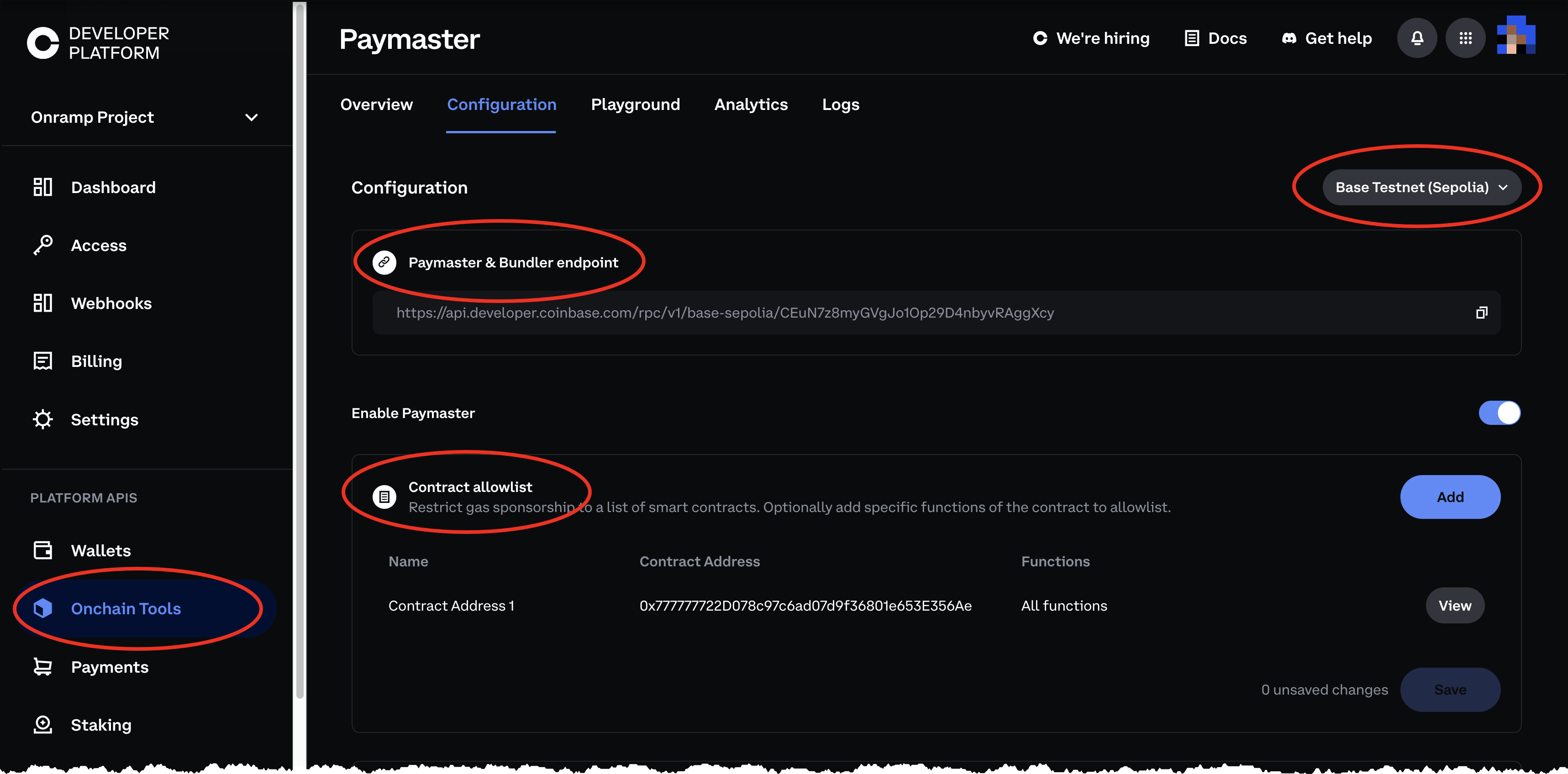
> **How to Get a Paymaster & Bundler endpoint on Base testnet (Sepolia) from CDP**
1. [Create](https://coinbase.com/developer-platform) a new CDP account or [sign in](https://portal.cdp.coinbase.com) to your existing account.
2. Navigate to [Paymaster](https://portal.cdp.coinbase.com/products/bundler-and-paymaster).
3. The address of the NFT contract we are calling is `0x66519FCAee1Ed65bc9e0aCc25cCD900668D3eD49`, add that to the contract allowlist and save the policy.
4. Switch to Base testnet (Sepolia) in the top right of the configuration.
5. Copy your endpoint to use later.
 ## Sending a transaction
**How to call the mint function of a Base Sepolia NFT contract (or contract of choice)**
### 1. Initialize your project
In your terminal, create a directory called `paymaster-tutorial` and initialize a project using [npm](https://www.npmjs.com/).
```js lines wrap theme={null}
mkdir paymaster-tutorial
cd paymaster-tutorial
npm init es6
```
### 2. Download dependencies
2. Install `viem`.
```js lines wrap theme={null}
npm install viem
```
### 3. Create smart account using a private key
The example below uses a Coinbase Smart Account, but any ERC-4337 smart account will work.
a. Create a new private key with [Foundry](https://book.getfoundry.sh/reference/cast/cast-wallet-new).
b. Install Foundry: `curl -L https://foundry.paradigm.xyz | bash`
c. Generate a new key pair: `cast wallet new`.
d. Update your `config.js` file with the private key and create the account.
```js lines wrap theme={null}
//config.js
import { createPublicClient, http } from 'viem'
import { toCoinbaseSmartAccount } from 'viem/account-abstraction'
import { baseSepolia } from 'viem/chains'
import { privateKeyToAccount } from 'viem/accounts'
// Your RPC url. Make sure you're using the right network (base vs base-sepolia)
export const RPC_URL = "https://api.developer.coinbase.com/rpc/v1/base-sepolia/"
export const client = createPublicClient({
chain: baseSepolia,
transport: http(RPC_URL),
})
// Creates a Coinbase smart wallet using an EOA signer
const owner = privateKeyToAccount('')
export const account = await toCoinbaseSmartAccount({
client,
owners: [owner]
})
```
### 4. Add your smart contract's ABI
Create a file called `example-app-abi.js` to store our NFT contract's abi and address. You will have to update this to your smart contract's ABI.
```js lines wrap theme={null}
//example-app-abi.js
export const abi = [
{
inputs: [
{ internalType: "address", name: "recipient", type: "address" },
{ internalType: "uint16", name: "item", type: "uint16" },
],
name: "mintTo",
outputs: [{ internalType: "uint256", name: "", type: "uint256" }],
stateMutability: "payable",
type: "function",
},
];
```
### 5. Create the Bundler and Paymaster clients, submit transaction
Create a new file called `index.js`
```ts [expandable] lines wrap theme={null}
//index.js
import { http } from "viem";
import { baseSepolia } from "viem/chains";
import { createBundlerClient } from "viem/account-abstraction";
import { account, client, RPC_URL } from "./config.js";
import { abi } from "./example-app-abi.js";
// Logs your deterministic public address generated by your private key
console.log(`Minting nft to ${account.address}`)
// The bundler is a special node that gets your UserOperation on chain
const bundlerClient = createBundlerClient({
account,
client,
transport: http(RPC_URL),
chain: baseSepolia,
});
// The call for your app. You will have change this depending on your dapp's abi
const nftContractAddress = "0x66519FCAee1Ed65bc9e0aCc25cCD900668D3eD49"
const mintTo = {
abi: abi,
functionName: "mintTo",
to: nftContractAddress,
args: [account.address, 1],
};
const calls = [mintTo]
// Pads the preVerificationGas (or any other gas limits you might want) to ensure your UserOperation lands onchain
account.userOperation = {
estimateGas: async (userOperation) => {
const estimate = await bundlerClient.estimateUserOperationGas(userOperation);
// adjust preVerification upward
estimate.preVerificationGas = estimate.preVerificationGas * 2n;
return estimate;
},
};
// Sign and send the UserOperation
try {
const userOpHash = await bundlerClient.sendUserOperation({
account,
calls,
paymaster: true
});
const receipt = await bundlerClient.waitForUserOperationReceipt({
hash: userOpHash,
});
console.log("✅ Transaction successfully sponsored!");
console.log(`⛽ View sponsored UserOperation on blockscout: https://base-sepolia.blockscout.com/op/${receipt.userOpHash}`);
console.log(`🔍 View NFT mint on basescan: https://sepolia.basescan.org/address/${account.address}`);
process.exit()
} catch (error) {
console.log("Error sending transaction: ", error);
process.exit(1)
}
```
In your terminal you can run this script using the below command from the correct directory
```js lines wrap theme={null}
node index.js
```
## Next steps
Modify your allowlist and gas policy to ensure you only sponsor what you want!
## Other examples
Examples for integrations with other common SDKs can be found in the [paymaster-bundler-examples](https://github.com/coinbase/paymaster-bundler-examples/tree/master/examples) repository.
## Troubleshooting
If you run into any errors with this tutorial, please check out our [troubleshooting guide](/paymaster/reference-troubleshooting/troubleshooting).
## Sending a transaction
**How to call the mint function of a Base Sepolia NFT contract (or contract of choice)**
### 1. Initialize your project
In your terminal, create a directory called `paymaster-tutorial` and initialize a project using [npm](https://www.npmjs.com/).
```js lines wrap theme={null}
mkdir paymaster-tutorial
cd paymaster-tutorial
npm init es6
```
### 2. Download dependencies
2. Install `viem`.
```js lines wrap theme={null}
npm install viem
```
### 3. Create smart account using a private key
The example below uses a Coinbase Smart Account, but any ERC-4337 smart account will work.
a. Create a new private key with [Foundry](https://book.getfoundry.sh/reference/cast/cast-wallet-new).
b. Install Foundry: `curl -L https://foundry.paradigm.xyz | bash`
c. Generate a new key pair: `cast wallet new`.
d. Update your `config.js` file with the private key and create the account.
```js lines wrap theme={null}
//config.js
import { createPublicClient, http } from 'viem'
import { toCoinbaseSmartAccount } from 'viem/account-abstraction'
import { baseSepolia } from 'viem/chains'
import { privateKeyToAccount } from 'viem/accounts'
// Your RPC url. Make sure you're using the right network (base vs base-sepolia)
export const RPC_URL = "https://api.developer.coinbase.com/rpc/v1/base-sepolia/"
export const client = createPublicClient({
chain: baseSepolia,
transport: http(RPC_URL),
})
// Creates a Coinbase smart wallet using an EOA signer
const owner = privateKeyToAccount('')
export const account = await toCoinbaseSmartAccount({
client,
owners: [owner]
})
```
### 4. Add your smart contract's ABI
Create a file called `example-app-abi.js` to store our NFT contract's abi and address. You will have to update this to your smart contract's ABI.
```js lines wrap theme={null}
//example-app-abi.js
export const abi = [
{
inputs: [
{ internalType: "address", name: "recipient", type: "address" },
{ internalType: "uint16", name: "item", type: "uint16" },
],
name: "mintTo",
outputs: [{ internalType: "uint256", name: "", type: "uint256" }],
stateMutability: "payable",
type: "function",
},
];
```
### 5. Create the Bundler and Paymaster clients, submit transaction
Create a new file called `index.js`
```ts [expandable] lines wrap theme={null}
//index.js
import { http } from "viem";
import { baseSepolia } from "viem/chains";
import { createBundlerClient } from "viem/account-abstraction";
import { account, client, RPC_URL } from "./config.js";
import { abi } from "./example-app-abi.js";
// Logs your deterministic public address generated by your private key
console.log(`Minting nft to ${account.address}`)
// The bundler is a special node that gets your UserOperation on chain
const bundlerClient = createBundlerClient({
account,
client,
transport: http(RPC_URL),
chain: baseSepolia,
});
// The call for your app. You will have change this depending on your dapp's abi
const nftContractAddress = "0x66519FCAee1Ed65bc9e0aCc25cCD900668D3eD49"
const mintTo = {
abi: abi,
functionName: "mintTo",
to: nftContractAddress,
args: [account.address, 1],
};
const calls = [mintTo]
// Pads the preVerificationGas (or any other gas limits you might want) to ensure your UserOperation lands onchain
account.userOperation = {
estimateGas: async (userOperation) => {
const estimate = await bundlerClient.estimateUserOperationGas(userOperation);
// adjust preVerification upward
estimate.preVerificationGas = estimate.preVerificationGas * 2n;
return estimate;
},
};
// Sign and send the UserOperation
try {
const userOpHash = await bundlerClient.sendUserOperation({
account,
calls,
paymaster: true
});
const receipt = await bundlerClient.waitForUserOperationReceipt({
hash: userOpHash,
});
console.log("✅ Transaction successfully sponsored!");
console.log(`⛽ View sponsored UserOperation on blockscout: https://base-sepolia.blockscout.com/op/${receipt.userOpHash}`);
console.log(`🔍 View NFT mint on basescan: https://sepolia.basescan.org/address/${account.address}`);
process.exit()
} catch (error) {
console.log("Error sending transaction: ", error);
process.exit(1)
}
```
In your terminal you can run this script using the below command from the correct directory
```js lines wrap theme={null}
node index.js
```
## Next steps
Modify your allowlist and gas policy to ensure you only sponsor what you want!
## Other examples
Examples for integrations with other common SDKs can be found in the [paymaster-bundler-examples](https://github.com/coinbase/paymaster-bundler-examples/tree/master/examples) repository.
## Troubleshooting
If you run into any errors with this tutorial, please check out our [troubleshooting guide](/paymaster/reference-troubleshooting/troubleshooting).