> ## Documentation Index
> Fetch the complete documentation index at: https://docs.cdp.coinbase.com/llms.txt
> Use this file to discover all available pages before exploring further.
# Auth Method Linking
export const Tags = ({tags, className}) => {
if (!tags || !Array.isArray(tags)) {
return null;
}
return
{tags.map((tag, index) => {tag})}
;
};
## Overview
Auth method linking enables users to associate multiple authentication methods with a single user wallet account. This allows users to sign in using different methods (email, SMS, OAuth) while maintaining access to the same wallet and user identity.
Ready to get started? Jump to [implementation examples](#implementation-examples) to get a feel for the React components and hooks.
## Why link authentication methods?
By default, each authentication method creates a separate user identity. For example, if a user signs in with their email and later signs in with their phone number, they would have two different user wallets. Auth method linking solves this problem by allowing users to:
* **Access their wallet using multiple methods**: Sign in with email, phone, or social providers interchangeably.
* **Meet 2FA requirements**: For applications that require 2FA, CDP wallets provide a smooth integration.
* **Improve account security**: Add additional authentication factors as users accumulate more funds.
* **Enhance account recovery**: Multiple methods provide backup options if one method becomes unavailable.
**Important**: A user must be signed in before linking additional authentication methods. Users cannot link methods to an unauthenticated session.
## Supported authentication methods
You can link any combination of the following authentication methods to a single user account:
* Email OTP
* SMS OTP
* All supported OAuth providers
* Sign In With Ethereum (SIWE), including [Sign in with Base](/wallets/authentication/siwe#sign-in-with-base) via `siwe:base`
## Auto-linking accounts
Auto-linking automatically connects a user's Google or Apple sign-in to an existing account that shares the same verified email address. This prevents duplicate accounts when users switch between sign-in methods — for example, a user who originally signed up with their Gmail address via email OTP can later sign in with Google OAuth and land in the same wallet, without any manual linking step.
### How it works
When a user signs in for the first time with Google or Apple OAuth (or with a Gmail/iCloud email address), the system checks whether an account already exists under a linked auth method before creating a new one. Two scenarios are covered:
| Sign-in method | Trigger condition | Auto-link target |
| ---------------------------------------- | ----------------------------------------------- | -------------------------------------------------------------------------------------- |
| Google or Apple OAuth | No existing account found for the OAuth subject | Existing email-OTP account with the same verified `@gmail.com` / `@icloud.com` address |
| Email OTP (`@gmail.com` / `@icloud.com`) | No existing account found for the email address | Existing Google or Apple OAuth account with the same email address |
When a match is found, the new auth method is added to the existing account and the user is signed in to their original wallet. When no match is found, a new account is created as usual.
Auto-linking only applies to **Google** (`@gmail.com`) and **Apple** (`@icloud.com`). Other OAuth providers and email domains are not eligible.
### Requirements
For auto-linking to trigger, all of the following must be true:
* Auto-linking is **enabled** in your project settings (see below).
* The OAuth provider is **Google** or **Apple**.
* For OAuth sign-in: the email returned by the provider is **verified** and uses the provider's expected domain (`@gmail.com` or `@icloud.com`).
* No existing account is already registered under the OAuth subject ID — auto-linking only runs when a new account would otherwise be created.
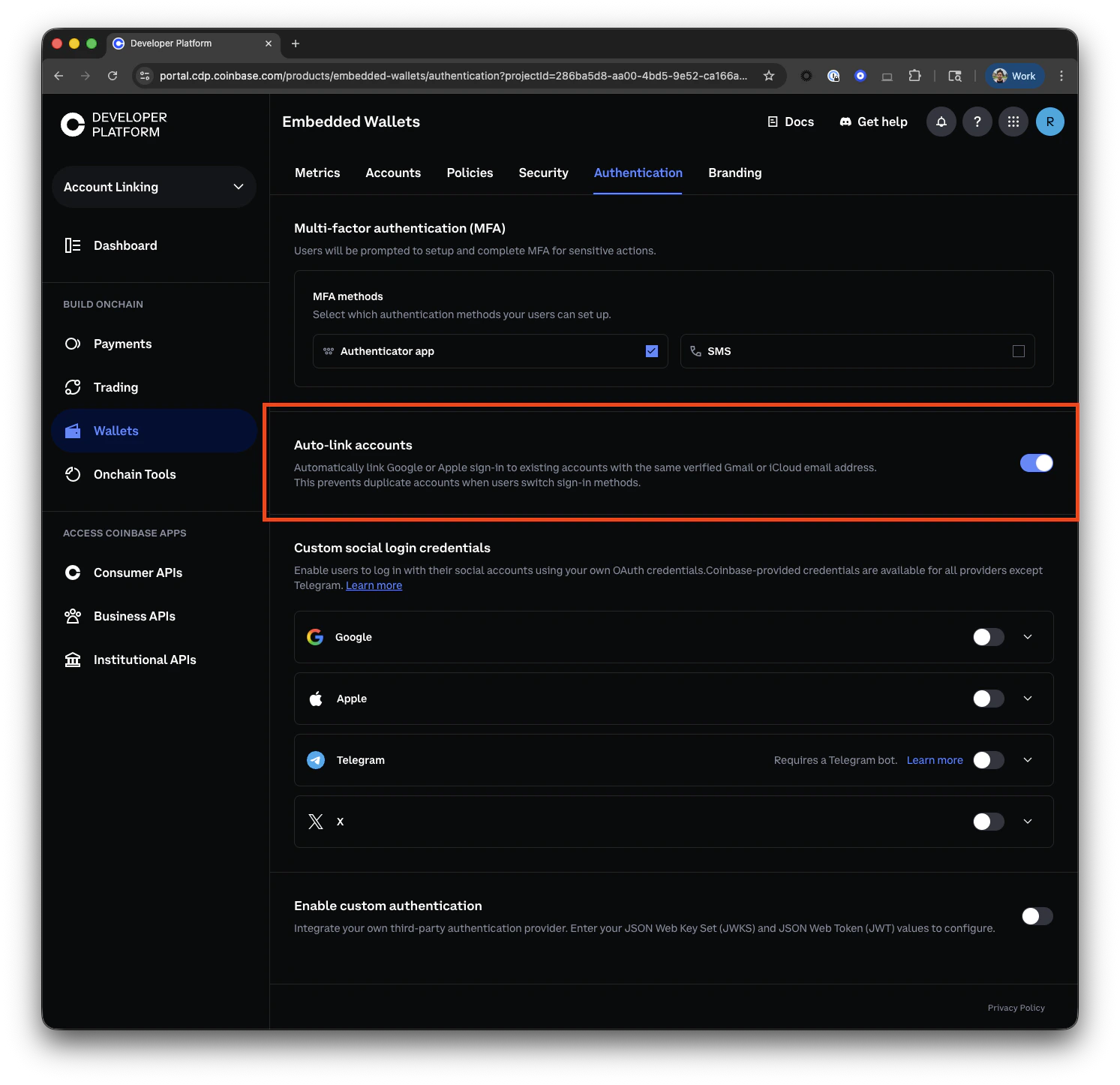
### Enabling auto-linking
Toggle auto-linking on or off from the [CDP Portal Authentication settings](https://portal.cdp.coinbase.com/products/embedded-wallets/authentication):
1. Open the **Authentication** tab for your project.
2. Find the **Auto-link accounts** section.
3. Enable the toggle.
The setting takes effect immediately for all new sign-in attempts. Existing accounts are not modified retroactively.
## Security features
Auth method linking maintains the same security standards as initial authentication:
Each additional authentication method must be verified before being linked:
* **Email**: Requires OTP verification (10-minute expiration).
* **SMS**: Requires OTP verification (5-minute expiration).
* **OAuth providers**: Requires successful OAuth flow completion.
* Protection against brute force attempts on OTP verification.
* Failed attempts may temporarily lock linking operations.
* Linked methods maintain the same device binding as the primary authentication.
* Users can access their wallet from up to 5 devices regardless of which linked method they use.
## Implementation examples
The examples below show both React component and hook-based approaches from `@coinbase/cdp-react` and `@coinbase/cdp-hooks`. For other implementation approaches, see the [Implementation Guide](/wallets/authentication/implementation-guide).
### Using React components
#### Basic usage
Render a `LinkAuth` component with an `onLinkSuccess` handler:
```tsx theme={null}
import { LinkAuth } from '@coinbase/cdp-react';
function ManageAuthMethods() {
return (
{
console.log(`Successfully linked ${method}`);
}}
/>
);
}
```
#### Accessing state
Display a message based on the LinkAuth state:
```tsx theme={null}
import {
LinkAuth,
LinkAuthError,
LinkAuthFlow,
LinkAuthFlowBackButton,
LinkAuthTitle,
} from '@coinbase/cdp-react';
function App() {
return (
{(state) => (
<>
{state.methodToLink ? (
Currently linking: {state.methodToLink}
) : (
Select a method to link
)}
)}
);
}
```
#### Advanced example: Using SignInModal
Customize LinkAuthItems to show a modal for non-OAuth methods instead of transitioning in place:
```tsx theme={null}
import {
LinkAuth,
LinkAuthItems,
SignInModal,
SignInModalTrigger,
useLinkAuthFlow,
useAppConfig,
type AuthMethod,
} from '@coinbase/cdp-react';
import { useCallback, useMemo, useState } from 'react';
function CustomLinkAuthItems() {
const { link, back } = useLinkAuthFlow();
const { authMethods } = useAppConfig();
const [openModal, setOpenModal] = useState(null);
const modalMethods = useMemo(
() => authMethods.filter(method => !method.startsWith([REDACTED]),
[authMethods],
);
const handleClose = useCallback(() => {
setOpenModal(null);
back();
}, [back, setOpenModal]);
const handleLink = useCallback(
(method: AuthMethod) => {
link(method);
if (!method.startsWith([REDACTED])) {
setOpenModal(method);
}
},
[link, setOpenModal],
);
return (
<>
{modalMethods.map(method => {
return (
(isOpen ? setOpenModal(method) : handleClose())}
onSuccess={() => setOpenModal(null)}
>
null
);
})}
);
}
function App() {
return (
Link a profile
);
}
```
### Using React hooks
#### Link an email address
Use the `useLinkEmail` hook to link an email address to the currently authenticated user. This follows the same two-step flow as email sign-in: initiate the flow and then verify the OTP.
```tsx theme={null}
import { useLinkEmail, useVerifyEmailOTP, useCurrentUser } from "@coinbase/cdp-hooks";
import { useState } from "react";
function LinkEmail() {
const { linkEmail } = useLinkEmail();
const { verifyEmailOTP } = useVerifyEmailOTP();
const { currentUser } = useCurrentUser();
const [flowId, setFlowId] = useState("");
const handleLinkEmail = async (email: string) => {
if (!currentUser) {
console.error("User must be signed in first");
return;
}
try {
// Initiate email linking
const result = await linkEmail(email);
setFlowId(result.flowId);
// In a real application, you would prompt the user for the OTP
const otp = "123456";
// Verify the OTP to complete linking
await verifyEmailOTP({
flowId: result.flowId,
otp
});
console.log("Email linked successfully!");
} catch (error) {
console.error("Failed to link email:", error);
}
};
return (
);
}
```
#### Link a phone number
Use the `useLinkSms` hook to link a phone number to the currently authenticated user. Like email linking, this requires OTP verification.
```tsx theme={null}
import { useLinkSms, useVerifySmsOTP, useCurrentUser } from "@coinbase/cdp-hooks";
import { useState } from "react";
function LinkPhoneNumber() {
const { linkSms } = useLinkSms();
const { verifySmsOTP } = useVerifySmsOTP();
const { currentUser } = useCurrentUser();
const [flowId, setFlowId] = useState("");
const handleLinkSms = async (phoneNumber: string) => {
if (!currentUser) {
console.error("User must be signed in first");
return;
}
try {
// Initiate SMS linking
const result = await linkSms(phoneNumber);
setFlowId(result.flowId);
// In a real application, you would prompt the user for the OTP
const otp = "123456";
// Verify the OTP to complete linking
await verifySmsOTP({
flowId: result.flowId,
otp
});
console.log("Phone number linked successfully!");
} catch (error) {
console.error("Failed to link phone number:", error);
}
};
return (
);
}
```
**SMS security considerations:**
* SMS authentication is inherently vulnerable to SIM swapping attacks.
* Consider the security implications when allowing SMS as a linked authentication method.
* For high-value accounts, encourage users to link additional non-SMS methods.
#### Link a Google account
Use the `useLinkGoogle` hook to link a Google account to the currently authenticated user. This initiates the OAuth flow for Google authentication.
```tsx theme={null}
import { useLinkGoogle, useCurrentUser } from "@coinbase/cdp-hooks";
function LinkGoogleAccount() {
const { linkGoogle } = useLinkGoogle();
const { currentUser } = useCurrentUser();
const handleLinkGoogle = async () => {
if (!currentUser) {
console.error("User must be signed in first");
return;
}
try {
// This initiates the OAuth flow to link a Google account
await linkGoogle();
// The user will be redirected to Google for authentication
// After successful authentication, the Google account will be linked
} catch (error) {
console.error("Failed to link Google account:", error);
}
};
return (
);
}
```
#### Link an Apple account
Use the `useLinkApple` hook to link an Apple account to the currently authenticated user. This initiates the OAuth flow for Apple authentication.
```tsx theme={null}
import { useLinkApple, useCurrentUser } from "@coinbase/cdp-hooks";
function LinkAppleAccount() {
const { linkApple } = useLinkApple();
const { currentUser } = useCurrentUser();
const handleLinkApple = async () => {
if (!currentUser) {
console.error("User must be signed in first");
return;
}
try {
// This initiates the OAuth flow to link an Apple account
await linkApple();
// The user will be redirected to Apple for authentication
// After successful authentication, the Apple account will be linked
} catch (error) {
console.error("Failed to link Apple account:", error);
}
};
return (
);
}
```
#### Link an X account
Use the `useLinkOAuth` hook to link an X account to the currently authenticated user. This initiates the OAuth flow for X authentication.
```tsx theme={null}
import { useLinkOAuth, useCurrentUser } from "@coinbase/cdp-hooks";
function LinkXAccount() {
const { linkOAuth } = useLinkOAuth();
const { currentUser } = useCurrentUser();
const handleLinkX = async () => {
if (!currentUser) {
console.error("User must be signed in first");
return;
}
try {
// This initiates the OAuth flow to link an X account
await linkOAuth("x");
// The user will be redirected to X for authentication
// After successful authentication, the X account will be linked
} catch (error) {
console.error("Failed to link X account:", error);
}
};
return (
);
}
```
#### Link a Telegram account
Use the `useLinkOAuth` hook to link a Telegram account to the currently authenticated user. This initiates the OAuth flow for Telegram authentication.
```tsx theme={null}
import { useLinkOAuth, useCurrentUser } from "@coinbase/cdp-hooks";
function LinkTelegramAccount() {
const { linkOAuth } = useLinkOAuth();
const { currentUser } = useCurrentUser();
const handleLinkTelegram = async () => {
if (!currentUser) {
console.error("User must be signed in first");
return;
}
try {
// This initiates the OAuth flow to link a Telegram account
await linkOAuth("telegram");
// The user will be redirected to Telegram for authentication
// After successful authentication, the Telegram account will be linked
} catch (error) {
console.error("Failed to link Telegram account:", error);
}
};
return (
);
}
```
#### Link any OAuth provider
Use the `useLinkOAuth` hook to link any supported OAuth provider to the currently authenticated user. This provides a unified interface for all OAuth providers.
```tsx theme={null}
import { useLinkOAuth, useCurrentUser } from "@coinbase/cdp-hooks";
function LinkOAuthProvider() {
const { linkOAuth } = useLinkOAuth();
const { currentUser } = useCurrentUser();
const handleLinkGoogle = async () => {
if (!currentUser) {
console.error("User must be signed in first");
return;
}
try {
// Link a Google account
await linkOAuth("google");
} catch (error) {
console.error("Failed to link Google account:", error);
}
};
const handleLinkApple = async () => {
if (!currentUser) return;
try {
// Link an Apple account
await linkOAuth("apple");
} catch (error) {
console.error("Failed to link Apple account:", error);
}
};
const handleLinkX = async () => {
if (!currentUser) return;
try {
// Link an X account
await linkOAuth("x");
} catch (error) {
console.error("Failed to link X account:", error);
}
};
const handleLinkTelegram = async () => {
if (!currentUser) return;
try {
// Link a Telegram account
await linkOAuth("telegram");
} catch (error) {
console.error("Failed to link Telegram account:", error);
}
};
return (
);
}
```
**OAuth authentication support:**
* OAuth2 login is currently only supported via web. An upcoming release will add support for React Native.
## User experience best practices
When implementing auth method linking, consider these UX recommendations:
Prompt users to add additional authentication methods as their account value increases. For example:
* Basic users: Single authentication method.
* Users with funds: Prompt to add a second method.
* High-value accounts: Encourage multiple authentication methods.
* Explain the benefits of linking additional methods before prompting.
* Show which methods are already linked in account settings.
* Provide clear success/error messages during the linking process.
* Position linked methods as a recovery option.
* Encourage users to link at least one additional method for account security.
* Provide clear documentation on how to use linked methods for sign-in.
For apps integrating with Coinbase Onramp:
* Inform users they need both email and phone verification for onramp.
* Automatically prompt for the missing method when users attempt to use onramp.
* Provide a seamless flow from authentication to onramp.
## Error States
Common errors you may encounter when linking authentication methods:
| Error | Description |
| ----------------------- | ----------------------------------------------------------------------- |
| `METHOD_ALREADY_LINKED` | The authentication method is already linked to this or another account. |
| `ACCOUNT_EXISTS` | The intended account to link already belongs to another user. |
## What to read next
* **[Authentication Methods](/wallets/authentication/overview)**: Learn about available authentication methods
* **[React Hooks](/sdks/cdp-sdks-v2/frontend/@coinbase/cdp-hooks)**: Comprehensive guide to CDP React hooks
* **[Onramp Integration](/wallets/using-wallets/onramp/cross-platform)**: Integrate Coinbase Onramp with linked authentication
* **[Session Management](/wallets/authentication/session-management)**: Understand how sessions work with linked methods
* **[Best Practices](/wallets/authentication/best-practices)**: Security recommendations for production applications
 ## Security features
Auth method linking maintains the same security standards as initial authentication:
## Security features
Auth method linking maintains the same security standards as initial authentication: