> ## Documentation Index
> Fetch the complete documentation index at: https://docs.cdp.coinbase.com/llms.txt
> Use this file to discover all available pages before exploring further.
# React Native Quickstart
export const Tags = ({tags, className}) => {
if (!tags || !Array.isArray(tags)) {
return null;
}
return
{tags.map((tag, index) => {tag})}
;
};
## Overview
Use React Native to build mobile apps with Coinbase Developer Platform (CDP) user wallets in under 5 minutes!
Your React Native apps can leverage **EVM Externally Owned Accounts (EOA)**, **EVM Smart Accounts**, and **Solana Accounts**, bringing different blockchain compatibility directly to iOS and Android users.
Get up and running fast by integrating our wallet infrastructure into your React Native project with [`create-cdp-app`](https://www.npmjs.com/package/@coinbase/create-cdp-app).
All [CDP React hooks](/sdks/cdp-sdks-v2/frontend/@coinbase/cdp-hooks) are compatible with React Native. Check out the [CDP React SDK reference](/sdks/cdp-sdks-v2/frontend) for comprehensive method signatures, types, and examples.
React Native user wallets bring the same powerful CDP wallet infrastructure to mobile apps with:
* **Native mobile performance**: Optimized for iOS and Android
* **Familiar mobile UX**: Email and social login flows users expect
* **Cross-platform support**: Write once, run on iOS and Android
* **Expo compatibility**: Works seamlessly with managed and bare Expo workflows
## Prerequisites
* A free [CDP Portal](https://portal.cdp.coinbase.com) account.
* [Node.js 22+](https://nodejs.org/en/download).
* A node package manager installed (i.e., `npm` or `pnpm`).
* Installed [iOS Simulator](https://docs.expo.dev/workflow/ios-simulator/).
* Installed [Android Emulator](https://docs.expo.dev/workflow/android-studio-emulator/).
### Minimum Version Requirements
| | |
| -------------- | ------------------------------ |
| Xcode | 16.1 |
| iOS | 15.1 |
| Android Studio | Latest stable |
| Android SDK | API 24 (min) / API 35 (target) |
| Android | 7.0 (API 24) |
Let's get started by scaffolding a new React Native app with the necessary dependencies.
## 1. Create the React Native app
Navigate to [CDP Portal](https://portal.cdp.coinbase.com) and select your project from the top-left dropdown. Clicking the gear icon will take you to your project details:
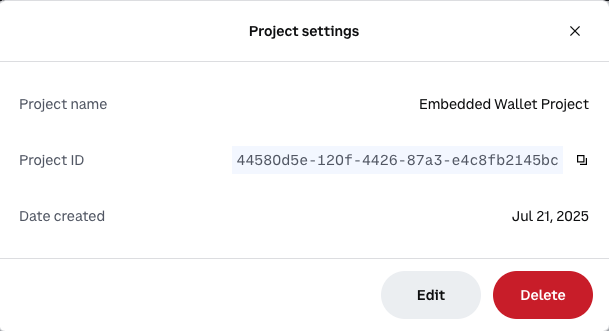 Copy the **Project ID** value. You will use this in the next step when configuring your demo app.
Use the latest version of `create-cdp-app` to create a new React Native app:
```bash npm theme={null}
npm create @coinbase/cdp-app@latest
```
```bash pnpm theme={null}
pnpm create @coinbase/cdp-app@latest
```
```bash yarn theme={null}
yarn create @coinbase/cdp-app@latest
```
Follow the prompts to configure your app with a user wallet. Name your project, select `React Native with Expo` as a template, and enter your CDP Project ID that you copied in the previous step.
1. Make sure to select `React Native with Expo` as a template.
2. In this example we are using [Smart Accounts](/wallets/using-wallets/smart-accounts) to create a smart account for new users on sign in.
This allows us to pay for transaction fees on behalf of the user.
```console theme={null}
Ok to proceed? (y) y
> npx
> create-cdp-app
✔ App Name: … my-react-native-app
✔ Template: › React Native with Expo
✔ CDP Project ID (Find your project ID at https://portal.cdp.coinbase.com/projects/overview): …
✔ Account Type: › EVM Smart Accounts
```
This example uses EVM Smart accounts, but we also support EVM EOA accounts and Solana accounts for React Native.
If you plan to use social login with React Native (Google, Apple, etc.), you need to configure deep linking:
1. Navigate to the [Security Configuration](https://portal.cdp.coinbase.com/products/embedded-wallets/security) in CDP Portal
2. Add `cdp-rn-demo://callback` to your allowed domains
The demo app is pre-configured with the deep link scheme `cdp-rn-demo://callback`. This is required for OAuth/social login to redirect users back to your app after authentication.
**Email and SMS authentication work without this step.** Deep links are only required for OAuth/social login in React Native (OAuth works out-of-the-box on web with standard HTTPS redirects).
For your production app, replace `cdp-rn-demo` with your own custom scheme (configured in your `app.json`). See our [Implementation Guide](/wallets/authentication/implementation-guide#react-native-social-login-configuration) for details.
Navigate to your project directory and start the development server:
Be prepared to wait a few minutes the first time you run the app for the dev server and simulator to boot up.
```bash npm theme={null}
cd my-react-native-app
npm install
npm run ios # or npm run android
```
```bash pnpm theme={null}
cd my-react-native-app
pnpm install
pnpm run ios # or pnpm run android
```
```bash yarn theme={null}
cd my-react-native-app
yarn install
yarn run ios # or yarn run android
```
On successful startup, you should see your React Native app running on the iOS simulator or Android emulator.
Open up the App.tsx file and start editing to see your changes live.
## 2. Sign in and send your first transaction
Now that your user wallet is configured and your app is running, let's try it out.
Choose between email or SMS to receive a verification code. Social login will complete after you authenticate with your Provider.
Copy the **Project ID** value. You will use this in the next step when configuring your demo app.
Use the latest version of `create-cdp-app` to create a new React Native app:
```bash npm theme={null}
npm create @coinbase/cdp-app@latest
```
```bash pnpm theme={null}
pnpm create @coinbase/cdp-app@latest
```
```bash yarn theme={null}
yarn create @coinbase/cdp-app@latest
```
Follow the prompts to configure your app with a user wallet. Name your project, select `React Native with Expo` as a template, and enter your CDP Project ID that you copied in the previous step.
1. Make sure to select `React Native with Expo` as a template.
2. In this example we are using [Smart Accounts](/wallets/using-wallets/smart-accounts) to create a smart account for new users on sign in.
This allows us to pay for transaction fees on behalf of the user.
```console theme={null}
Ok to proceed? (y) y
> npx
> create-cdp-app
✔ App Name: … my-react-native-app
✔ Template: › React Native with Expo
✔ CDP Project ID (Find your project ID at https://portal.cdp.coinbase.com/projects/overview): …
✔ Account Type: › EVM Smart Accounts
```
This example uses EVM Smart accounts, but we also support EVM EOA accounts and Solana accounts for React Native.
If you plan to use social login with React Native (Google, Apple, etc.), you need to configure deep linking:
1. Navigate to the [Security Configuration](https://portal.cdp.coinbase.com/products/embedded-wallets/security) in CDP Portal
2. Add `cdp-rn-demo://callback` to your allowed domains
The demo app is pre-configured with the deep link scheme `cdp-rn-demo://callback`. This is required for OAuth/social login to redirect users back to your app after authentication.
**Email and SMS authentication work without this step.** Deep links are only required for OAuth/social login in React Native (OAuth works out-of-the-box on web with standard HTTPS redirects).
For your production app, replace `cdp-rn-demo` with your own custom scheme (configured in your `app.json`). See our [Implementation Guide](/wallets/authentication/implementation-guide#react-native-social-login-configuration) for details.
Navigate to your project directory and start the development server:
Be prepared to wait a few minutes the first time you run the app for the dev server and simulator to boot up.
```bash npm theme={null}
cd my-react-native-app
npm install
npm run ios # or npm run android
```
```bash pnpm theme={null}
cd my-react-native-app
pnpm install
pnpm run ios # or pnpm run android
```
```bash yarn theme={null}
cd my-react-native-app
yarn install
yarn run ios # or yarn run android
```
On successful startup, you should see your React Native app running on the iOS simulator or Android emulator.
Open up the App.tsx file and start editing to see your changes live.
## 2. Sign in and send your first transaction
Now that your user wallet is configured and your app is running, let's try it out.
Choose between email or SMS to receive a verification code. Social login will complete after you authenticate with your Provider.
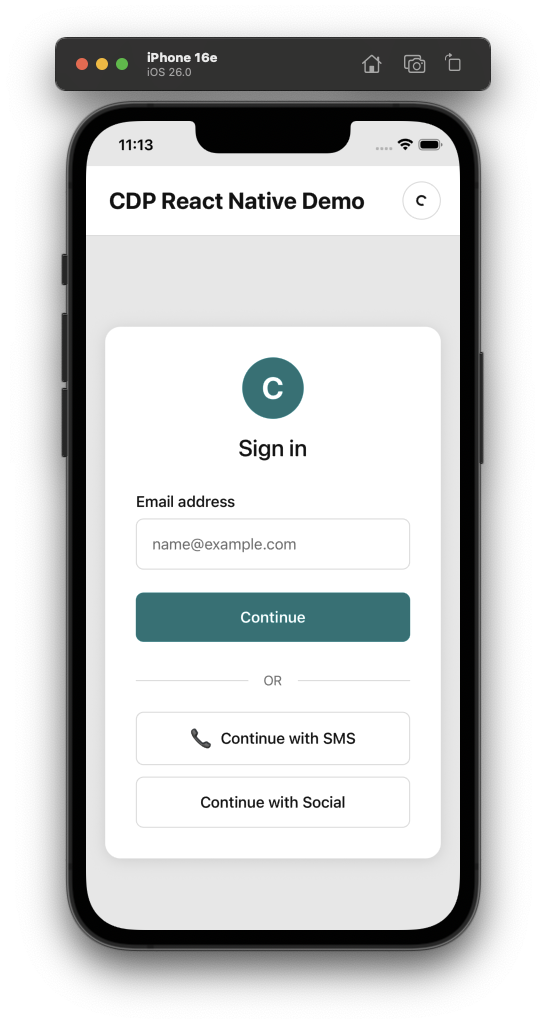 Enter the verification code sent to your email or phone number.
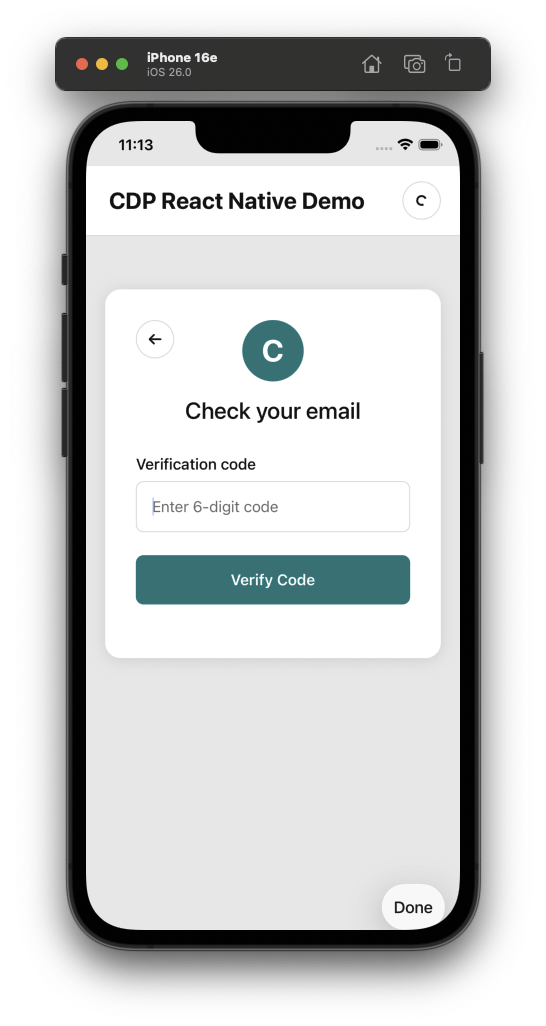 Congrats! Your new user wallet has been created, authenticated, and is ready to use on all EVM compatible networks.
We're using [Smart Accounts](/wallets/using-wallets/smart-accounts) in this example.
If you're not using Smart Accounts, you will see a slightly different transaction screen, with a link to get testnet ETH instead of USDC.
Congrats! Your new user wallet has been created, authenticated, and is ready to use on all EVM compatible networks.
We're using [Smart Accounts](/wallets/using-wallets/smart-accounts) in this example.
If you're not using Smart Accounts, you will see a slightly different transaction screen, with a link to get testnet ETH instead of USDC.
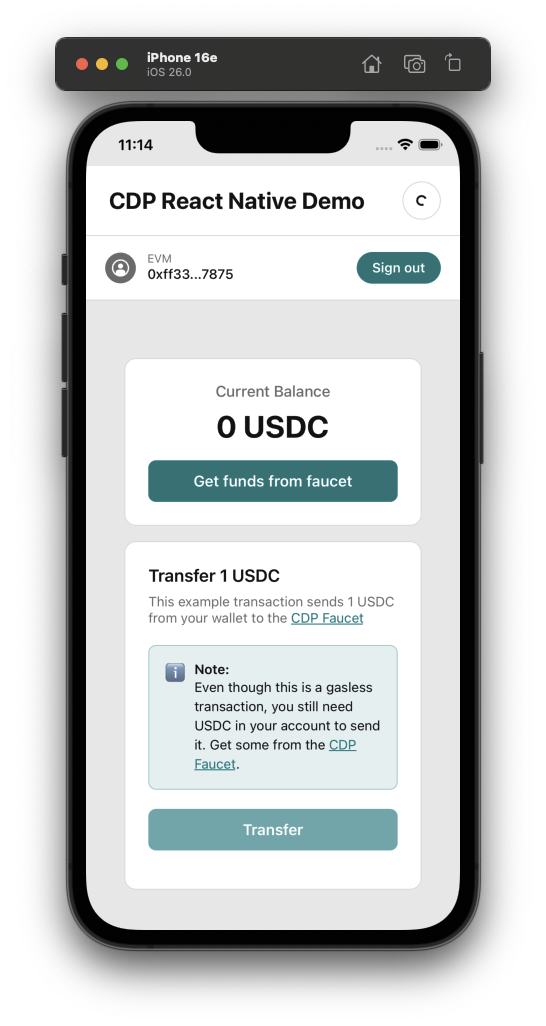 The demo app uses the wallet to send itself some testnet tokens on Base Sepolia.
Get some testnet funds by tapping the **Get funds from faucet** button which will give you a link to the [CDP Portal Faucet](https://portal.cdp.coinbase.com/products/faucet) prefilled with your wallet address and token.
Once you claim the funds, the balance shown in the app will update automatically. Finally, tap **Transfer** to initiate the transfer. Once complete, you'll see a transaction hash and a button to copy a link to the blockchain explorer.
If you used the same configuration [from above](/wallets/client-side-development/react-native#create-the-react-native-app), you will have a Smart Account who's transaction fees will
be automatically paid for by a feature called [Gas Sponsorship](/wallets/using-wallets/smart-accounts#gas-sponsorship-with-paymaster).
The demo app uses the wallet to send itself some testnet tokens on Base Sepolia.
Get some testnet funds by tapping the **Get funds from faucet** button which will give you a link to the [CDP Portal Faucet](https://portal.cdp.coinbase.com/products/faucet) prefilled with your wallet address and token.
Once you claim the funds, the balance shown in the app will update automatically. Finally, tap **Transfer** to initiate the transfer. Once complete, you'll see a transaction hash and a button to copy a link to the blockchain explorer.
If you used the same configuration [from above](/wallets/client-side-development/react-native#create-the-react-native-app), you will have a Smart Account who's transaction fees will
be automatically paid for by a feature called [Gas Sponsorship](/wallets/using-wallets/smart-accounts#gas-sponsorship-with-paymaster).
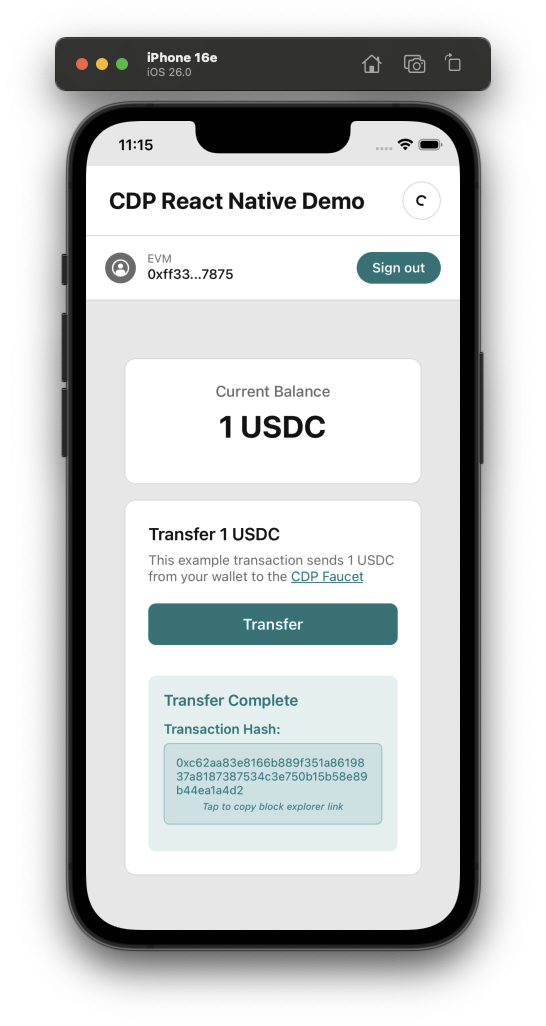 🎉 You've successfully created a user wallet and sent your first transaction on mobile!
## Example apps
React Native with Expo managed workflow
React Native without Expo
Expo with Wagmi integration
## What to read next
* **[React Hooks](/sdks/cdp-sdks-v2/frontend/@coinbase/cdp-hooks)**: Explore all available CDP hooks
* **[Authentication Methods](/wallets/authentication/overview)**: Learn about available user authentication methods
* **[Smart Accounts](/wallets/using-wallets/smart-accounts)**: Learn about Smart Accounts and how to use them
🎉 You've successfully created a user wallet and sent your first transaction on mobile!
## Example apps
React Native with Expo managed workflow
React Native without Expo
Expo with Wagmi integration
## What to read next
* **[React Hooks](/sdks/cdp-sdks-v2/frontend/@coinbase/cdp-hooks)**: Explore all available CDP hooks
* **[Authentication Methods](/wallets/authentication/overview)**: Learn about available user authentication methods
* **[Smart Accounts](/wallets/using-wallets/smart-accounts)**: Learn about Smart Accounts and how to use them