> ## Documentation Index
> Fetch the complete documentation index at: https://docs.cdp.coinbase.com/llms.txt
> Use this file to discover all available pages before exploring further.
# Custodial Wallets Quickstart
> Create a custodial account in Sandbox and verify balances with the CDP CLI or the CDP SDK
This guide walks you through creating an **entity-owned** custodial account in **Sandbox**, adding test balances in the CDP Portal, and checking balances.
You can follow along with either the **[CDP CLI](/get-started/build-with-ai/cdp-for-agents)** or the **[CDP SDK](https://www.npmjs.com/package/@coinbase/cdp-sdk)**. Use the tabs in each step to switch between them.
The custodial SDK is currently available for **TypeScript** only. For other languages, use the CDP CLI or call the [Accounts REST API](/api-reference/v2/rest-api/accounts/accounts) directly.
For Sandbox API keys and environment basics, see the [Sandbox quickstart](/get-started/sandbox/quickstart).
**Base API URL (Sandbox):** `https://sandbox.cdp.coinbase.com`
## Prerequisites
* A CDP login with access to the [CDP Portal](https://portal.cdp.coinbase.com)
* [Node.js](https://nodejs.org/) 22 or later
* A **Sandbox** API key JSON from the Portal (**Sandbox** environment, **Accounts** permission enabled)
Never commit API keys to source control. Store them in environment variables or a secrets manager. Do not use real personal data in the Sandbox environment.
## 1. Install and configure
[CDP CLI](/get-started/build-with-ai/cdp-for-agents) handles JWT authentication for you — configure your API key once and it signs requests.
```bash theme={null}
npm install -g @coinbase/cdp-cli
cdp --version
```
Node.js 22 or later is required.
**Configure your Sandbox API key:**
```bash theme={null}
cdp env sandbox --key-file ~/Downloads/cdp_api_key.json
```
Use `-e sandbox` on commands below if your default environment is not `sandbox`, or run `cdp env sandbox` to switch context. More detail: [CDP CLI quickstart](/get-started/build-with-ai/cdp-for-agents).
Install the [CDP SDK](https://www.npmjs.com/package/@coinbase/cdp-sdk). The SDK handles JWT authentication for you — configure your API key once and it signs requests.
```bash theme={null}
npm install @coinbase/cdp-sdk
```
```bash theme={null}
pnpm add @coinbase/cdp-sdk
```
```bash theme={null}
yarn add @coinbase/cdp-sdk
```
Node.js 22 or later is required.
**Configure your Sandbox API key.** The custodial APIs authenticate with your API key ID and secret. `CdpClient` reads these from the environment automatically:
```bash theme={null}
export CDP_API_KEY_ID="YOUR_API_KEY_ID"
export CDP_API_KEY_SECRET="YOUR_API_KEY_SECRET"
```
Point the client at Sandbox with the `basePath` option (the default is the production platform base `https://api.cdp.coinbase.com/platform`):
```typescript main.ts theme={null}
import { CdpClient } from "@coinbase/cdp-sdk";
const cdp = new CdpClient({
basePath: "https://sandbox.cdp.coinbase.com/platform",
});
```
Load your API key from a `.env` file instead of `export` by adding `import "dotenv/config";` before you construct the client. Never commit API keys to source control.
## 2. Create an account
Create a named entity account. Supplying an idempotency key is optional but recommended — it makes the request safely retryable, so retries return the same result instead of creating duplicate accounts. See [Idempotency](/api-reference/v2/idempotency).
Create the account with `POST /v2/accounts`:
```bash theme={null}
cdp api -X POST /accounts name="My Test Account" -e sandbox
```
With an idempotency key:
```bash theme={null}
cdp api -X POST /accounts name="My Test Account" "Header:X-Idempotency-Key:$(uuidgen)" -e sandbox
```
`cdp api` paths are relative to the Sandbox platform base `https://sandbox.cdp.coinbase.com/platform/v2`. If `cdp api` fails with a host or path error, configure the URL explicitly: `cdp env sandbox --key-file ~/Downloads/cdp_api_key.json --url https://sandbox.cdp.coinbase.com/platform/v2`. See [How it works](/get-started/build-with-ai/cdp-for-agents#how-it-works).
Create the account with `cdp.accounts.createAccount`. The returned object includes the `accountId` you use in later steps:
```typescript main.ts theme={null}
import { randomUUID } from "node:crypto";
const account = await cdp.accounts.createAccount({
idempotencyKey: randomUUID(),
name: "My Test Account",
});
console.log(JSON.stringify(account, null, 2));
```
```json theme={null}
{
"accountId": "account_af2937b0-9846-4fe7-bfe9-ccc22d935114",
"type": "cdp",
"owner": "entity_af2937b0-9846-4fe7-bfe9-ccc22d935114",
"name": "My Test Account",
"createdAt": "2023-10-08T14:30:00Z",
"updatedAt": "2023-10-08T14:30:00Z"
}
```
Copy the `accountId` from the response (for example `account_af2937b0-9846-4fe7-bfe9-ccc22d935114`). You use it in the Portal and in later steps below.
## 3. Create and fund the account through the Portal
Sandbox does not move real funds. You add **simulated** balances in the Portal:
In **Sandbox** mode in the CDP Portal, open the **Accounts** tab.
Open the account you created with the API (for example **My Test Account**).
Add balances in supported test assets (for example **USD** and **USDC**). Values are for testing only.
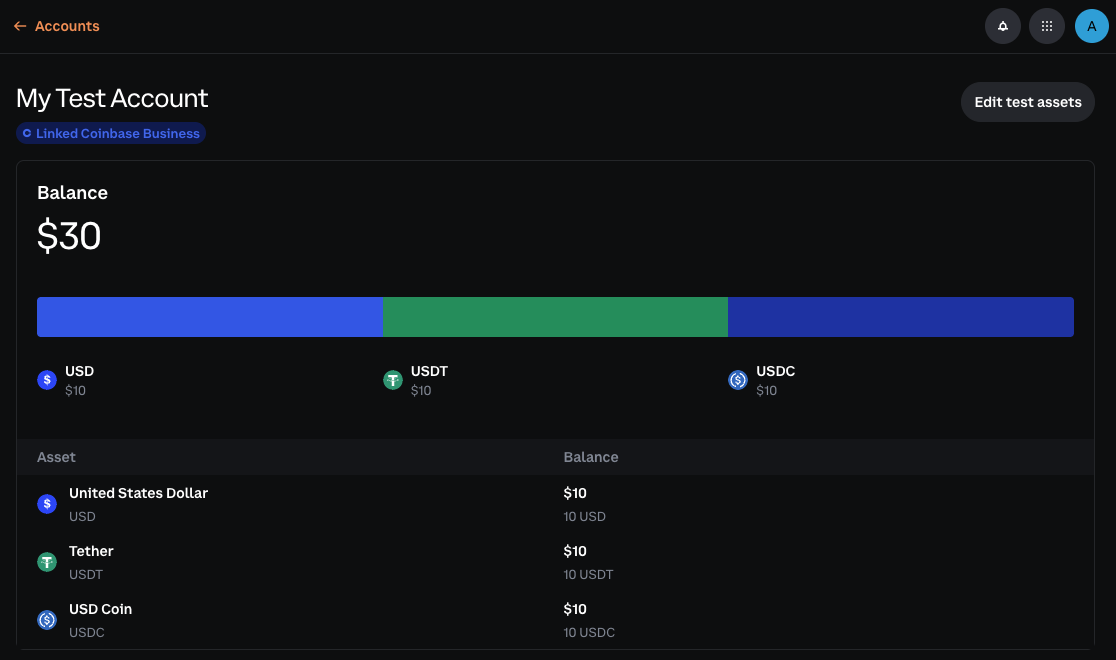 All balances are simulated in Sandbox — no blockchain or testnet connectivity. You cannot fund accounts by sending real or testnet crypto.
## 4. List and inspect accounts
After funding the account, list your Sandbox accounts and inspect one account's balances.
List all accounts:
```bash theme={null}
cdp api /accounts -e sandbox
```
```json theme={null}
{
"accounts": [
{
"accountId": "account_af2937b0-9846-4fe7-bfe9-ccc22d935114",
"name": "My Test Account",
"createdAt": "2026-02-11T20:00:00Z",
"updatedAt": "2026-02-11T20:00:00Z"
}
]
}
```
Inspect an account:
```bash theme={null}
export ACCOUNT_ID="account_af2937b0-9846-4fe7-bfe9-ccc22d935114"
cdp api "/accounts/$ACCOUNT_ID" -e sandbox
```
```json theme={null}
{
"accountId": "account_af2937b0-9846-4fe7-bfe9-ccc22d935114",
"name": "My Test Account",
"balances": [
{
"asset": "usd",
"amount": "1000.00"
},
{
"asset": "usdc",
"amount": "500.00"
}
],
"createdAt": "2026-02-11T20:00:00Z",
"updatedAt": "2026-02-11T23:00:00Z"
}
```
List accounts, then fetch balances for the account you want to inspect:
```typescript main.ts theme={null}
const { accounts } = await cdp.accounts.listAccounts();
console.log(JSON.stringify(accounts, null, 2));
const accountId = accounts[0].accountId;
const accountDetails = await cdp.accounts.getAccountById({
accountId,
});
const { balances } = await cdp.accounts.listBalances({
accountId,
});
console.log(JSON.stringify({ ...accountDetails, balances }, null, 2));
```
## 5. Verify balance(s)
```bash theme={null}
export ACCOUNT_ID="account_af2937b0-9846-4fe7-bfe9-ccc22d935114"
cdp accounts balances "$ACCOUNT_ID"
```
List all custodial account IDs:
```bash theme={null}
cdp accounts list
```
`cdp accounts list` and `cdp accounts balances` ship in recent `@coinbase/cdp-cli` releases. If your CLI reports an unknown command, run `npm install -g @coinbase/cdp-cli@latest`, then try again. You can always use `cdp api "/accounts/$ACCOUNT_ID/balances" -e sandbox` as a fallback; see [List balances for account](/api-reference/v2/rest-api/accounts/list-balances-for-account).
List the balances for the account with `cdp.accounts.listBalances`:
```typescript main.ts theme={null}
const { balances } = await cdp.accounts.listBalances({
accountId: account.accountId,
});
console.log(JSON.stringify(balances, null, 2));
```
## What to read next
Concepts: custody model, ownership, and how accounts connect to payments
Environments and `cdp api` field syntax
Generate inbound addresses tied to an account
REST reference for account and balance endpoints
All balances are simulated in Sandbox — no blockchain or testnet connectivity. You cannot fund accounts by sending real or testnet crypto.
## 4. List and inspect accounts
After funding the account, list your Sandbox accounts and inspect one account's balances.
List all accounts:
```bash theme={null}
cdp api /accounts -e sandbox
```
```json theme={null}
{
"accounts": [
{
"accountId": "account_af2937b0-9846-4fe7-bfe9-ccc22d935114",
"name": "My Test Account",
"createdAt": "2026-02-11T20:00:00Z",
"updatedAt": "2026-02-11T20:00:00Z"
}
]
}
```
Inspect an account:
```bash theme={null}
export ACCOUNT_ID="account_af2937b0-9846-4fe7-bfe9-ccc22d935114"
cdp api "/accounts/$ACCOUNT_ID" -e sandbox
```
```json theme={null}
{
"accountId": "account_af2937b0-9846-4fe7-bfe9-ccc22d935114",
"name": "My Test Account",
"balances": [
{
"asset": "usd",
"amount": "1000.00"
},
{
"asset": "usdc",
"amount": "500.00"
}
],
"createdAt": "2026-02-11T20:00:00Z",
"updatedAt": "2026-02-11T23:00:00Z"
}
```
List accounts, then fetch balances for the account you want to inspect:
```typescript main.ts theme={null}
const { accounts } = await cdp.accounts.listAccounts();
console.log(JSON.stringify(accounts, null, 2));
const accountId = accounts[0].accountId;
const accountDetails = await cdp.accounts.getAccountById({
accountId,
});
const { balances } = await cdp.accounts.listBalances({
accountId,
});
console.log(JSON.stringify({ ...accountDetails, balances }, null, 2));
```
## 5. Verify balance(s)
```bash theme={null}
export ACCOUNT_ID="account_af2937b0-9846-4fe7-bfe9-ccc22d935114"
cdp accounts balances "$ACCOUNT_ID"
```
List all custodial account IDs:
```bash theme={null}
cdp accounts list
```
`cdp accounts list` and `cdp accounts balances` ship in recent `@coinbase/cdp-cli` releases. If your CLI reports an unknown command, run `npm install -g @coinbase/cdp-cli@latest`, then try again. You can always use `cdp api "/accounts/$ACCOUNT_ID/balances" -e sandbox` as a fallback; see [List balances for account](/api-reference/v2/rest-api/accounts/list-balances-for-account).
List the balances for the account with `cdp.accounts.listBalances`:
```typescript main.ts theme={null}
const { balances } = await cdp.accounts.listBalances({
accountId: account.accountId,
});
console.log(JSON.stringify(balances, null, 2));
```
## What to read next
Concepts: custody model, ownership, and how accounts connect to payments
Environments and `cdp api` field syntax
Generate inbound addresses tied to an account
REST reference for account and balance endpoints