> ## Documentation Index
> Fetch the complete documentation index at: https://docs.cdp.coinbase.com/llms.txt
> Use this file to discover all available pages before exploring further.
# Tempo Integration
export const TypeScriptConfigRequirement = () => {
return <>
TypeScript users: Set moduleResolution: "node16" or "nodenext" in your tsconfig.json (not the legacy "node") to avoid compilation errors with the CDP SDK.
;
};
## Overview
[Tempo](https://tempo.xyz) is a stablecoin payments blockchain where all value is held in TIP-20 tokens — there is no native gas token. CDP user wallets integrate with Tempo using a two-step sign-then-broadcast pattern: the CDP backend signs the transaction server-side, and you broadcast it to Tempo's RPC yourself using a [viem](https://viem.sh) public client.
API key wallets also support Tempo out of the box — see [API Key Wallets on Tempo](#api-key-wallets-on-tempo) below.
This guide covers:
* Configuring the CDP wagmi connector for Tempo
* Creating a viem public client to read chain state and broadcast transactions
* Querying TIP-20 token balances (Tempo has no native token)
* Signing and broadcasting TIP-20 transfers with `useSignEvmTransaction`
Tempo uses its own native account abstraction model and does not support ERC-4337 smart accounts. You must configure your CDP wallet with `createOnLogin: "eoa"`.
## Prerequisites
## Prerequisites
* A free [CDP Portal](https://portal.cdp.coinbase.com) account and project
* [Node.js 22+](https://nodejs.org/en/download)
* A node package manager installed (i.e., `npm`, `pnpm`, or `yarn`)
* Basic familiarity with React and TypeScript
* Configured your domain in CDP Portal (see below)
**Step 1: Access CDP Portal**
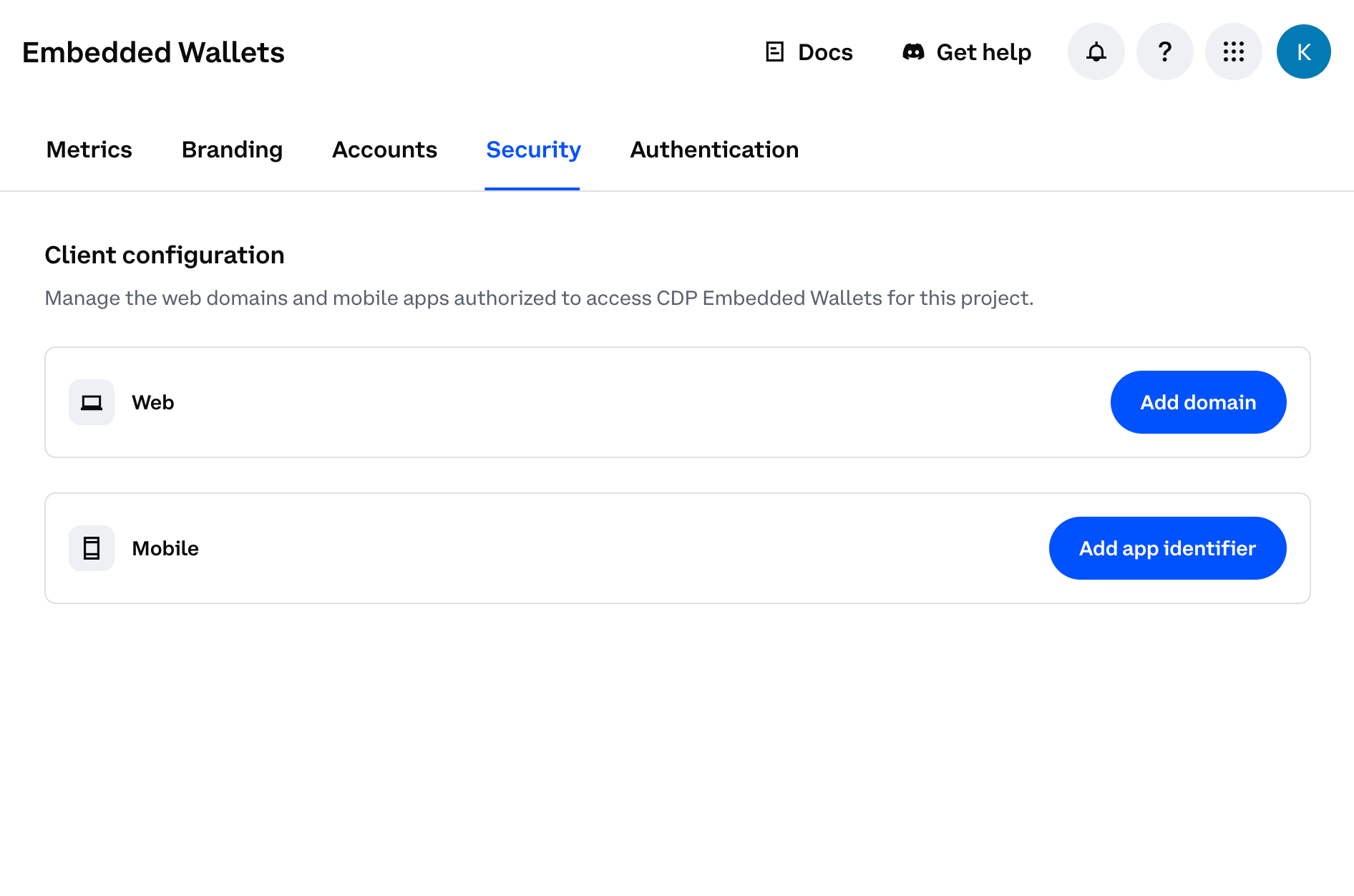
Navigate to the [Security Configuration](https://portal.cdp.coinbase.com/products/embedded-wallets/security) in CDP Portal, and click **Add domain** to include your local app.
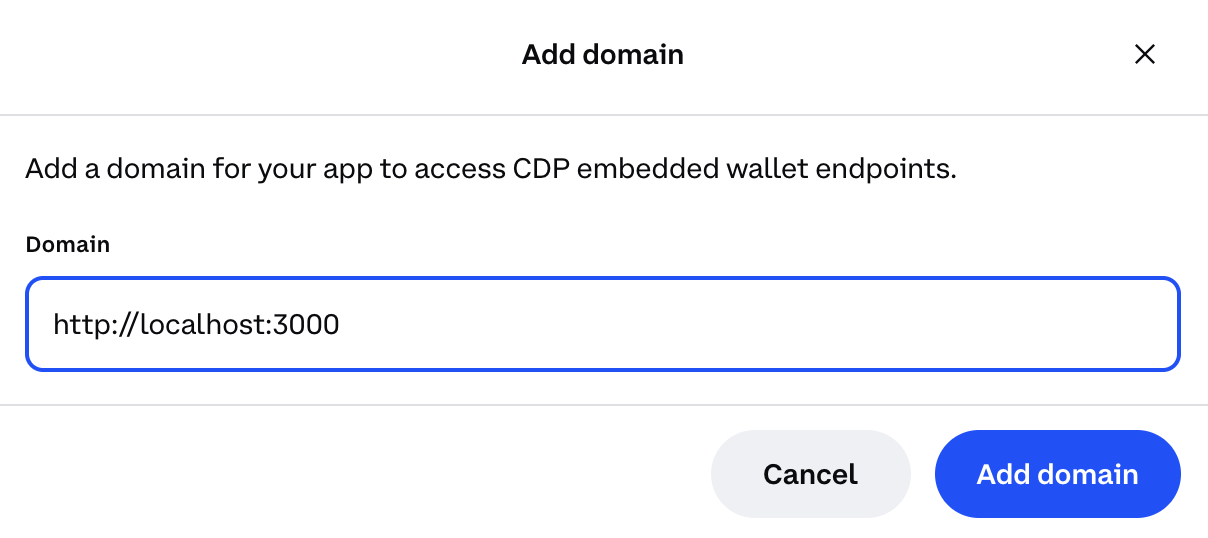
**Step 2: Add your domain**
* For local development: Use `http://localhost:3000` (or your preferred port)
* For production: Use your actual domain (e.g., `https://yourapp.com`)
For production apps, only add your actual production domain. Do not add `localhost` to production CDP projects as malicious apps running locally could impersonate your frontend and abuse your project credentials.
**Step 3: Save your changes**
Click **Add domain** again to save your changes.
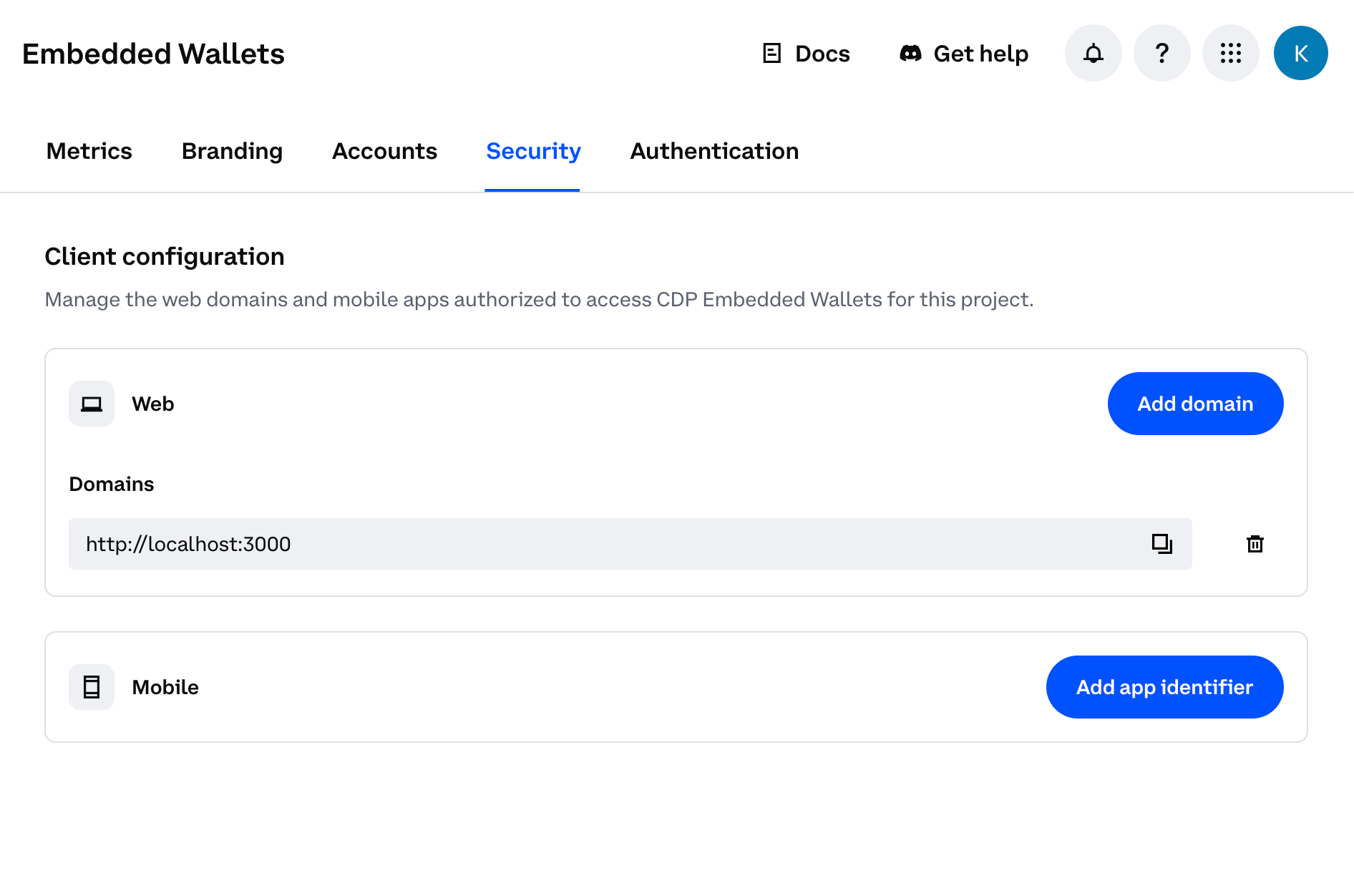
You should see your domain listed in the CDP Portal dashboard. The allowlist will take effect immediately upon saving.
Install the required packages:
```bash npm theme={null}
npm install @coinbase/cdp-react @coinbase/cdp-wagmi @coinbase/cdp-hooks viem wagmi @tanstack/react-query
```
```bash pnpm theme={null}
pnpm add @coinbase/cdp-react @coinbase/cdp-wagmi @coinbase/cdp-hooks viem wagmi @tanstack/react-query
```
```bash yarn theme={null}
yarn add @coinbase/cdp-react @coinbase/cdp-wagmi @coinbase/cdp-hooks viem wagmi @tanstack/react-query
```
Configure `createCDPEmbeddedWalletConnector` with `tempoModerato` as the chain and set `createOnLogin: "eoa"`. Smart accounts are not supported on Tempo.
```ts src/config.ts theme={null}
import { type Config } from "@coinbase/cdp-react";
import { createCDPEmbeddedWalletConnector } from "@coinbase/cdp-wagmi";
import { QueryClient } from "@tanstack/react-query";
import { createConfig, http } from "wagmi";
import { tempoModerato } from "viem/chains";
export const cdpConfig: Config = {
projectId: "your-project-id",
ethereum: {
createOnLogin: "eoa", // smart accounts are not supported on Tempo
},
authMethods: ["email"],
};
const connector = createCDPEmbeddedWalletConnector({
cdpConfig,
providerConfig: {
chains: [tempoModerato],
transports: {
[tempoModerato.id]: http(),
},
},
});
export const wagmiConfig = createConfig({
connectors: [connector],
chains: [tempoModerato],
transports: {
[tempoModerato.id]: http(),
},
});
export const queryClient = new QueryClient();
```
Create a viem `PublicClient` pointed at the Tempo RPC. This client handles all read operations (balances, nonces, gas estimation) and is used to broadcast signed transactions.
```ts src/tempo.ts theme={null}
import { createPublicClient, http } from "viem";
import { tempoModerato } from "viem/chains";
export { tempoModerato };
/**
* Viem public client for the Tempo Moderato testnet.
* Used for reading chain state and broadcasting signed transactions.
*/
export const tempoClient = createPublicClient({
chain: tempoModerato,
transport: http(),
});
```
Tempo has no native token. Query balances by calling `balanceOf` on each TIP-20 token contract via `tempoClient.readContract`. All Tempo stablecoins use 6 decimals.
TIP-20 is Tempo's token standard. It shares the same interface as ERC-20, which is why viem's standard ERC-20 ABI works without modification.
```ts src/Balances.tsx theme={null}
import { useEffect, useState } from "react";
import { formatUnits } from "viem";
import { useAccount } from "wagmi";
import { tempoClient } from "./tempo";
const TOKENS = [
{ symbol: "pathUSD", address: "0x20c0000000000000000000000000000000000000" as const },
{ symbol: "AlphaUSD", address: "0x20c0000000000000000000000000000000000001" as const },
];
const TOKEN_DECIMALS = 6;
const ERC20_BALANCE_OF_ABI = [
{
name: "balanceOf",
type: "function",
stateMutability: "view",
inputs: [{ name: "account", type: "address" }],
outputs: [{ name: "", type: "uint256" }],
},
] as const;
export function Balances() {
const { address } = useAccount();
const [balances, setBalances] = useState<{ symbol: string; formatted: string }[]>([]);
useEffect(() => {
if (!address) return;
Promise.all(
TOKENS.map((token) =>
tempoClient.readContract({
address: token.address,
abi: ERC20_BALANCE_OF_ABI,
functionName: "balanceOf",
args: [address],
}),
),
).then((results) => {
setBalances(
TOKENS.map((token, i) => ({
symbol: token.symbol,
formatted: formatUnits(results[i] as bigint, TOKEN_DECIMALS),
})),
);
});
}, [address]);
return (
{balances.map((b) => (
{b.symbol}: {b.formatted}
))}
);
}
```
CDP user wallets sign transactions server-side. Use `useSignEvmTransaction` from `@coinbase/cdp-hooks` to get a signed transaction from the CDP backend, then broadcast it yourself using `tempoClient.sendRawTransaction`.
This two-step approach is required because the signer lives in the CDP backend, not in an injected browser wallet.
```tsx src/Transaction.tsx theme={null}
import { useSignEvmTransaction } from "@coinbase/cdp-hooks";
import { type Hex, encodeFunctionData } from "viem";
import { useAccount } from "wagmi";
import { tempoClient, tempoModerato } from "./tempo";
const ERC20_TRANSFER_ABI = [
{
name: "transfer",
type: "function",
stateMutability: "nonpayable",
inputs: [
{ name: "to", type: "address" },
{ name: "amount", type: "uint256" },
],
outputs: [{ name: "", type: "bool" }],
},
] as const;
const TOKEN_ADDRESS = "0x20c0000000000000000000000000000000000000" as const;
const RECIPIENT = "0x5bc1473610754a5ca10749552b119df90c1a1877" as const;
export function SendTransaction() {
const { address: eoaAddress } = useAccount();
const { signEvmTransaction } = useSignEvmTransaction();
const handleSend = async () => {
if (!eoaAddress) return;
const data = encodeFunctionData({
abi: ERC20_TRANSFER_ABI,
functionName: "transfer",
args: [RECIPIENT, 10_000_000n], // 10 tokens at 6 decimals
});
// Fetch nonce, fees, and gas limit from Tempo
const [nonce, fees, gasLimit] = await Promise.all([
tempoClient.getTransactionCount({ address: eoaAddress }),
tempoClient.estimateFeesPerGas().catch(() => ({
maxFeePerGas: 1000n,
maxPriorityFeePerGas: 1000n,
})),
tempoClient
.estimateGas({ account: eoaAddress, to: TOKEN_ADDRESS, data, value: 0n })
.catch(() => 60000n),
]);
// Sign the transaction via the CDP backend
const { signedTransaction } = await signEvmTransaction({
evmAccount: eoaAddress,
transaction: {
to: TOKEN_ADDRESS,
value: 0n,
data,
chainId: tempoModerato.id,
type: "eip1559",
nonce,
gas: gasLimit,
maxFeePerGas: fees.maxFeePerGas ?? 1000n,
maxPriorityFeePerGas: fees.maxPriorityFeePerGas ?? 1000n,
},
});
// Broadcast the signed transaction to Tempo
const hash = await tempoClient.sendRawTransaction({
serializedTransaction: signedTransaction as Hex,
});
await tempoClient.waitForTransactionReceipt({ hash });
console.log("Transaction confirmed:", hash);
};
return ;
}
```
`useSendEvmTransaction` does not support Tempo because CDP's Send Transaction API does not include Tempo as a managed network. Instead, use `useSignEvmTransaction` to sign and broadcast manually — exactly as shown above.
Wrap your app in `CDPReactProvider`, `WagmiProvider`, and `QueryClientProvider`:
```tsx src/main.tsx theme={null}
import { CDPReactProvider } from "@coinbase/cdp-react";
import { StrictMode } from "react";
import { createRoot } from "react-dom/client";
import { QueryClientProvider } from "@tanstack/react-query";
import { WagmiProvider } from "wagmi";
import App from "./App.tsx";
import { cdpConfig, queryClient, wagmiConfig } from "./config.ts";
createRoot(document.getElementById("root")!).render(
,
);
```
## API Key Wallets on Tempo
API key wallets support Tempo with no server-side changes required. Because Tempo is EVM-compatible, signing works by simply setting the correct chain ID in your transaction — the same signing infrastructure that works for Base and Ethereum works for Tempo.
```typescript theme={null}
import { CdpClient } from "@coinbase/cdp-sdk";
const cdp = new CdpClient();
const account = await cdp.evm.getOrCreateAccount({ name: "tempo-account" });
const signedTx = await cdp.evm.signTransaction({
address: account.address,
transaction: {
to: "0x...",
value: 0n,
chainId: tempoModerato.id, // Tempo Moderato chain ID
type: "eip1559",
nonce,
gas: gasLimit,
maxFeePerGas,
maxPriorityFeePerGas,
data,
},
});
// Broadcast using a viem public client pointed at Tempo
const hash = await tempoClient.sendRawTransaction({
serializedTransaction: signedTx.signedTransaction as Hex,
});
```
For more, see the [non-custodial wallets documentation](/wallets/non-custodial-wallets/overview).
## Demo app
Explore a complete working integration in the [CDP + Tempo demo app](https://github.com/coinbase/cdp-wallet-demo-apps/tree/main/apps/react-wagmi-tempo).
## Advanced Tempo features
Viem's `tempoActions` extension unlocks Tempo-native capabilities beyond what a plain public client provides:
| Feature | Description |
| --------------------------- | -------------------------------------------------------------------------------------------------- |
| **Batch calls** | Send multiple transactions atomically in a single `sendTransactionSync` call via the `calls` array |
| **Fee sponsorship** | Designate a `feePayer` address to cover transaction fees on behalf of users |
| **Concurrent transactions** | Use `nonceKey` to send parallel transactions without nonce collisions |
| **Configurable fee token** | Choose which TIP-20 token pays fees, either per-transaction or as a chain-level default |
| **Tempo-specific actions** | Read TIP-20 token metadata and other Tempo protocol data via `client.token.getMetadata()` |
To enable these features, extend your viem client with `tempoActions` from `viem/tempo`:
```ts theme={null}
import { createClient, http, publicActions } from 'viem'
import { tempoModerato } from 'viem/chains'
import { tempoActions } from 'viem/tempo'
export const tempoClient = createClient({
chain: tempoModerato,
transport: http(),
})
.extend(publicActions)
.extend(tempoActions())
```
See the [viem Tempo documentation](https://viem.sh/tempo) for the full action reference.
## What to read next
* [**React Hooks**](/sdks/cdp-sdks-v2/frontend/@coinbase/cdp-hooks): Full reference for `useSignEvmTransaction` and other CDP hooks
* [**Wagmi Integration**](/wallets/ecosystem-compatibility/wagmi): General guide for using CDP user wallets with wagmi
* [**API Key Wallets**](/wallets/non-custodial-wallets/overview): Use API key wallets to sign Tempo transactions from your backend
* [**Tempo documentation**](https://docs.tempo.xyz): Official Tempo chain documentation
 **Step 2: Add your domain**
* For local development: Use `http://localhost:3000` (or your preferred port)
* For production: Use your actual domain (e.g., `https://yourapp.com`)
**Step 2: Add your domain**
* For local development: Use `http://localhost:3000` (or your preferred port)
* For production: Use your actual domain (e.g., `https://yourapp.com`)
 You should see your domain listed in the CDP Portal dashboard. The allowlist will take effect immediately upon saving.