> ## Documentation Index
> Fetch the complete documentation index at: https://docs.cdp.coinbase.com/llms.txt
> Use this file to discover all available pages before exploring further.
# App Attestation
> Verify that wallet API requests come from a legitimate, unmodified build of your mobile app.
export const Tags = ({tags, className}) => {
if (!tags || !Array.isArray(tags)) {
return null;
}
return
{tags.map((tag, index) => {tag})}
;
};
Mobile App Attestation verifies that requests to CDP wallet APIs come from a legitimate, unmodified version of your app.
When enabled, the CDP SDK automatically attaches proof to each sensitive request: the CDP backend validates it before processing, and any request that can't pass validation is rejected.
We support both iOS and Android.
| iOS App Attest | Android Play Integrity |
| ----------------------------------------- | -------------------------------------------- |
| Apple-signed device key bound to your app | Google-signed integrity verdict for your app |
## Use cases
Attestation is **opt-in** and a general recommendation for production apps.
For any live app handling real user wallets or assets.
Block spoofed or tampered clients from authenticating.
Apply attestation to mobile while securing web separately with domain configuration.
Attestation has no effect on web apps. To secure your web surface, configure your allowed domains in [Domain Allowlisting](/wallets/security-and-policies/domain-allowlisting).
## What is protected
Attestation is enforced at authentication. Since all wallet operations require an authenticated session, attestation effectively protects every action in your app.
When attestation is configured in the [CDP Portal](https://portal.cdp.coinbase.com) for your app, the CDP backend requires valid proof at login and rejects any request that cannot provide it. The protection is entirely server-side and transparent to your users.
## Getting started
Set up Apple App Attest for iOS apps
Set up Google Play Integrity for Android apps
## Portal configuration
Before enabling attestation, configure your app's identity in the [CDP Portal](https://portal.cdp.coinbase.com). Navigate to your project, open the [**Security**](https://portal.cdp.coinbase.com/products/embedded-wallets/security) tab, and add your mobile app in the **Client configuration** section.
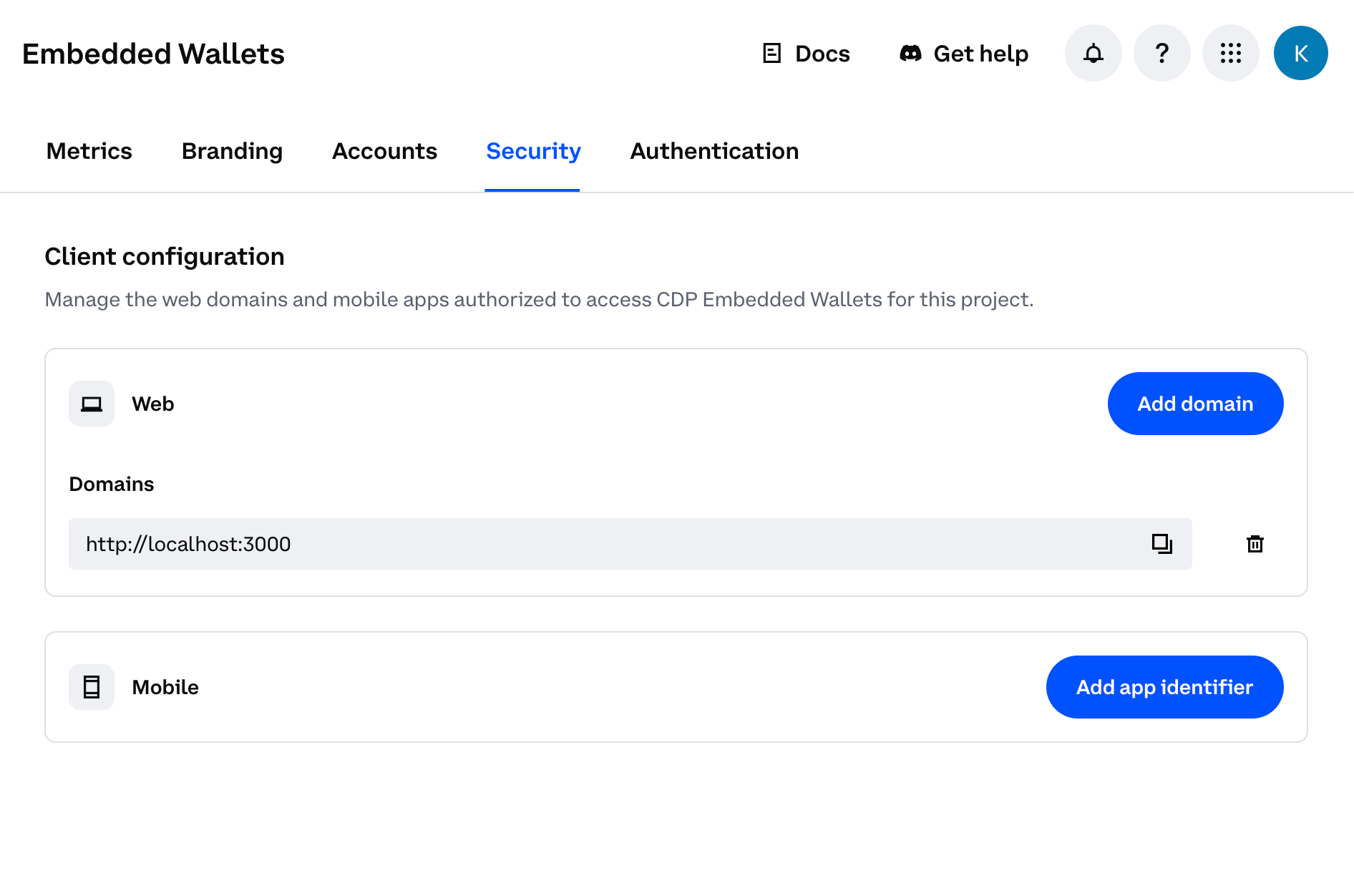 Click **Add app identifier** and follow the steps to configure your iOS application.
You will need:
* **Apple Team ID** - found in Xcode under Signing & Capabilities (e.g. `ABC123DEF4`)
* **Bundle ID** - the bundle identifier of your app (e.g. `com.example.myapp`)
The portal expects the identifier in `teamID.bundleID` format (e.g. `ABC123DEF4.com.example.myapp`). The Team ID must be exactly 10 alphanumeric characters and the bundle ID must be dot-separated alphanumeric segments. The portal will reject invalid formats.
See the [iOS setup guide](/wallets/security-and-policies/app-attestation/ios#setup) for details.
Click **Add app identifier** and follow the steps to configure your Android application.
You will need:
* **Package name** - the application ID of your app (e.g. `com.example.myapp`)
* **Google Cloud project number** - found in Google Cloud Console → Project Settings
* **Service account JSON** - credentials for a service account that has the Play Integrity API permission
See the [Android setup guide](/wallets/security-and-policies/app-attestation/android#setup) for details.
Each platform supports a maximum of 10 entries. Duplicate identifiers are not allowed.
Once saved, the CDP backend will begin enforcing attestation for requests from that app identity.
## Authentication errors
If attestation fails (for example, due to a misconfigured bundle ID in the portal, a missing import in your client code, or a device that cannot produce a valid token), users will see a generic authentication error.
If your users encounter unexpected authentication errors after enabling attestation, check:
1. The bundle ID (iOS) or package name (Android) in your [CDP Portal](https://portal.cdp.coinbase.com/products/embedded-wallets/security) project settings matches what is compiled into your app.
2. The `@coinbase/cdp-app-attest` import is present in your app entry point.
3. On Android, the app was installed via the Play Store.
Enabling attestation in the portal takes effect immediately. Ensure the updated app version with `@coinbase/cdp-app-attest` installed and imported is fully rolled out to all your users before enabling attestation in the portal. If attestation is enabled while users are still on an older version without the package, they will experience authentication errors.
## What to read next
* [iOS App Attest](/wallets/security-and-policies/app-attestation/ios) — set up attestation for iOS
* [Android Play Integrity](/wallets/security-and-policies/app-attestation/android) — set up attestation for Android
* [React Native Quickstart](/wallets/client-side-development/react-native) — get started with user wallets in React Native
Click **Add app identifier** and follow the steps to configure your iOS application.
You will need:
* **Apple Team ID** - found in Xcode under Signing & Capabilities (e.g. `ABC123DEF4`)
* **Bundle ID** - the bundle identifier of your app (e.g. `com.example.myapp`)
The portal expects the identifier in `teamID.bundleID` format (e.g. `ABC123DEF4.com.example.myapp`). The Team ID must be exactly 10 alphanumeric characters and the bundle ID must be dot-separated alphanumeric segments. The portal will reject invalid formats.
See the [iOS setup guide](/wallets/security-and-policies/app-attestation/ios#setup) for details.
Click **Add app identifier** and follow the steps to configure your Android application.
You will need:
* **Package name** - the application ID of your app (e.g. `com.example.myapp`)
* **Google Cloud project number** - found in Google Cloud Console → Project Settings
* **Service account JSON** - credentials for a service account that has the Play Integrity API permission
See the [Android setup guide](/wallets/security-and-policies/app-attestation/android#setup) for details.
Each platform supports a maximum of 10 entries. Duplicate identifiers are not allowed.
Once saved, the CDP backend will begin enforcing attestation for requests from that app identity.
## Authentication errors
If attestation fails (for example, due to a misconfigured bundle ID in the portal, a missing import in your client code, or a device that cannot produce a valid token), users will see a generic authentication error.
If your users encounter unexpected authentication errors after enabling attestation, check:
1. The bundle ID (iOS) or package name (Android) in your [CDP Portal](https://portal.cdp.coinbase.com/products/embedded-wallets/security) project settings matches what is compiled into your app.
2. The `@coinbase/cdp-app-attest` import is present in your app entry point.
3. On Android, the app was installed via the Play Store.
Enabling attestation in the portal takes effect immediately. Ensure the updated app version with `@coinbase/cdp-app-attest` installed and imported is fully rolled out to all your users before enabling attestation in the portal. If attestation is enabled while users are still on an older version without the package, they will experience authentication errors.
## What to read next
* [iOS App Attest](/wallets/security-and-policies/app-attestation/ios) — set up attestation for iOS
* [Android Play Integrity](/wallets/security-and-policies/app-attestation/android) — set up attestation for Android
* [React Native Quickstart](/wallets/client-side-development/react-native) — get started with user wallets in React Native