

Until the next-generation Coinbase Wallet SDK is ready, Base Account SDK (
@base-org/account) is the current recommendation for interacting with Coinbase Wallet.Overview
@coinbase/wallet-sdk is the legacy Coinbase Wallet SDK. Until the next-generation Coinbase Wallet SDK is ready, Base Account SDK (@base-org/account) is the current recommendation for interacting with Coinbase Wallet.
If you already use @base-org/account, you do not need to change your integration.
When you add Coinbase Wallet, connect users with a Sign in with Base or Base button. You do not need to immediately replace an existing Coinbase Wallet button — you can offer both during a transition period.
Changes to user experience when clicking Coinbase Wallet
As of SDK v4.0, users without the Coinbase Wallet extension are directed to a popup window where they can choose to connect with the mobile app, via WalletLink, or use a passkey-powered Smart Wallet natively on the web. This will continue to be the case, but the logged out experience has changed to educate Smart Wallet users that they should be using “Sign in with Base” in the future. Here is how it looks on desktop.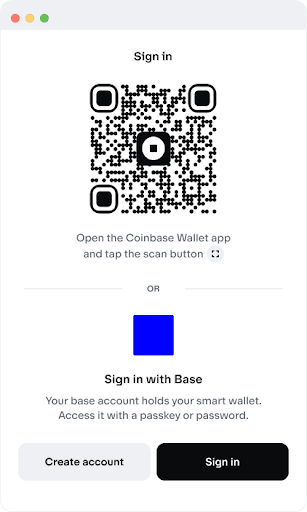
Desktop experience showing the updated logged out flow for Coinbase Wallet users
How to migrate
Replace@coinbase/wallet-sdk with Base Account SDK (@base-org/account).
Base Account SDK setup