

https://sandbox.cdp.coinbase.com
1. Create Sandbox API keys
1
Access CDP Portal Sandbox
Navigate to Sandbox mode in the CDP Portal
2
Create Sandbox API key
- Go to Settings
- Click Create secret API Key
- Enter an API key nickname
- Download the API key JSON file and save it securely
2. Install CDP CLI
CDP CLI is a command-line tool that handles JWT authentication automatically — configure your API key once and it takes care of signing every request for you.Node.js 22 or later is required.
3. Create and fund an account through the portal
1
Go to Sandbox Accounts
In Sandbox mode, navigate to the Accounts tab
2
Create test account
Name the account (e.g., “My Test Account”)
3
Add test assets
Add balances in different assets to your account. Currently we support USD, USDC, USDT (e.g., set USD to $1000)
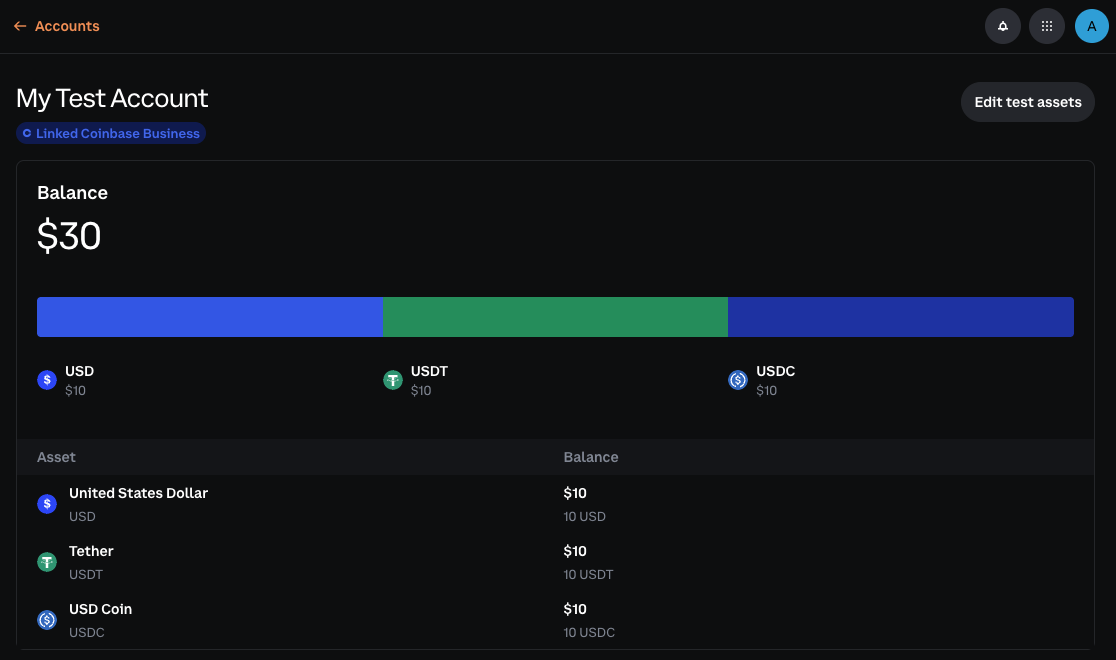
4. Verify balance(s)
Run the following to verify your account balance:5. Alternative: Test with Postman
Prefer a GUI? See the Postman guide for setup instructions.6. Test custodial API flows
Now that you’re set up, use these quickstarts to test the custodial APIs end to end in Sandbox:Custodial Wallets Quickstart
Create an entity-owned account, add simulated balances through the Portal, and verify balances with the CDP CLI or SDK.
Customers Quickstart
Onboard a KYC’d customer, create customer-owned accounts, and test capability changes.
Payment Methods Quickstart
List mock payment methods and test successful and failed fiat withdrawal flows.
Deposit Destinations Quickstart
Create a placeholder deposit address, simulate an incoming deposit, and inspect webhook payloads.
Transfers Quickstart
Send Sandbox transfers to reserved crypto addresses, test emails, and payment methods.
API Reference
Explore request and response schemas for Sandbox-compatible APIs.
Sandbox test data and scenarios
Use the product quickstarts above for the full API walkthroughs. These Sandbox-specific fixtures are available when you test custodial API flows:Accounts
- Sandbox accounts are isolated from Live and do not require linking to external Coinbase accounts.
- Account funding is available through the Portal UI with simulated balances only. You cannot fund Sandbox accounts by sending real or testnet crypto.
- Supported test balances in the Portal include USD, USDC, and USDT.
Payment methods
Sandbox automatically creates entity-level test payment methods based on your entity’s region. Use active methods to test successful withdrawals and inactive methods to test error handling.US entities
EU entities
Deposit destinations
- In Sandbox, deposit destinations are placeholder addresses for API testing. They are not real blockchain addresses and the Sandbox does not connect to any blockchain network.
- The API uses deposit destination for the resource. The Portal UI uses deposit address for the same concept.
- Deposit simulation uses the Sandbox-only
/fake/deposit/cryptoendpoint or the Portal Deposit action. Theasset_symbolandnetworkmust match the destination configuration. - Simulated deposits fire transfer webhooks, create transfer records visible through the Transfers API, and credit the account balance immediately.
Transfers
Sandbox transfers are simulated. Webhooks fire and transfer statuses change, but no real crypto transaction or fiat rail movement occurs.Reserved crypto addresses
Reserved email addresses
Any other email returns a
4xx error so Sandbox does not validate real email addresses.
What to read next
For a GUI-based testing option, see Testing with Postman. For product-specific concepts, continue with these references:Payment APIs Overview
Learn how accounts, payment methods, deposit destinations, and transfers fit together.
Custodial wallets
Use accounts, balances, and transfers with your custodial funds.
Transitioning to Live
When you’re ready to move from Sandbox to Live:- Complete integration testing: Ensure all features work correctly in Sandbox
- Create Live API keys: Generate Live credentials in the CDP Portal
- Update configuration: Switch from
sandbox.cdp.coinbase.comtoapi.cdp.coinbase.com - Start with small transactions: Begin with small test transactions to verify everything works
- Set up monitoring: Configure alerting for failed transactions and API errors