

owner parameter.
You can follow along with the CDP CLI, TypeScript SDK, or Java SDK. Use the tabs in each step to switch between them.
Custodial account operations are available in the TypeScript and Java SDKs. For other languages, use the CDP CLI or call the Accounts REST API directly.
https://sandbox.cdp.coinbase.com
Prerequisites
- A CDP login with access to the CDP Portal
- For the CLI or TypeScript SDK: Node.js 22 or later
- For the Java SDK: JDK 21, Gradle, and a GitHub personal access token (classic) with
read:packagesaccess - A Sandbox API key JSON from the Portal (Sandbox environment, Accounts permission enabled)
1. Install and configure
- CDP CLI
- TypeScript SDK
- Java SDK
CDP CLI handles JWT authentication for you — configure your API key once and it signs requests.Configure your Sandbox API key:Use
Node.js 22 or later is required.
-e sandbox on commands below if your default environment is not sandbox, or run cdp env sandbox to switch context. More detail: CDP CLI quickstart.2. Create an account
Create a named entity account. Omittingowner makes the account entity-owned. Supplying an idempotency key is optional but recommended — it makes the request safely retryable, so retries return the same result instead of creating duplicate accounts. See Idempotency.
- CDP CLI
- TypeScript SDK
- Java SDK
Create the account with With an idempotency key:
POST /v2/accounts:cdp api paths are relative to the Sandbox platform base https://sandbox.cdp.coinbase.com/platform/v2. If cdp api fails with a host or path error, configure the URL explicitly: cdp env sandbox --key-file ~/Downloads/cdp_api_key.json --url https://sandbox.cdp.coinbase.com/platform/v2. See How it works.Example response
Example response
accountId from the response (for example account_af2937b0-9846-4fe7-bfe9-ccc22d935114). You use it in the Portal and in later steps below.
Create a customer-owned account
To create a customer-owned account instead, pass the customer’s ID asowner. Before you run an example:
- Follow the Customers quickstart to create a customer in Sandbox.
- Confirm that all three custody capabilities —
custodyCrypto,custodyFiat, andcustodyStablecoin— areactive. If any are missing, account creation returns403witherrorType: customer_not_authorized. - Replace the example customer ID with your customer’s ID.
- Set
REQUESTER_IP_ADDRESSto the end user’s public IPv4 or IPv6 address. Pass it ascompliance.requesterIpAddress, not your application’s server IP. Customer-owned account creation requires this field under the custody capability policy; omitting it returns400witherrorType: invalid_requestwhen enforcement is active.
- CDP CLI
- TypeScript SDK
- Java SDK
Reuse the Sandbox environment configured in step 1. Pass the customer ID as
owner:owner is the customer ID you supplied. Use the returned account ID for the remaining funding and balance steps. See Create account for the full request and response schema.
3. Create and fund the account through the Portal
Sandbox does not move real funds. You add simulated balances in the Portal:1
Go to Sandbox Accounts
In Sandbox mode in the CDP Portal, open the Accounts tab.
2
Select the test account
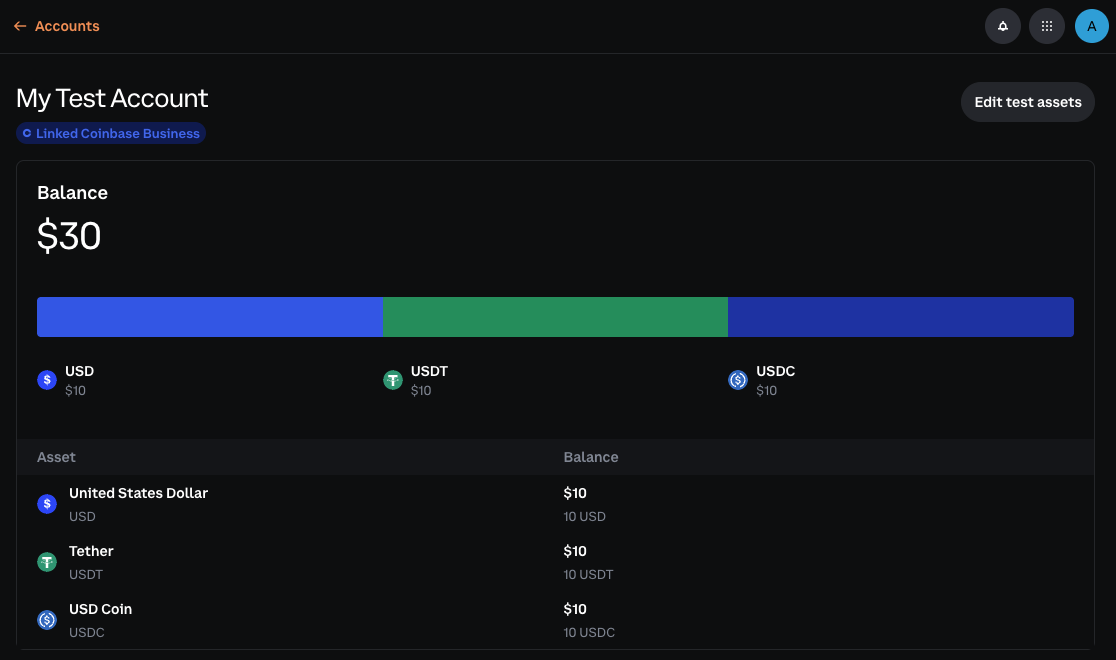
Open the account you created with the API (for example My Test Account).
3
Add test assets
Add balances in supported test assets (for example USD and USDC). Values are for testing only.
4. List and inspect accounts
After funding the account, list your Sandbox accounts and inspect one account’s balances.- CDP CLI
- TypeScript SDK
- Java SDK
List all accounts:
Inspect an account:
Example list response
Example list response
Example account response
Example account response
5. Verify balance(s)
- CDP CLI
- TypeScript SDK
- Java SDK
cdp accounts list and cdp accounts balances ship in recent @coinbase/cdp-cli releases. If your CLI reports an unknown command, run npm install -g @coinbase/cdp-cli@latest, then try again. You can always use cdp api "/accounts/$ACCOUNT_ID/balances" -e sandbox as a fallback; see List balances for account.What to read next
Custodial wallets overview
Concepts: custody model, ownership, and how accounts connect to payments
CDP CLI how it works
Environments and
cdp api field syntaxDeposit Destinations Quickstart
Generate inbound addresses tied to an account
Accounts API reference
REST reference for account and balance endpoints